Find out about the content and methodology of SAP Best Practices for Business Intelligence intended for small to mid-sized businesses. SAP Best Practices are preconfigured, tested, and documented scenarios you can use during the implementation process.
Key Concept
SAP Best Practices is the brand name for preconfigured business scenarios that SAP delivers. They are designed to simplify and speed up your implementation project. In 2004, Ludwigshafen University of Applied Sciences conducted a study of 192 companies that implemented SAP software with built-in industry best practices. It found that SAP Best Practices helped reduce overall project risk by 71 percent. In addition, companies that used the best practices lowered their TCO by 11 percent. SAP Press recently published this study as Enhanced Project Success Through SAP Best Practices — International Benchmarking Study.
Despite limited budgets and timelines, small and mid-sized companies can run SAP BI. SAP provides reusable SAP Best Practices that offer a step-by-step approach for self-study, evaluation, and implementation, as well as project team and end-user training. SAP Best Practices for BI includes documentation and preconfigured content, such as user roles, to develop reports that meet the needs of specific processes for small to mid-sized businesses (for example, sales, manufacturing, and Customer Relationship Management [CRM] reporting). Although companies of all sizes can use SAP Best Practices, we assume that small and mid-sized companies benefit the most because they allow even inexperienced consultants to come up to speed quickly.
SAP developed Best Practices for BI based on existing BI business content. SAP Best Practices for BI explains which business content objects you need to activate for which purposes and how to activate them. Furthermore, the documentation describes how to enhance business content or create custom objects to meet specific needs. You can use the generic SAP Best Practices for BI CD on top of all industry solutions. In addition, SAP continuously develops BI Best Practices for industries, such as Analytics for Chemicals or High Tech, which it delivers with the relevant industry solution (for example, SAP Best Practices for High Tech).
An SAP Best Practices package consists of Building Blocks, which are small, flexible, and transparent pieces of functionality that develop and deliver the technical methodology for SAP Best Practices. SAP delivers Building Blocks as documentation units on a documentation CD.
An example of a Building Block would be the BI Connectivity Building Block — a bundle of reusable configuration steps that connects the SAP BI system and the relevant source system (such as mySAP ERP Central Component [ECC], Supply Chain Management [SCM], or CRM). Building Blocks provide the necessary guidelines and tools to enable content developers to follow a common structure.
Several SAP Best Practices packages are available. The SAP Best Practices Baseline Package contains generic business scenarios to provide a basis for industry solutions independent of the focus of that particular solution. SAP Best Practices industry packages exist for many different industries, such as high tech and chemicals. SAP Best Practices cross-industry packages focus on the areas of CRM, SCM, and BI. For information about which solutions are available, refer to the SAP Help Portal under https://help.sap.com. Choose SAP Best Practices>(Package of your interest).
In this article, we focus on the following aspects of SAP Best Practices for BI: deliverables, how to use SAP Best Practices in implementation projects, a sales analysis scenario, and how to order.
Note
SAP Best Practices for BI 1.70 is the newest version based on SAP NetWeaver BI 7.0. The oldest available version is SAP Best Practices for BI 1.30B, which is based on SAP BW 3.0B.
The documentation of SAP Best Practices for BI guides you through the manual installation and activation of business objects in the BI system. This means that users need to activate all the objects manually. If the objects do not fully satisfy your business needs, you can make adjustments.
Deliverables and Documentation
The SAP Best Practices for BI documentation CD contains step-by-step implementation procedures for various scenarios in areas such as Financial Accounting (FI), CRM, SCM, Product Lifecycle Management (PLM), and Human Capital Management (HCM). Figure 1 shows a detailed view from the documentation CD.
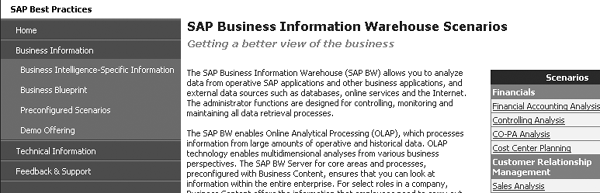
Figure 1
Preconfigured scenarios page for BW on the documentation CD
SAP Best Practices for BI contains documentation including scenario descriptions, scenario overviews, business process procedures, scenario installation guides, Building Block descriptions, and Building Block configuration guides. HTML scenario descriptions highlight the key points of the scenario as well as the business content InfoProviders that technical team members need to activate. The scenario overviews are Microsoft PowerPoint presentations that describe the main reports of each scenario. Business process procedures are Word documents that describe how to navigate within scenario-specific reports. The scenario installation guide alerts you to which Building Blocks to install for a specific scenario and prescribes the installation order. HTML Building Block descriptions highlight the key points of the building blocks to help you decide whether you need this building block for your scenario. The Building Block configuration guide describes the necessary implementation steps. SAP Best Practices for BI also provides further documentation, including a sample project plan and several “How to…” guides.
SAP Best Practices also delivers demo data offline on the CD via Business Information>Demo Offering as well as step-by-step instructions to load sales, purchasing, manufacturing, and demo master data. This allows you to prepare a demo without loading data from SAP source systems.
The documentation CD provides a link to SAP Best Practices for BI tutorials based on BI business content 3.5, including configuration (installation), configuration (more info), and business user procedures. The tutorials in configuration (installation) use the BW Connectivity, General Settings for BW Integration, and Sales Analysis Building Blocks. The “more info” tutorials show how to assign DataSources manually and how to monitor the upload of data from source systems. The tutorials in the business user procedures section explain several scenarios: Accounts Receivable Analysis, CRM – Opportunities Analysis, Cost Center Accounting, Credit Management Cockpit, Inventory Analysis, Manufacturing Analysis, Purchasing Analysis, and Sales Analysis.
Project Phases
Within the Business Intelligence-Specific Information section on your documentation CD, you find an example project plan for BI implementation projects. This project plan guides you through all phases from preparation to go-live and support. We’ll highlight the main tasks in each phase.
During the project preparation stage, you can demonstrate existing scenarios. To find them on the documentation CD, go to Business Information>Preconfigured Scenarios and select a scenario to see the related scenario description, overview documentation, and business process procedures (Figure 2).
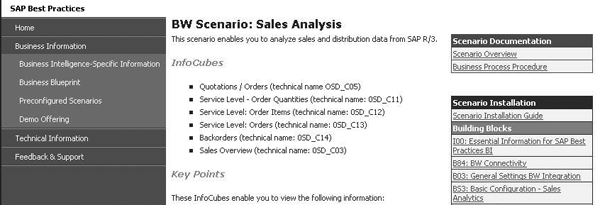
Figure 2
Scenario description for the sales analysis scenario
You can also use SAP Tutor demo versions of the business process procedures to show what the reports look like and how to navigate them. To access the SAP Tutor demos on your documentation CD, go to Business Information>Demo Offering. Click on SAP Tutorials for Business Intelligence to open SAP Service Marketplace. Expand End User Procedures to access SAP Tutor (Figure 3).
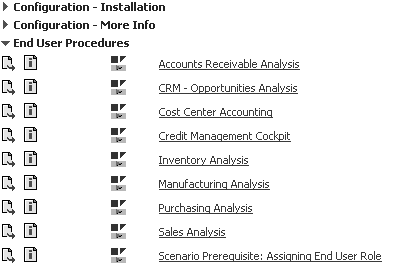
Figure 3
SAP Tutor demos on SAP Service Marketplace
Within the business blueprint phase, define the final scope for the project. SAP’s Solution Scope document provides an overview of the supported business scenarios to help you decide which parts of SAP Best Practices to implement and whether you need additional functionality. On the documentation CD, go to Business Information>Business Blueprint and choose the Solution Scope document.
In the realization phase, start to implement the relevant SAP Best Practices scenarios. Navigate to Business Information>Preconfigured Scenarios and select the relevant scenario. Select Scenario Installation Guide — this document walks you through the installation of the complete scenario. You find information about connecting your BI system to relevant source systems as well as creating the end user role.
Tip!
If you do not have SAP Tutor software, you can install a special version for free that allows you to play SAP tutorials. Find the link to the installation file on the
Demo Offering page of the SAP Best Practices for BI documentation CD.
If you cannot cover all of your requirements in SAP Best Practices, you should look at existing BI business content before developing custom BI objects. To search for information about the current BI business content on SAP Help Portal, go to
https://help.sap.com and follow menu path
Documentation>SAP NetWeaver>SAP NetWeaver 2004s>(Language)>SAP NetWeaver by Key Capability>BI Content.
In the final preparation phase, you can use the SAP Best Practices documents, including SAP tutorials and business process procedures, to test the scenarios and to train end users. Lastly, SAP Best Practices facilitates your go-live and support phase because your system uses standard configuration so errors are easier to spot. You can enhance the foundation of scenarios that you’ve already installed with other scenarios or features such as Web reporting or Portal integration. For example, SAP NetWeaver Portal can expand your use of BW. You could build dashboards or cockpits to combine several reports in more visually appealing graphs. SAP also delivers SAP Best Practices for Portals.
Sales Analysis Scenario
Before you install a scenario, you should carefully read the documentation 100: Essential Information for SAP Best Practices for BI, which is the first link in Scenario Installation under Building Blocks (Figure 2). This documentation explains SAP Best Practices and Building Blocks, including the release levels on which SAP developed and tested the installation (BI and source systems such as SAP ERP, SCM, or CRM). This documentation also mentions SAP notes that are required for the installation or that help to avoid errors, as well as tips and tricks for administrative activities in BI such as handling warning messages and assigning DataSources to InfoSources.
Note
To get SAP support, create a Customer Service System (CSS) message in the CSS system. For problems concerning SAP Best Practices for BI, use the component name SV-SMB-AIO-BP-BI.
Once you are familiar with Essential Information for SAP Best Practices for BI, you can start installing the Sales Analysis scenario according to Figure 4. Install the Building Blocks one after the other starting from the bottom (BI Connectivity). All SAP Best Practices for BI use the BI Connectivity Building Block, which includes local BI and source system settings as well as how to connect the systems. The documentation contains detailed configuration steps.
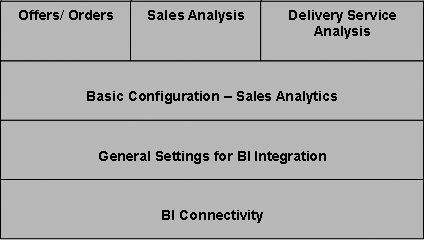
Figure 4
Building Blocks of the sales analysis scenario
The General Settings for BI Integration Building Block also relates to all SAP Best Practices for BI scenarios. It describes general settings that you must perform in the source and BI systems, such as maintaining services and profiles and activating business content objects that apply to all scenarios.
The scenario-specific Basic Configuration — Sales Analytics Building Block is compulsory for the sales analysis scenario. It contains the basic configuration settings for configuring the source system, activating business content DataSources, replicating DataSources, and loading master data.
Note
Because the configuration consists of several Building Blocks, you can easily create new scenarios on top of existing ones. For example, the analytical application scenarios using Visual Composer are based on existing SAP content. If you have already installed BI Connectivity once, you do not have to install it again for the same system. This is true for connectivity as well as for many other Building Blocks that different scenarios reuse. They are part of the SAP Best Practices for Business Intelligence CD released in August 2006.
Tip!
SAP customers and partners can order the SAP Best Practices for BI documentation CD for free on SAP Service Marketplace. Log on and follow this path:
Education, Consulting, Solution Areas and more>Quick Links>/bestpractices. You can also access the SAP Best Practices for BI documentation in SAP Help Portal. Go to
https://help.sap.com and follow the menu path
SAP Best Practices>Cross-Industry Packages>Business Intelligence> (Version)>(Language). The available versions represent the BI system that SAP used for development and testing. For example,
V1.70 is the first SAP Best Practices for BI version delivered for SAP NetWeaver BI 7.0.
V3.35 is the third SAP Best Practices for BI version delivered for SAP BW 3.5 (
Figure 5).
Once you have installed these Building Blocks, you can install the Building Blocks for Sales Analysis, Offers/Orders, and/or Delivery Service Analysis. You do not have to install all of these Building Blocks, just the ones that contain the InfoProviders you need for your analysis that you chose during your business blueprint phase. The Building Block description helps you decide whether you need to install that Building Block. The configuration guides walk you through the installation and configuration procedures.
After you have installed the Building Blocks and checked the installation guide to ensure that you finished all of the necessary steps, you can use the Business Process Procedure document shown in Figure 2 to test the scenario and view the reports for your analysis.
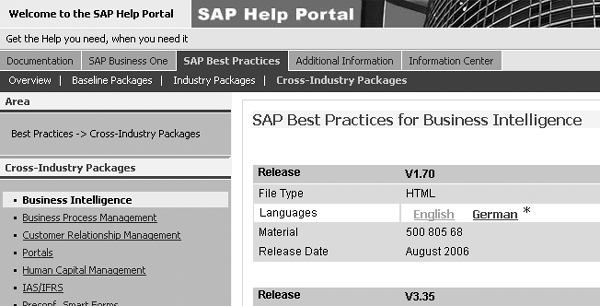
Figure 5
SAP Best Practices in SAP Help Portal
Bjoern Mueller-Punge
Bjoern Mueller-Punge is a project manager for Best Practices for BI at SAP. He has been working at SAP for eight years. Bjoern is a graduate in computer science of the University of Karlsruhe in Germany.
You may contact the author at bjoern.mueller-punge@sap.com.
If you have comments about this article or publication, or would like to submit an article idea, please contact the editor.
Tanja Fidanyan
Tanja Fidanyan is a developer for SAP Best Practices for BI. She has been working at SAP for six years. Tanja is a graduate of the University of Mainz with a degree in Applied Linguistics and Cultural Studies.
You may contact the author at tanja.fidanyan@sap.com.
If you have comments about this article or publication, or would like to submit an article idea, please contact the editor.