Conduct technical assurance audits using robust features within your existing SAP ERP implementation. Discover undocumented tips for leveraging key reports and controls to gain transparency and the necessary evidence trail to perform rigorous system and business process audits.
Key Concept
SAP’s standard and improved role-based audit approach makes auditors lives easier and relieves them from many hassles related to security and access for auditing appropriate areas in SAP systems. The standard approach also enforces best practices with segregation within audit and security teams and other customization using the role-based approach.
Before SAP R/3 4.6C, auditing in SAP systems was transaction based with some configuration processes. To make it easier for the auditors, the audit feature now is role based, with individual roles assigned to a user master record. It is important to use the standard feature of SAP because it needs no investment and gives you a standardized audit structure. We’ll go over the role-based audit features in SAP ERP Central Component (SAP ECC) 6.0 and some related configuration.
SAP Audit Feature Overview and Configuration
The SAP audit feature (formerly referred to as Audit Information System [AIS]) improves audit quality and rationalizes audit methods. It consists of the audit report tree, which helps with one of the biggest issues facing SAP GRC professionals: Where do you find audit-relevant information? The SAP audit feature includes SAP standard programs that help with:
- Information retrieval using existing SAP programs
- Preconfigured reports to know who has access to critical transactions
- Standards/checklist for auditing to customize audit programs
Figure 1 gives a visual overview of the audit feature with authorizations in the back end to provide access to key audit reports. The reports are populated in the menu tree by functional area (e.g., business, system audit) and the online reports cover the system information, reconciliation, balance sheet, and accounts. The data export functionality helps to interface with external audit reporting software, especially SAP BusinessObjects GRC solutions.
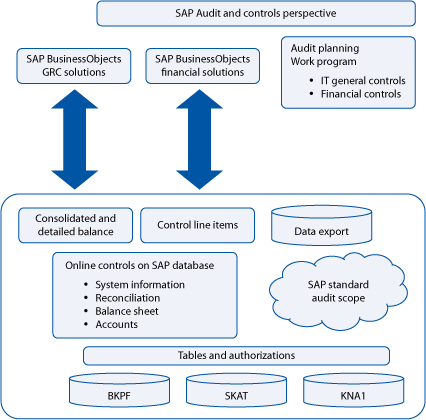
Figure 1
Visual overview of SAP audit
The key stakeholders in the audit environment are shown in Figure 2. Reports of the individual procedures are available at any time in real time with balance sheet and profit and loss statement (P&L) data, accounts and transaction figures, line items, and processes that internal auditors, external auditors, data security officers, and tax auditors can leverage.
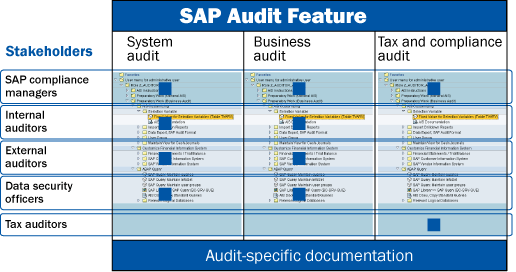
Figure 2
Stakeholders in SAP audit feature
SAP audit features are designed to assist with holistic and integrated audit scenarios that have become prevalent since the advent of Sarbanes-Oxley in the US:
- Business audit: This structure supports the audit approaches driven by a financial statement-oriented or process-oriented audit with global organizations. The auditor has access to evaluation programs with default control data for every check field. This assists in audit information to be focused on custom organizational values for each company.
- System audit: This is the essential IT general control (ITGC)-driven approach helping to cover key technical settings and useful ITGC information such as all the system parameters, user access review – critical access, and security audit logging.
- Tax/compliance audit: A tax audit covers specific state and local tax issues and integrates some features from SAP Data Retention Tool (DART) geared towards IRS and other tax reporting.
Role-Based Concept for the SAP Audit
The SAP ECC 6.0 role-based audit feature consists of several single end-user roles (transaction- and authorization-based roles). To work with the SAP audit, the auditor needs a user ID in the SAP system with the relevant single roles (transaction and authorization roles) assigned to his or her user master record.
Single roles are divided into two groups:
- Transaction roles: Contain a menu, but have no authorization values
- Authorization roles: Contain authorization values, but have no menu
The detailed description of each role is provided in the description area of transaction PFCG (profile generator) (Figure 3). Pull up the menu role and read the information in the Description tab.
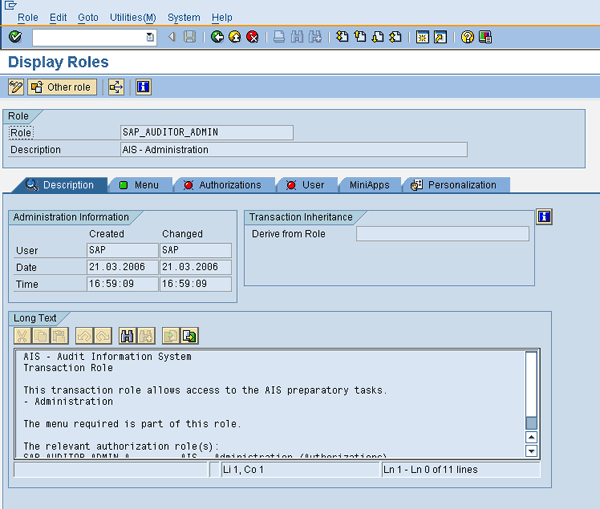
Figure 3
Description of single roles in profile generator
Categorization of Roles
Auditor roles are classified into the following important areas:
- System audit
- Business audit
- SAP audit administration
- One single composite role (contains all roles)
Each of these above can further be classified into:
- Transaction-based roles
- Authorization-based roles
Figure 4 lists transaction and authorization roles by audit area. The SAP audit roles can be divided into system audit, business audit, and auditor admin, which are further divided into transaction-based roles and authorization-based roles. It is important for the auditor to get both transaction- and authorization-based roles to execute all reports.
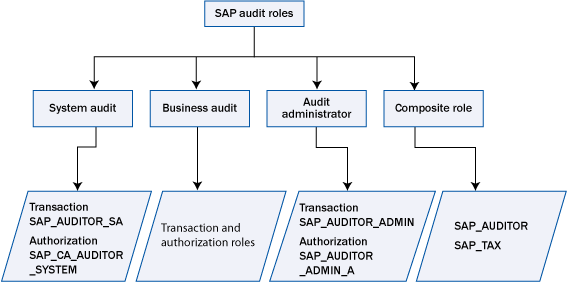
Figure 4
List of roles by audit area
Two composite roles contain all single roles along with authorization roles.
- SAP_AUDITOR: SAP audit (system and business audit)
- SAP_AUDITOR_TAX: SAP audit – tax audit
It is a good practice to customize all standard roles to your company’s landscape, and customize the authorization-level data based on organization policy. For example, you can convert the role SAP_AUDITOR to Z_AUDITOR.
You need to maintain the authorization-based roles with the right values in them. Taking the example of authorization-based role SAP_CA_AUDITOR_SYSTEM, Figure 5 shows the high-level hierarchy of roles, which you can find in SAP Note 0451960.
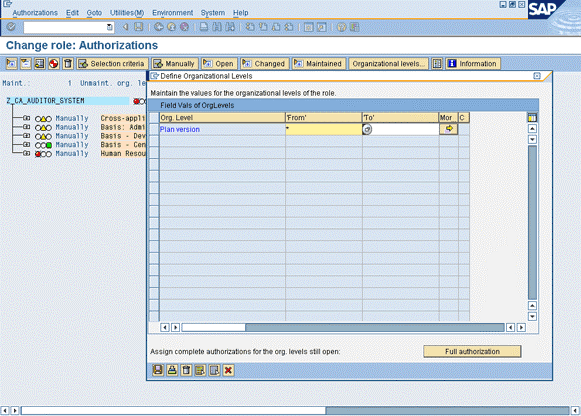
Figure 5
The authorizations to be maintained in profile generator
After assigning the right roles to the auditor’s user master record (transaction and authorization role), the menu tree for the auditor looks like what is shown in Figure 6.
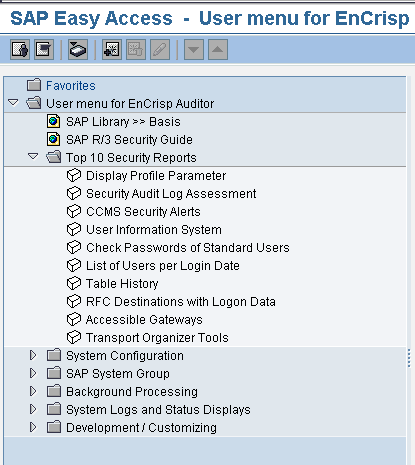
Figure 6
Menu tree populated on role assignment
SAP Audit Process Flow
Figure 7 details the steps you need to execute in sequence to have the audit feature functioning.

Figure 7
SAP audit process flow
Configuration Procedure (Systems and Business Audit)
After assigning the auditor admin roles to the auditor’s user master record, the system populates the menu tree with configuration steps to be followed. With each configuration step, documentation is provided to guide the configuration procedure.
The configuration procedure is divided into two groups:
- Preparatory Work (General AIS): General audit configuration is needed for both system and business audits. This step involves assigning roles to auditors and must be performed by the security admin and the auditor admin as it gives profile generator access (Figure 8).
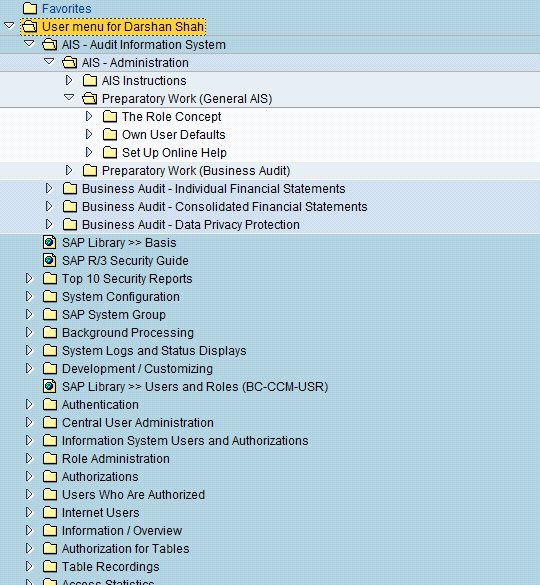
Figure 8
General audit configuration process
- Preparatory Work (Business Audit): This section is needed for customizing the business audit to the organization’s environment, the details of which are provided in the documentation with each step. Once this step is performed, the business audit piece is customized to the organization’s environment and is ready to be used for financial audits. Figure 9 shows the menu tree populated for business audit once the right roles are assigned.
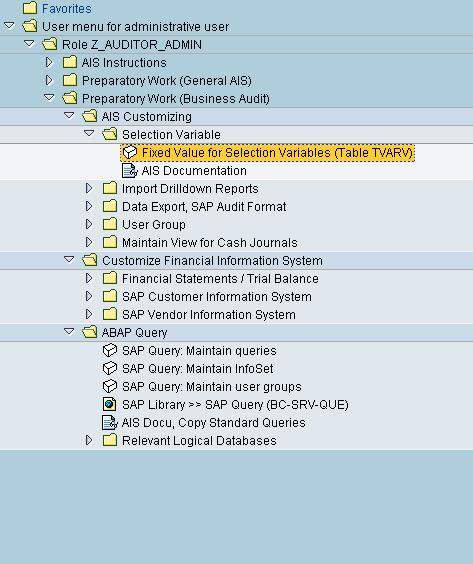
Figure 9
Business audit configuration
Darshan Shah
Darshan Shah is a platinum solutions consultant with itelligence Consulting. itelligence is a leading global mid-market SAP provider that offers a full scope of SAP services, including SAP consulting, licensing, managed hosting, customer support, and education. It is one of only 12 consulting firms to earn SAP Global Partner status and one of only six to earn SAP Global Hosting Partner status. With an MBA degree in finance, Darshan has managed and implemented several SAP projects over the last nine years in North America and Asia. He has extensive experience in designing and implementing solutions in conjunction with SAP. He is skilled in helping clients to make strategic decisions for overall ERP implementations.
You may contact the author at Darshan.shah@itelligencegroup.com.
If you have comments about this article or publication, or would like to submit an article idea, please contact the editor.