The enhanced aggregated planning business function is for planning high-data volume scenarios in SAP Advanced Planning & Optimization (SAP APO). This function is useful in Retail, Apparel, and Footwear planning scenarios that have many product variants. You can use enhanced aggregated planning to plan at the product group level instead of product level for rough-cut capacity planning (RCCP) and material requirements planning. It is useful for executing constraint-based planning in Capable-to-Match (CTM) and disaggregating the supplies consistently according to demands.
Key Concept
Using enhanced aggregated planning, you can execute constraint planning in Capable-to-Match (CTM) for the complete supply chain network. With enhanced aggregated planning in CTM you can create a supply plan based on capacity and material constraints. The CTM enhanced disaggregation function enables you to use fixed pegging relationships to disaggregate the supplies according to the original demands. In the case of excess supplies, you can use predefined quotas to disaggregate the supplies.
- Improve performance because the number of planning objects and periods are reduced
- Simplify the planning process by planning at an aggregated level
- Simplify the supply chain model to be planned (option of planning large models)
- Make planning decisions at an aggregated level (for example, selecting sources of supply, considering capacities, or defining lot sizes)
Enhanced aggregated planning in SCM is also integrated with the SAP ERP Central Component (SAP ECC) Apparel and Footwear (AFS) industry solution. You can send AFS material grid information to the SCM location product hierarchy. My step-by-step guide shows you how to configure enhanced aggregated planning with CTM available from SCM 7.0 enhancement package 2.
In traditional aggregated planning with CTM, available from SCM 5.0, you can aggregate demands and supplies for CTM planning using a location product hierarchy (plants and warehouses where the materials are manufactured and stored). Disaggregation of a CTM constraint plan is still based on a bucket-oriented approach in which the bucket demand splits are used to determine the supply split ratios. In the constraint planning scenario, in which supplies are created according to the available resource capacities rather than the demand bucket, disaggregation using the bucket demand can lead to incorrect disaggregate supply ratios. For example, the size large might not have sufficient supplies, and small might have too many if the decision is based on capacity rather than demand.
Aggregated planning in SCM 7.02 enhances the disaggregation functionality by considering the original demands and fixed pegging relationships to determine the demand split ratios. The main advantage is that now the supplies can be disaggregated based on the exact demands at the size level. In the case of constrained supplies (supply less than the demand), the supply is disaggregated according to the ratio of the original demands. Additionally, in the case of supply being more than the demand, predefined location product hierarchy quotas are used for disaggregation.
Step 1. Maintain the Supply Chain Model for Aggregated Planning
You need to create the following master data for aggregated planning in the SCM system:
- Product and locations: You execute aggregated planning at the header location product level. A header location product is the header product of a location product hierarchy that you have generated from a location hierarchy and a product hierarchy. You can use location hierarchy to combine several smaller warehouses in a region to one virtual region for planning. Hierarchy is the SCM master data object that you can use to combine the SKUs along with the product groups. For example, the product group SHIRT can have multiple SKUs (e.g., SHIRT_LARGE, SHIRT_MEDIUM, and SHIRT_SMALL). You create all the levels of these two-level hierarchies as stand-alone products and locations in the product and location master data. Ensure that the header and sub-level products have similar attributes (e.g., procurement type or lot size)
- Resources, Production Process Model (PPM), or Production Data Structure (PDS) and transport lanes: You define resources, the source of supplies (lanes and PPM or PDS), to define the supply chain model for executing network planning and capacity planning. In case you plan to execute aggregated planning at the resource level, you can define the resource hierarchy and connect header and sub-level resources. The total of the resource capacities defined at the header product level should form the resource capacity at the sub-product level. If you are using several PPMs or PDSs at the sub-product level, the resource consumption of the PPM or PDS at the header product level should form the resource consumption of the different PPMs or PDSs at the sub-product level. For external procurement, the same transportation lanes must apply for the header and sub products because SNP aggregation and disaggregation use the source determination decisions from the header product level.
Step 2. Maintain a Location Product Hierarchy for Aggregated Planning
You can create two-level product and resources hierarchies. The prerequisite for creating a hierarchy is to define a hierarchy structure. A hierarchy structure, defined in customizing, forms the basis of a hierarchy. This structure determines the following properties of each hierarchy:
- Master data object type from which the hierarchy is built (for example, location).
- Maximum number of levels the hierarchy can have.
You define hierarchy structures in customizing for SCM Basis by following menu path Master Data > Hierarchy > Define Hierarchy Structure (Figure 1).
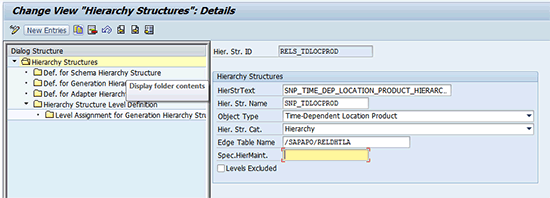
Figure 1
Maintain the hierarchy structure
Define Hierarchy Structure Levels
For each of the hierarchy structures, you define the number of levels. You can execute planning with CTM only when you have two levels of the hierarchy defined. Level one is for product group (header product), and level two is for SKUs (child product). As shown in Figure 2, you define both levels for the location product.
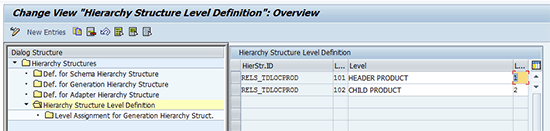
Figure 2
Define hierarchy structure levels
Define Hierarchy and Quota
Hierarchies show hierarchical relationships between the master data objects of an object type. They are based on hierarchy structures, and you can create, change, and delete them in the course of hierarchy maintenance. You can create a hierarchy in SCM using the SAP Easy Access screen. Follow menu path SCM Basis > Master Data > Hierarchy > Maintain Hierarchy (Figure 3).
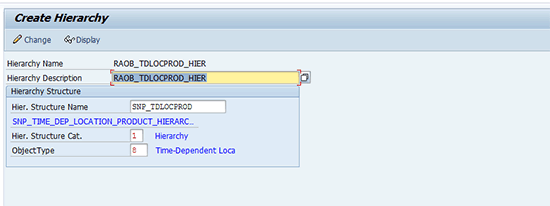
Figure 3
Maintain location product hierarchy
I use the model shown in Figure 4 to demonstrate the end-to-end process flow for enhanced aggregated planning using CTM. The supply chain model consists of two locations: BL_FRNK_DC (Distribution Center) and BL_FRNK (Plant). The product BP_SHIRT consists of four sizes that are linked to the main product using location product hierarchy.
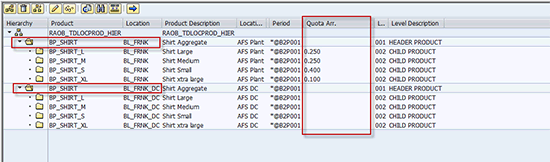
Figure 4
Maintain location production hierarchy with quota splits
Define PPM/PDS Hierarchy
Figure 5
Figure 5
Maintain the PPM/PDS hierarchy structure
Step 3. Set Up Transactional Data Used for Enhanced Aggregated Planning
To illustrate the new functions of disaggregation, I list the initial transactional data available for the CTM planning and disaggregation runs in Figure 6, which is the planning board in SCM. The aggregated demand for BP_SHIRT at BL_FRNK_DC is 100 units in week 28.2012 and 200 units in week 30.2012. There is also an initial stock of 40 units at the aggregate product level.
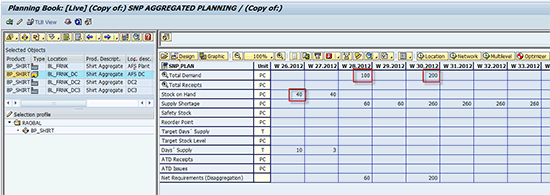
Figure 6
Aggregated supply after the CTM planning run
The aggregate demand and supplies consist of the size level demands and supplies shown in Figure 7.
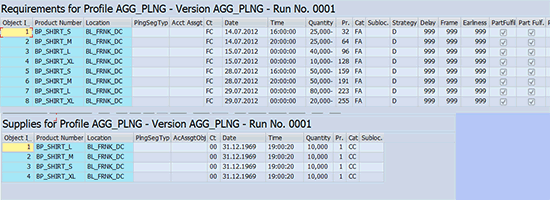
Figure 7
Aggregated supply after the CTM planning run
Step 4. Execute CTM Planning at Aggregate Level
To execute the CTM planning at the aggregate level, you maintain the settings in the CTM profile (Figure 8) using transaction /SAPAPO/CTM. You need to select the Enhanced Aggregated Planning indicator and maintain the corresponding hierarchy names in the Location Product and PPM/PDS fields in the Hierarchies section.
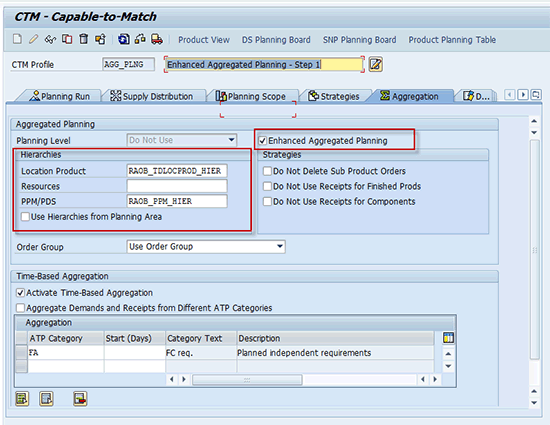
Figure 8
Maintain the CTM profile for enhanced aggregated planning
You execute enhanced aggregated planning in CTM in two phases. In phase 1, you net all the size level demands for supplies across the complete supply chain (i.e., you fix peg all open demands and supplies at size levels using the default CTM strategies). This step ensures that only the open demands are selected for creating the long-term procurement and production plan. In phase 2, you select the open demands for planning and create a feasible production plan considering all material and capacity constraints (Figure 9). To demonstrate the advantages and the key functions of the enhanced aggregated planning procedure, I use the example of changing the key resource.

Figure 9
Maintain capacity constraints for resources
In my example I add the primary resource B_BUCKET with a planned downtime from calendar week (CW) 28.2012 to CW 30.2012. As a result of the downtime, you can create the production plan at the plant only in CW 27.2012. The demands and supplies fall in different buckets, as shown in Figure 10.
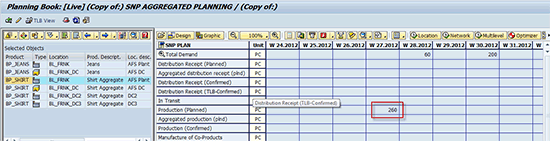
Figure 10
Supply plan after CTM enhanced aggregated planning
In the normal aggregated planning procedure, the total receipt of 260 would be disaggregated as per demands in the current bucket (i.e., CW 27.2012). However, because no demand is in this bucket, the system disaggregates the quantities equally for all sizes. In a constraint planning model, this has a significant disadvantage as it leads to an excessive difference between the net demands and supplies. To address this limitation, the new enhanced aggregation function considers the original demand situation and disaggregates the demands in the exact ratio of the original demand even if they fall under different buckets.
Step 5. Disaggregate the Procurement and Product Plan
CTM disaggregation is executed for the complete model selected in the CTM profile. Disaggregation happens at each level of the supply chain. To ensure that the supply chain levels are determined correctly, execute the Low Level Code (LLC) determination using transaction /SAPAPO/SNPLLC (Figure 11). To ensure that the LLC is executed for only the header products, select the indicator named Determine LLC for header LP.
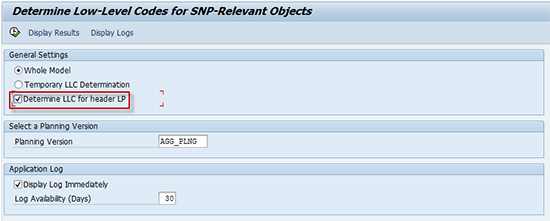
Figure 11
Determine low level codes for the supply chain model
Use transaction code /SAPAPO/CTMDIS to execute the actual order disaggregation (Figure 12).
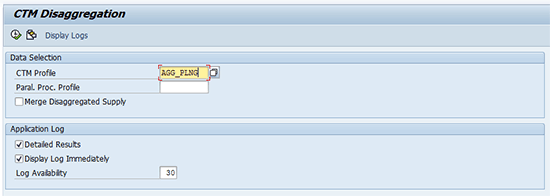
Figure 12
Execute CTM enhanced disaggregation
Figure 13 shows the disaggregated results of the purchase requisition created at the distribution center BL_FRNK_DC. The key figure Aggregated distribution receipt (plnd) shows the total disaggregated quantity, which is aligned with the total demand of 200 units in the CW 30.2012.
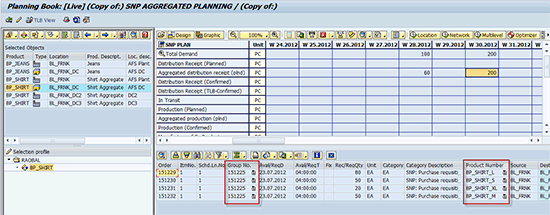
Figure 13
Disaggregated supplies at size level
Figure 14 shows the disaggregated production plan at the plant BL_FRNK. The key figure Aggregated production (plnd) indicates the total quantity at the size level. The details section shows the individual planned orders. The total supply at the size level after the disaggregation is aligned to the net requirements for each individual product. Even though the aggregated supply is in CW 27.2012 and the demands are in CW 28.2012 and CW 30.2012, the system was able to disaggregate the aggregate supply according to the individual demands at the size level.
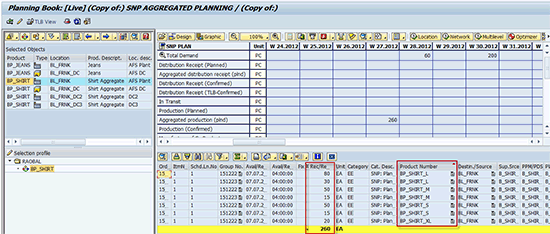
Figure 14
Disaggregated production plan at the size level considering the pegged demands
Step 6. Disaggregate of Procurement and Product Plan (Excess Quantity) Using Quota
In planning scenarios that have excess supplies created at the header level because of lot sizes, the system can disaggregate the excess supply as per the predefined quota values. These quota values are maintained at the location product hierarchy. As indicated in Figure 4 the net quota values are maintained for all four sizes (BP_SHIRT_S = 40%, BP_SHIRT_M = 25%, BP_SHIRT_L = 25%, and BP_SHIRT_XL = 10%). To create excess supply, maintain the product master with the Minimum lot size of 1000 Units (Figure 15).
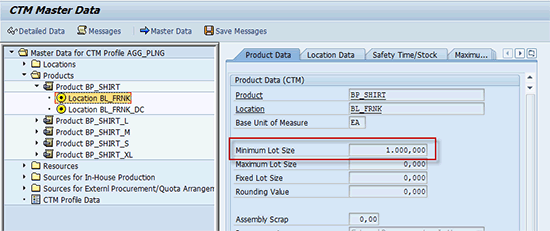
Figure 15
Maintain lot size value for header product location
After the CTM planning run, create the planned order of 1000 units for the header product. The planned order of 1000 units is disaggregated according to the original firmed demands of -100 and -200 units in CW28.2012 and CW30.2012 for the aggregate product BP_SHIRT at the distribution center BP_FRNK_DC (Figure 16).
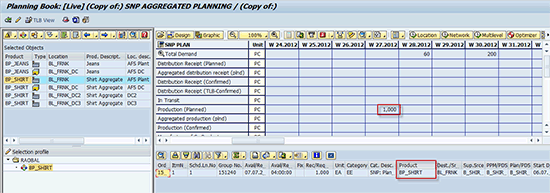
Figure 16
Aggregated supply after the CTM planning run
As you can notice in Figure 17, enhanced aggregated planning can be used to disaggregate supplies based on the original demands using fixed pegging relationships. This function can be used when constraint planning is used and supplies are created in different buckets than the original demands. Aggregated planning with SCM is optimal for working with very large data volumes. The key challenge is maintenance of the appropriate master data for location product hierarchies and the associated quota values. To maintain these values, SAP recommends that you use the BAPI BAPI_LPHSRVAPS_SAVENODES. Using the BAPI you can update all the relevant fields for the time-dependent location product hierarchy.
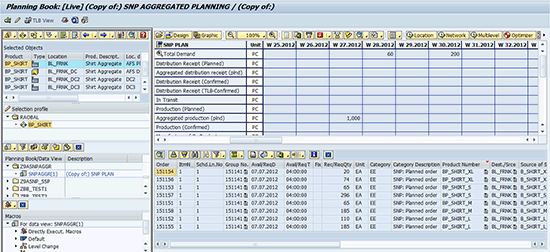
Figure 17
Disaggregated supply after the CTM disaggregation run
Balaji Gaddam
Balaji Gaddam is a team lead of SAP SCM Center of Expertise and is based out of SAP headquarters in Newtown Square, PA. Balaji recently celebrated his 10-year anniversary at SAP and has been involved with SAP SCM/CTM solution development, implementation, and support for the last eight years. He is the author of Capable to Match (CTM) with SAP APO, available at www.sap-press.com. You find Balaji on LinkedIn at https://www.linkedin.com/pub/gaddam-balaji/5/210/454.
You may contact the author at balaji.rao.gaddam@sap.com.
If you have comments about this article or publication, or would like to submit an article idea, please contact the editor.




 Premium