Ingo Hilgefort writes about the features and enhancements that are new with release 4.1 for the integration between the SAP BusinessObjects Business Intelligence suite, SAP NetWeaver BW, SAP NetWeaver BW on SAP HANA, and SAP ERP.
Key Concept
Release 4.1 of the SAP BusinessObjects BI Suite of products has several new features, such as the ability to define a relative depth for hierarchical reporting with Crystal Reports for Enterprise, the auto refresh capability of Web Intelligence, and offline dashboards with SAP BusinessObjects Dashboards.
With the release of SAP BusinessObjects BI 4.1, there have been several enhancements for:
- Web Intelligence
- Crystal Reports for Enterprise
- SAP BusinessObjects Dashboards
- SAP BusinessObjects Analysis, edition for OLAP
- SAP BusinessObjects Explorer
In addition, several enhancements have been made to the following products in the same time frame:
- SAP Lumira 1.0 Service Pack 11 (SP11)
- SAP BusinessObjects Design Studio 1.1
- SAP BusinessObjects Analysis 1.4, edition for Microsoft Office
The products mentioned above (Lumira, Design Studio, Analysis Office) are integrated with the SAP BusinessObjects 4.1 release, but are not necessarily always released together with the SAP BusinessObjects suite. Instead they are released more frequently. The release versions mentioned above are those versions that are available in combination with the overall 4.1 suite release.
Note
For more information on SAP BusinessObjects BI 4.1 see my article “SAP BusinessObjects BI 4.1 Offers New Capabilities for Analysis, Explorer, and Lumira.”
SAP BusinessObjects BI 4.1 - Upgrade Options
Before I look at the set of new functionality in the SAP BusinessObjects BI 4.1 client product, let’s take a look at the upgrade options to move to the 4.1 release.
There are overall three options to deploy the 4.1 release:
- SAP BusinessObjects BI 4.1 can be deployed as a full installation for new installations or as a side-by-side installation
- SAP BusinessObjects BI 4.1 can be installed as an update on top of an existing SAP BusinessObjects BI 4.0 deployment
- SAP BusinessObjects BI 4.1 can be installed as an upgrade for an existing XI R2 or XI R 3.x deployment (Figure 1)
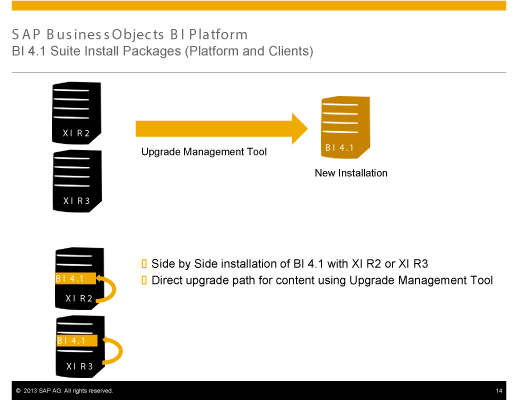
Figure 1
Update options XI R2 and XI R3.x
As shown in Figure 1, if you are currently using SAP BusinessObjects XI release 2 or XI release 3.x, you can update to the SAP BusinessObjects BI 4.1 release in two ways. The first option would be to create a new installation on new (additional) hardware of the SAP BusinessObjects BI 4.1 release. You would then leverage the Upgrade Management Tool to move the necessary content, such as your reports, user definitions, and security definitions, from the prior version to the SAP BusinessObjects BI 4.1 installation.
The second option is to leverage the same hardware as the prior release and to deploy SAP BusinessObjects BI 4.1 as a side-by-side installation. You then would also leverage the Upgrade Management Tool to move the necessary content into the new system.
The advantage of using the first approach – a new installation on new hardware – is that you can use this new installation as a trigger to review a lot of the content from your old release and to consider some housecleaning of your system. You then can select which content you would like to move to the new installation. The disadvantage of this approach is clearly the need for additional hardware.
The second approach – the side-by-side installation – eliminates the disadvantage of the additional hardware requirement. You can still decide which content is being moved from your prior release as part of the new SAP BusinessObjects BI 4.1 system, but you need to ensure that your existing hardware does meet the minimum hardware requirements for SAP BusinessObjects BI 4.1.
Figure 2 shows the two options available to you in case your starting release is SAP BusinessObjects BI 4.0. The first option is a direct upgrade from SAP BusinessObjects BI 4.0 to SAP BusinessObjects BI 4.1 by simply deploying SAP BusinessObjects BI 4.1 on top of the existing SAP BusinessObjects BI 4.0 system using the same hardware.

Figure 2
Update options for BI 4.0
In this situation you need to ensure that your existing hardware still meets the minimum hardware requirements for the SAP BusinessObjects BI 4.1 deployment. You need to update all existing nodes of your SAP BusinessObjects BI 4.0 installation.
The second option to upgrade to the SAP BusinessObjects BI 4.1 system is to create a new installation on additional hardware and then to move the required content from the SAP BusinessObjects BI 4.0 system to your new installation of SAP BusinessObjects BI 4.1.
The difference in this approach compared to the new installation approach for the XI R2 and XI R3 releases is that you would now leverage the SAP BusinessObjects BI 4.x Lifecycle Management tool to move the content from SAP BusinessObjects BI 4.0 to SAP BusinessObjects BI 4.1 instead of the Upgrade Management Tool.
Now let’s look into some of the new capabilities as part of the integration between the 4.1 release and SAP NetWeaver BW, SAP NetWeaver BW on SAP HANA, and SAP ERP.
Crystal Reports for Enterprise 4.1
With Crystal Reports for Enterprise 4.1 there are several enhancements for the integration with SAP NetWeaver BW. You can now:
- Switch between the technical name and the description for prompts based on BEx variables
- Define a level-based selection for BEx queries that contain a hierarchy variable
- Define a relative depth for BEx queries that contain a hierarchy node variable
In addition to those enhancements listed above, there is a change in the workflow for creating a new report with Crystal Reports for Enterprise 4.1 based on a BEx query. Prior to the release 4.1 you were able to create a new report by simply selecting the needed BEx query and selecting the objects you wanted to include into the report without having to provide values for any BEx variables. With the release 4.1 this workflow is slightly changing.
After selecting the BEx query you now need to provide values for mandatory BEx variables before you can select the required objects for your report. The benefit of this change is that Crystal Reports for Enterprise now does not have to ask for all the available metadata but instead can focus on the metadata that matches your inputs.
Figure 3 shows the option to switch between the description or the key value for the prompt, which is now available with the 4.1 release. This allows the report designer to display either the description or the key value as part of the report design.

Figure 3
Switch between key and description for prompt values
In Figure 4 you can see that Crystal Reports for Enterprise 4.1 is now offering a level-based selection, even though the underlying BEx query contains a hierarchy variable.
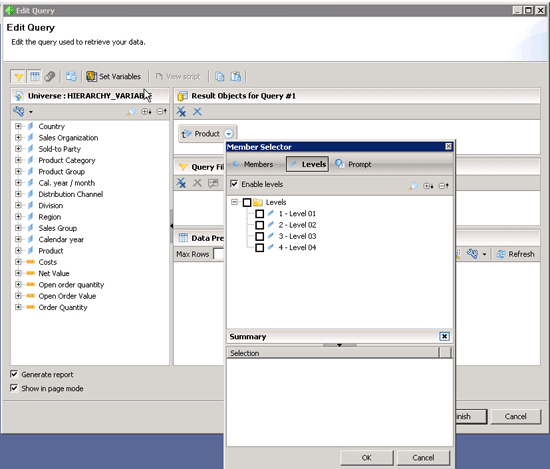
Figure 4
Level-based selection/hierarchy variable
In the case of a hierarchy variable the user can leverage the variable manager (Figure 5) as part of the query panel first. After setting the default hierarchy the user is now able to create a level-based selection for the hierarchy instead of selecting a set of fixed members.
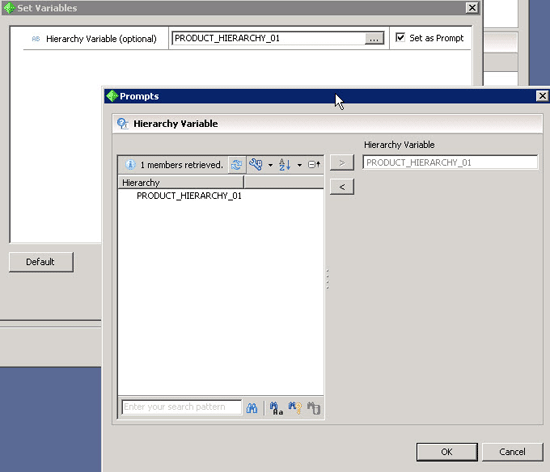
Figure 5
Variable manager
If you create a level-based selection and the consumer of your report changes the value for the hierarchy variable, the defined level selection is still used when the report is refreshed. The corresponding hierarchy levels of the newly selected hierarchy will be shown in your report.
You can now define a relative depth for BEx queries with hierarchy node variables so that the report does not automatically return all the available data. Instead you can limit the data volume being returned.
Figure 6 shows the option to either select all descendants or to define a relative depth. Both options leverage the selected hierarchy node value from the hierarchy node variable as the starting point for the data retrieval. This means that even if you select the All node descendants option and then select a node, for example, on level 3 of your hierarchy, you would only retrieve the selected node with all children and all descendants. If you configure a relative depth, you would retrieve the selected node and the number of levels that you configured as the relative depth.
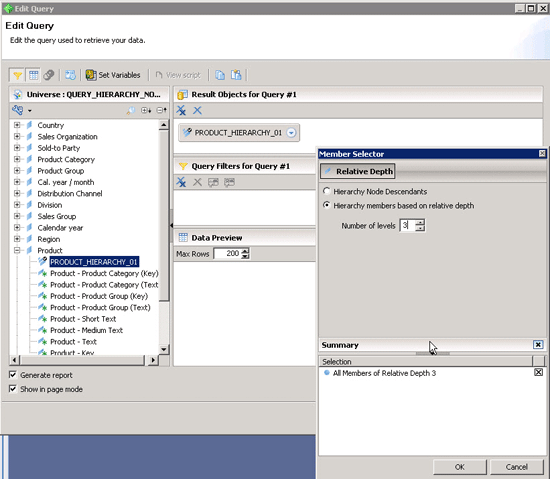
Figure 6
Hierarchy node relative depth
Both of these options – to create a level-based selection for a hierarchy variable and a relative depth for a hierarchy node variable scenario – were not possible prior to the release 4.1 in Crystal Reports for Enterprise. This helps you to limit the data volume for your hierarchical reports in Crystal Reports for Enterprise and in that way helps you to increase the overall performance.
SAP BusinessObjects Web Intelligence 4.1
With Web Intelligence 4.1 there are several enhancements for the integration with SAP NetWeaver BW. You can now:
- Define a level-based selection for BEx queries that do contain a hierarchy variable
- Define a relative depth for BEx queries that do contain a hierarchy node variable
- Configure an Auto Refresh for reports that will require a second refresh of the report itself to receive the correct results
- Leverage the Merge Dimension capabilities of Web Intelligence in combination with hierarchies
In addition to those enhancements listed above, Web Intelligence is impacted by the change in workflow that I outlined for Crystal Reports for Enterprise. With the release of 4.1 of Web Intelligence you have to provide values for mandatory variables before you can start creating a report. This leads to fewer calls to the SAP NetWeaver BW back end as less metadata is being retrieved.
In the same way as Crystal Reports for Enterprise, Web Intelligence is with release 4.1 able to create a level-based selection in case your underlying BEx Query contains a hierarchy variable (Figure 7).

Figure 7
Level-based selection for Web Intelligence
Web Intelligence 4.1 offers the ability to define the relative depth when your underlying BEx query contains a hierarchy node variable (Figure 8).

Figure 8
Relative depth for a hierarchy node variable
You can decide to either retrieve all children and descendants for the selected node or you can create a relative depth definition that limits the retrieve dataset based to the number of levels you configured as relative depth.
If you selected the option to configure a relative depth and not to retrieve all descendants and children for the selected node, the report will not contain all the data and the user does not have the option to drill down further and retrieve additional data on the fly. In such a scenario the data volume is limited to the configured depth and the user cannot expand the retrieved data to more levels.
The 4.1 release for Web Intelligence also has the ability to configure the automatic refresh of your report, in case, for example, your report contains database delegated key figures. Prior to release 4.1 the user had to manually refresh the report a second time to retrieve the correct subtotals for scenarios when the report contained database delegated key figures.
Figure 9 shows the configuration dialog in the Central Management Console (CMC) for the Web Intelligence application. Here your administrator can configure the auto refresh option, so that the user can then configure the auto refresh option per report.
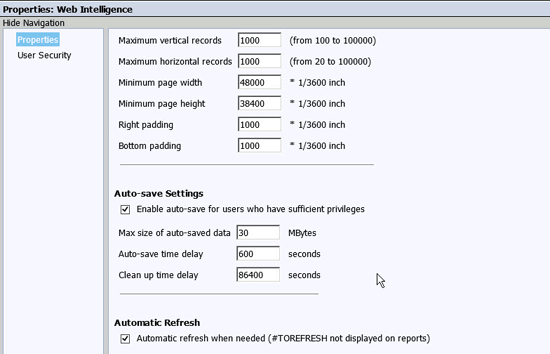
Figure 9
Central Management Console - auto refresh configuration
Figure 10 shows the option to activate the auto refresh option per report. The auto refresh option can only be activated by the user per report after the administrator configures the general option for the Web Intelligence application in the CMC.

Figure 10
Web Intelligence document - auto refresh configuration
In addition to those enhancements, Web Intelligence 4.1 also offers an enhancement to the merge dimension functionality (Figure 11) that enables Web Intelligence to merge data based on hierarchies.

Figure 11
Web Intelligence - merge dimension with hierarchies
SAP BusinessObjects Dashboards 4.1
SAP BusinessObjects Dashboards 4.1 brings only a small amount of enhancements for the integration with your SAP landscape, but nevertheless there are two important enhancements. You can now:
- Bind the input values for BEx Variables to the underlying Microsoft Excel spreadsheet
- Configure your dashboard to become an offline dashboard
As shown in Figure 12, you can now bind your prompts based on BEx query variables to cells in the underlying Microsoft Excel sheet. With this new ability you can leverage all the different capabilities of SAP BusinessObjects Dashboards to pass a value to the underlying BEx query. You can now pick up the value from the underlying spreadsheet. This ability is part of SAP BusinessObjects BI 4.1 Service Pack 01 (SP01).
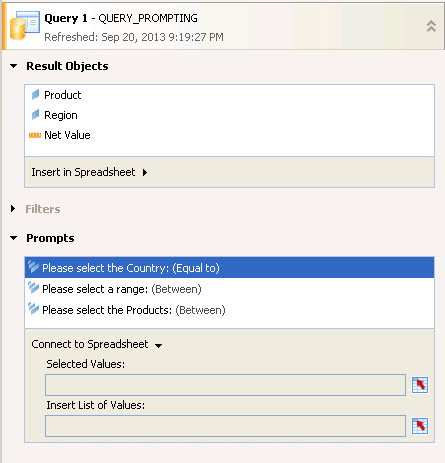
Figure 12
Binding BEx query variables to a spreadsheet
Figure 13 shows the Document Properties in SAP BusinessObjects Dashboards 4.1 with the option to configure the dashboard for offline usage. After the property has been set, the consumer of the dashboard is able to download the dashboard with the currently shown data.

Figure 13
Document properties - offline dashboard
Universes for SAP Landscapes
SAP BusinessObjects BI 4.1 offers several enhancements for the ability to author a universe on top of your SAP landscape:
- As part of authoring a universe for your SAP ERP system, the primary and foreign keys are now being detected
- You can also now detect joins between different sources from your SAP ERP system when creating the universe
- For input columns you can now leverage an improved user interface (UI)
- The integrity check for your universe based on SAP ERP checks input columns to ensure that mandatory input columns have been resolved in the universe
- Optional input columns for your SAP ERP-based universe are now supported and can be leveraged in combination with optional input parameters. Prior to the 4.1 release, optional input columns were always treated as a mandatory entry.
Figure 14 shows the ability to detect the joins in your SAP ERP-based universe, which becomes especially helpful when combining multiple InfoSets or ABAP functions into a multi-source universe. You now can use the functionality to automatically detect the necessary joins between the different sources. The suggested joins are based on the primary and foreign keys.
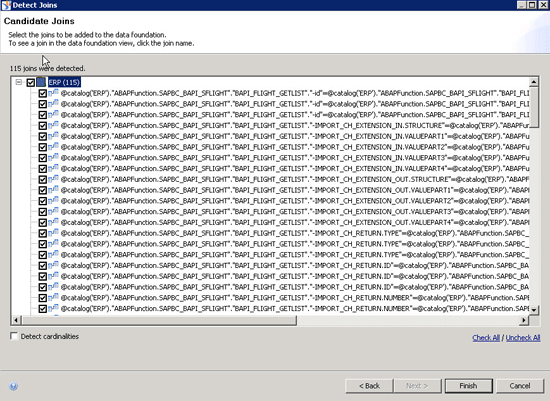
Figure 14
Join detection in ERP universe
Figure 15 shows the new UI for editing the input columns for your SAP ERP-based universe. If your underlying SAP ERP source, for example, an ABAP function, contains predefined parameters, those result in input columns as part of your universe.

Figure 15
UI for input columns
When creating the universe, you can then decide how you would like to resolve the input column. The new UI gives you three options:
- No Assignment: This option is only possible if the underlying parameter in the data source is an optional input. By setting this option for the input column, the input column is basically ignored and the data is retrieved without setting any filter values for this column.
- Value: This option allows you to configure a fixed value for the input column.
- Parameter: This option allows you to point the input column to a parameter in the universe. You need to create the parameter in the universe before assigning it to the input column. Currently this option has a major limitation, as the input column only accepts parameters for single values.
Note
Ingo will provide more information about SAP BusinessObjects BI 4.1 at the SAPinsider Reporting & Analytics 2013 Nov. 20-22 in Orlando. He’ll be featured in an SAP ExpertsLive session at the SAP Insider booth, speaking on “What's new in SAP BusinessObjects BI 4.1 for SAP NetWeaver BW and SAP ERP customers?” Other sessions by Ingo at the conference include “A technical guide to integrating SAP BusinessObjects BI 4.x with SAP NetWeaver BW, SAP NetWeaver BW on SAP HANA, and SAP ERP.” A complete list of his sessions is here:
https://reporting2013.wispubs.com/Orlando/Search/?u=&s=&q=ingo&x=-1045&y=-39.
Note
Product Roadmap disclaimer: The descriptions in this article of future functionality are the author’s interpretation of the publicly available product integration roadmap. These items are subject to change at any time without any notice, and the author is not providing any warranty on these statements.

Ingo Hilgefort
Ingo Hilgefort started his career in 1999 with Seagate Software/Crystal Decisions as a trainer and consultant. He moved to Walldorf for Crystal Decisions at the end of 2000, and worked with the SAP NetWeaver BW development team integrating Crystal Reports with SAP NetWeaver BW. He then relocated to Vancouver in 2004, and worked as a product manager/program manager (in engineering) on the integration of BusinessObjects products with SAP products. Ingo's focus is now on the integration of the SAP BusinessObjects BI suite with SAP landscapes, such as SAP BW and SAP BW on SAP HANA, focusing on end-to-end integration scenarios. In addition to his experience as a product manager and in his engineering roles, Ingo has been involved in architecting and delivering deployments of SAP BusinessObjects software in combination with SAP software for a number of global customers, and has been recognized by the SAP Community as an SAP Mentor for SAP BusinessObjects- and SAP integration-related topics. Currently, Ingo is the Vice President of Product Management and Product Strategy at Visual BI Solutions, working on extensions to SAP’s product offering such as SAP BusinessObjects Design Studio and SAP Lumira. You may follow him on Twitter at @ihilgefort.
You may contact the author at Ingo@visualbi.com.
If you have comments about this article or publication, or would like to submit an article idea, please contact the editor.



 Premium