Discover how to debug common issues with the 7.0 release of SAP BusinessObjects Planning and Consolidation, version for SAP NetWeaver. Learn how objects are organized within the system to see where you can set breakpoints for debugging. Then find out how you can debug application logic, which implements your business logic, to ensure that you achieve correct results.
Key Concept
You can use debugging to troubleshoot technical problems or application logic. Technical problems refer to issues that can cause hard errors, system errors related to bugs within the software, or an incorrect configuration within the software. You write application logic to meet a business requirement. For example, consider allocating a budget down to different departments. A flaw in your application logic could lead to incorrect results. Debugging application logic allows you to find these flaws.
SAP BusinessObjects Planning and Consolidation is SAP’s primary application for budgeting, forecasting, and financial planning. Companies who need to create yearly budgets or forecast future targets can use the application to achieve their goals.
Note
There are currently two platforms of SAP BusinessObjects Planning and Consolidation: SAP BusinessObjects Planning and Consolidation 7.0, version for the Microsoft platform and SAP BusinessObjects Planning and Consolidation 7.0, version for SAP NetWeaver. (These are the official names.) For the purposes of this article, we use the unofficial abbreviation SAP BPC 7.0 NW, or simply SAP BPC, with the understanding that we are talking about the version for SAP NetWeaver.
This is the first of three articles that focus on topics such as troubleshooting system or application issues with SAP BPC 7.0 NW. This first article discusses debugging, with a primary focus on application logic. The second article will look at logging and tracing concepts for troubleshooting problems. Finally, in the third article, we’ll present our experiences with resolutions to common issues you may encounter and show you methods we have used to troubleshoot these issues.
When dealing with troubleshooting system or application issues, debugging is often the best way to find the source of the problem. For example, suppose that the CEO has mandated that several different levels within the organization must review the yearly budget. The CEO starts by setting the target at the top of the organization based on the year’s financial goals. These goals can then be allocated by the corporate IT or business to different levels in the organization as a starting point for the departmental budgets. This way, the budgets are aligned to achieve the company’s financial goals. Department heads can then review and change their budgets to try to achieve their departmental goals. During the allocation process, the numbers become distorted or inadvertently changed so they are no longer correct after the allocation is completed. To address this problem, your best option is to look at the possibility of incorrect application logic. Although this inaccuracy is not a technical problem, debugging is usually the only way to find the mistake in your application logic because logging and troubleshooting do not tell you where the issue is.
You can view the ABAP code within SAP BPC 7.0 NW. Even though ABAP is SAP’s proprietary language, all its source code is available to debug any SAP BPC application logic or SAP NetWeaver platform logic. To help you debug SAP BPC, you should understand the product architecture, which includes many different technologies, including Microsoft .NET technologies as well as SAP ABAP technologies. For more information, read our article, “Configure SAP BusinessObjects Planning and Consolidation for SAP NetWeaver to Optimize System Performance.”
To understand how debugging works, you need to understand how SAP BPC 7.0 NW organizes technical objects and components.
SAP BPC Objects and Components
SAP BPC includes numerous types of objects. The most relevant objects for debugging are:
- ABAP data dictionary objects (DDIC)
- SAP NetWeaver Business Warehouse (SAP NetWeaver BW) objects
- Dynamic SAP BPC tables
Note
As of the writing of this article, SAP has moved to a new naming convention for SAP NetWeaver Business Intelligence (SAP NetWeaver BI). This is now SAP NetWeaver Business Warehouse (SAP NetWeaver BW).
ABAP DDIC objects describe the code and objects delivered by SAP that are installed on your SAP NetWeaver system during the SAP BPC installation process. You use these objects and code when debugging system and configuration issues. It is important to know how to find the relevant objects and code that will help you debug your specific issue. SAP NetWeaver BW objects and dynamic SAP BPC tables are the objects that are created when you build your planning applications in SAP BPC . Understanding SAP NetWeaver BW objects and dynamic SAP BPC tables is important when you debug application logic or the modules that store data, such as comments or journals.
To see the ABAP DDIC objects that exist for debugging, use transaction SE80 (ABAP Workbench) in the SAP NetWeaver Application Server (SAP NetWeaver AS) ABAP system. All objects within SAP BPC are organized by packages, which are containers used to group objects in an SAP NetWeaver AS ABAP system. The package that houses all objects in an SAP BPC system is called UJ (a package available for SAP BPC development to use). A package can have any number of objects in the ABAP system assigned to it, including sub-packages, which are packages assigned to packages. Sub-packages are organized by major SAP BPC components; for example, all ABAP objects related to the Admin module are stored in sub-package UJA (a random third character is used for each module), as shown in Figure 1. Here you have the list of packages delivered with SAP BPC 7.0 NW. To see all of the packages available in SAP BPC, you can just look at the sub-packages for the main package UJ.
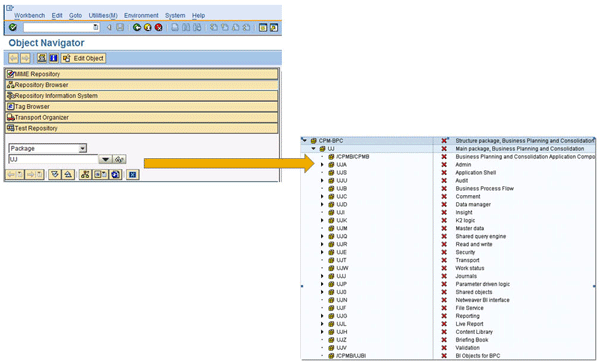
Figure 1
UJ sub-packages for SAP BPC components
Open a package in transaction SE80 to view all objects related to that package. For example, if you expand the sub-package UJA, you can see all objects within this sub-package. To see all tables for the Admin module, follow menu path Dictionary Objects > Database Tables (Figure 2).
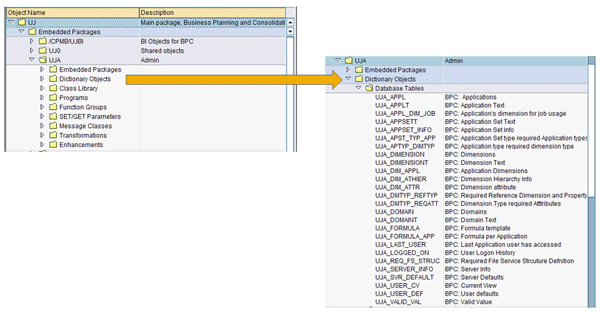
Figure 2
Database tables for the Admin module
In addition to the SAP-delivered tables for the UJx sub-packages, you can also see dynamic tables. To deal with dynamic tables more efficiently in the debugging process, you should understand the convention used for naming them. This convention helps you understand how the SAP BPC objects are arranged, so while you’re debugging any system- or configuration-related errors, you can find the solution to your problem more quickly.
For example, SAP BPC stores comments in an application-specific format. When you create an application, the system generates a set of dynamic tables. Whenever you modify the application, the system updates the table structures. Some modules delete the data from these dynamic tables, and others copy the data to the new target table (Table 1).
|
Journal
|
/1CPMB/application_set_prefix+application_prefix+JRDT
|
|
Audit
|
/1CPMB/application_set_prefix+application_prefix+AD
|
|
Audit archive
|
/1CPMB/application_set_prefix+application_prefix+AD_A
|
|
Work status
|
/1CPMB/LKWS+application_set_prefix+application_prefix
|
|
Comment
|
/1CPMB/application_set_prefix+application_prefix+CMT
|
|
Comment archive
|
/1CPMB/application_set_prefix+application_prefix+CMTA
|
|
| Table 1 |
Naming convention of dynamic tables |
This naming convention is somewhat arbitrary. The “/1CPMB/” designates all generated ABAP DDIC objects in the SAP BPC system. The application_set_prefix and application_prefix describe the SAP BPC application sets (AppSets) and applications. The hard-coded string provides a shorthand notation for the module. For example, “CMT” is the shorthand notation for the module “Comments.”
Understanding this naming convention helps you find underlying tables that can aid in troubleshooting. For example, you may want to see the comments table to find out why a comment displays incorrectly in a comments report, or you may want to see the work-status table to see why some of the SAP BPC data is not locked appropriately (e.g., if the lock was deleted mistakenly).
To find where the comments are stored for the RATE application in the APSHELL_JPN AppSet, for example, you need to follow three steps.
First, you must figure out the dynamic table naming convention, which is identified by the type of information you want to receive about the data. In this case, you’re looking for comments data. The naming convention for a dynamic comments table is:
Comment /1CPMB/application_set_prefix+application_prefix+CMT
Your second step is to figure out the application_set_prefix for the APSHELL_JPN AppSet. You can find this in table UJA_APPSET_INFO by using transaction SE16 (Figure 3). The APPSET_PREFIX field tells you the application_set_prefix, in this example AP.

Figure 3
UJA_APPSET_INFO table
Now that you have the application_set_prefix, you can move to the next step, which is to find the application_prefix. You can find the application_prefix for the AppSet in table UJA_APPL. Figure 4 shows the application prefix SLY in the APPL PREFIX field for the RATE application ID in transaction SE16.

Figure 4
UJA_APPL table
Now that you have the application_set_prefix AP and the application_prefix SLY, you can derive the comments table based on the naming convention. Figure 5 shows an example of a comments table.
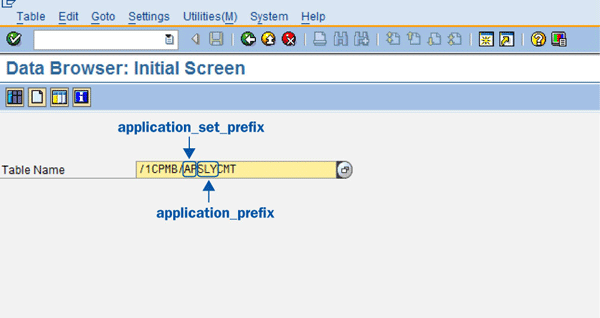
Figure 5
Example of a comments table
The table that stores comments for the APSHELL_JPN AppSet’s RATE InfoCube is the /1CPMB/APSLYCMT table. In this example, to debug issues related to comments for the RATE application within the APSHELL_JPN AppSet, check table /1CPMB/APSLYCMT.
SAP BPC Function Groups
At the beginning of this article, we mentioned the importance of understanding the architecture of SAP BPC. This provides the foundation you need to debug your SAP BPC system more efficiently. For example, all connections made from the Microsoft .NET server to the SAP BPC ABAP tier occur through the SAP .NET Connector (version 2.0). The SAP .NET Connector connects to SAP BPC function modules, which are organized in function groups. A function group is a group of similar functions.
If you want to set a breakpoint to debug processing dimensions (e.g. to see why the process is taking a long time), you first need to find the function module in which to set the breakpoint. The function groups in SAP BPC are organized in the packages. For example, processing dimensions are part of Dimension Management, which is in sub-package UJA and function group UJA1 (Figure 6). Expand this function group to view function module UJA_API_PROCESS_DIMENSION, in which you can set a breakpoint to debug the entire process dimension activity.
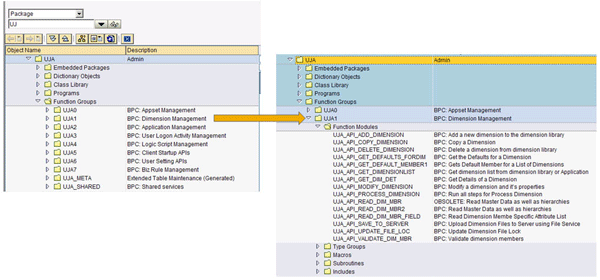
Figure 6
Function modules in the UJA1 function group
SAP BPC Namespaces
In addition to DDIC objects, SAP BPC is based on SAP NetWeaver BW. All SAP BPC dimensions and applications generate SAP NetWeaver BW InfoObjects and InfoCubes. Every new AppSet within SAP BPC is created as a new InfoArea in the /CPMB/BPC InfoArea (Figure 7).
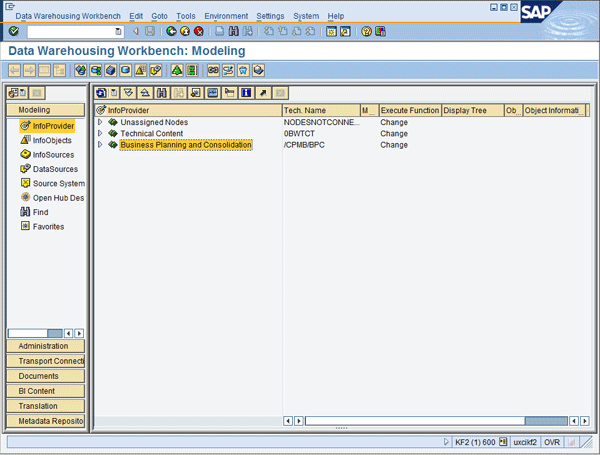
Figure 7
SAP BPC InfoArea
For example, if you create the AppSet called “Egg for ApShell” within the SAP BPC Admin Console, the AppSet appears in the Data Warehousing Workbench (Figure 8). This is important because you can view all master data and transactional data stored for a particular AppSet under its InfoArea. When you need to debug application logic, you have to test scenarios with different datasets, and you can find the datasets and underlying objects within the Data Warehousing Workbench.

Figure 8
Find the datasets and underlying objects for testing scenarios
You need to know where the AppSet is stored to find the SAP NetWeaver BW objects (e.g., InfoCubes and InfoObjects) that are part of your AppSet, so you can debug any issues in the SAP NetWeaver BW application logic. All SAP NetWeaver BW objects within this AppSet appear within this InfoArea (including InfoCubes, MultiProvider, and InfoObjects). The SAP BPC Admin Console generates all these SAP NetWeaver BW objects. It is a best practice not to change anything here. These generated objects are separated from the existing Enterprise Data Warehouse (EDW) through namespaces.
SAP BPC operates in its own namespace in SAP NetWeaver BW. SAP BPC is, by design, not directly integrated into the EDW. The reason behind this design decision is that if SAP BPC was completely integrated with the EDW, business users would never be able to maintain their own applications without impacting the whole EDW. Obviously, no IT department would allow that. However, IT does need to know how to debug any issues. Therefore, it is important to know that all debugging, logging, and tracing activities of SAP NetWeaver BW InfoObjects occur for the objects in an SAP BPC namespace.
Debugging Application Logic
SAP BPC can have application logic related through client-side functions or script logic. Because the bulk of application logic is implemented in script logic, we focus on script logic.
SAP BPC has a script logic tester program that you can use to debug script logic — a useful approach to discover what may have caused processing errors. Using the yearly budget example, you write the allocation scenario into script logic, and then you can debug the program to find where the error in the logic is using the script logic tester program. To execute this program, run transaction SE38 and then run the ABAP program UJK_SCRIPT_LOGIC_TESTER (Figure 9).
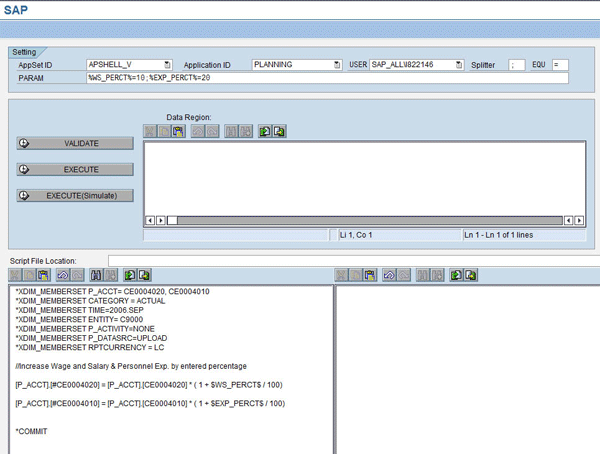
Figure 9
Script logic tester program example
The script logic is specified in the bottom-left side of the screen. You can validate or simulate the script logic here. To switch to debug mode, add the /H switch in the transaction box in the top left just before you execute your script logic.
Prakash Darji
Prakash Darji is currently director of product management in the Enterprise Performance Management area within SAP Business Objects. In his current role as a director of product management for the SAP BusinessObjects Planning and Consolidations product, his responsibilities include inbound product management through working on the short- and longer-term roadmap for SAP's Planning Solutions, managing deliverables for multiple releases, as well as creating product specifications for innovative features and functions to differentiate against key competitors. His full bio is available at: www.linkedin.com/in/prakashdarji.
You may contact the author at prakash.darji@sap.com.
If you have comments about this article or publication, or would like to submit an article idea, please contact the editor.
Ryan Leask
Ryan Leask currently runs the SAP BusinessObjects Planning and Consolidation solution management team for SAP, based out of Palo Alto, CA. Prior to this position, he led the EPM solution architecture team with a main focus on the design of SAP BusinessObjects Planning and Consolidation 7.0, version for SAP NetWeaver. Ryan has also worked on SAP xApp Analytics, SAP NetWeaver Visual Composer, SAP NetWeaver BW, SAP SEM, ABAP, SAP CRM, analytics/data mining, and whatever else seemed interesting. He has also co-authored SAP xApp Analytics (SAP PRESS, 2006), written many articles, and presented at numerous conferences.
You may contact the author at ryan.leask@sap.com.
If you have comments about this article or publication, or would like to submit an article idea, please contact the editor.