The "activities" functionality in the CO module is a powerful allocation tool, but many sites fail to take full advantage of it due to confusion. The author clears up this confusion by explaining its root causes.
The Controlling (CO) functionality known as "activities" is potentially the most useful allocation tool in the module. This tool is capable of easily tracking "internal" work and dispensing the firm’s capacity-related period costs from its employee "resources" to its employee "consumers." Yet, despite its usefulness, its capabilities are a source of confusion and, as a consequence, its potential remains largely underutilized at many SAP sites.
I suspect four unfortunate circumstances are the root cause for this confusion:
 The word "activity" appears in several SAP terms, but not in a consistent way.
In a standard SAP setup, a "plan" activity rate is used for the "actual" allocations.
In SAP, the purpose for having "fixed" and "variable" portions of a cost rate is unclear.
The CO menu options for allocating "activities" lack usable titles or instructions.
Understand these four issues and you can easily leverage CO activities. So that’s what we’ll do here — clarify each of these potential points of confusion and give you the head start you need to use activities (a.k.a. "Activity Types") in your overall cost allocation design.
Confusion Source #1:
The Word "Activity" Appears Inconsistently in Several SAP Terms
The first cause of what I like to refer to as CO "Activities phobia" is the number of seemingly different and unrelated SAP terms that include the word "activity," which is widely used throughout the SAP R/3 application suite, as shown in Figure 1. The result is that it’s just plain difficult to keep everything straight.
To help dispel this confusion, here are working definitions of the four terms that are most relevant to setting up and using the "activities" function of CO cost allocations:
- Activity Type. This term refers to a class of "master data" created in the Cost Center Accounting module. The purpose of Activity Types is to quantitatively record and describe what kinds of capacity the organization has available to allocate. By definition, Activity Types (sometimes referred to as "activities") need to describe something measurable, such as hours of work done or numbers of actions taken. You are free to define these as specifically or generically as you see fit, but common definitions include labor hours, machine run-time, phone calls answered, and invoices processed.
- Activity Allocation. This term refers to a transaction you can use to record quantities of activities performed by a cost center. Performed for whom? The "receiver" part of the company’s internal resource exchange is also recorded in an Activity Allocation. As you see in the allocation examples in Figure 2, the "receiver" can be any of several different kinds of CO module consumers (Manufacturing Order, Market Segment, Business Process, and more).
- Activity-Based Costing. Notice how this term is involved in only one of the examples shown in Figure 2. It also answers one of the questions asked by the cartoon characters below, "Can activities be used without (the) Activity-Based Costing (module turned on)?" The answer is "Yes," as Figure 2 illustrates. "Activities" are merely one approach to allocating from a Cost Center to any of several receivers, whereas "Activity Based Costing" is a sub-module in CO, similar to the "Cost Center Accounting" and "Internal Order" sub-modules.
- Activity Prices. This term is represented by the dollar rates quoted in the three examples depicted in Figure 2. Activity price details are often a perplexing topic in the world of activities and will be examined in the next two sections of this article. For now, it is enough to know that you need activity prices. Without them, you cannot perform an activity allocation.
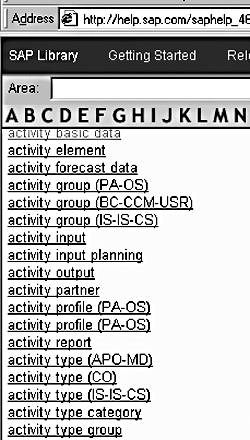
Figure 1
A Sample of SAP Terms Containing the Word "Activity"
Activity Types vs. Other Allocation Options
Activities, being “causal” in nature, are superior to the other CO module allocation options (such as assessments, distributions, and overhead costing sheets), which are merely “correlational.” Activities can record exactly what business actions have occurred (and where, in terms of a cost center) and assign the costs for those actions directly (and often in real time) regarding who or what caused them.
In contrast, assessments, distributions, and overhead costing sheets can only be used periodically to assign costs to receivers and, for the most part, only indirectly according to arbitrary bases or observed historic relationships.
Although both the resource producer and the resource consumer in the “activities” form of
allocating costs can often be cost centers, you are not limited to this. Figure 2 shows three examples of CO module cost allocations recorded via “activities.” In the first example, the internal customer is a Manufacturing Order in the Production Planning module; in the second example, it’s a Profitability Market Segment in the CO-PA module; and in the third example, it’s a Business Process in the Activity-Based Costing module.
In all three cases, the “sender” is a Cost Center. This is because within R/3, the Cost Centers of a Controlling Area represent the organization’s costs of capacity. Within the Cost Center Accounting area of CO, the Activity Types of the cost centers can represent (if you wish) what that capacity includes — labor hours, machine hours, units of inspection or R&D designs, and so on. If you decide to use Activity Types, it is your choice what to name your Activity Type masters and what measurement unit to assign them.
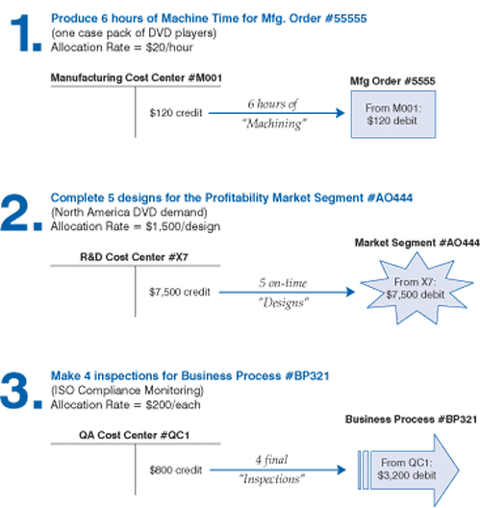
Figure 2
Three Examples of the "Activities" Form of CO Module Cost Allocations
Confusion Source #2:
The Standard SAP Setup Uses a "Plan" Activity Rate for "Actual" Allocations
The second cause of Activities phobia is the confusion about why both the plan and actual activity allocation transactions have to get their cost rates from the "plan" reference data.
According to SAP (and to common sense), it is not possible to accurately know an "actual activity price" in real time. It is only possible to know an actual activity price for a month once that month has been closed and all the data for the month has been reconciled and finalized.
Hence, to do actual activity allocation postings in real time — e.g., as business activities actually occur — it is necessary to do those postings with plan prices. SAP provides three mechanisms for generating plan prices:
- Automatic plan price calculation
- Automatic calculation of "actual historic" prices
The latter two options — the automated price calculation options — require significant setup and experience to execute proficiently. Therefore, the first option — the manual input of prices — is by far the most common mechanism used for generating plan prices at SAP sites. An example is shown in Figure 3.
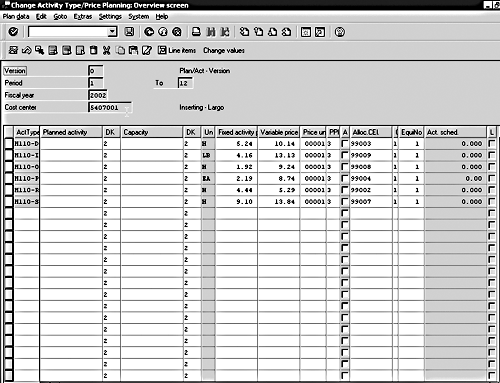
Figure 3
Data Entry Screen Used to Manually Type in "Plan" Activity Prices
Confusion Source #3:
The Purpose for Having "Fixed" and "Variable" Rate Portions in SAP Is Unclear
The third cause of Activities phobia is the consternation over fixed and variable costs. As shown in Figure 3, when inputting manual plan prices or calculating plan (or actual historic) prices, users are forced to distribute costs into "fixed" and "variable" portions. This creates a roadblock for many people who would potentially use activities, causing uncertainty as to how to proceed and what the impact might be on postings.
At first glance, for example, someone might incorrectly conclude that the "fixed" portion of an activity price would not be applied more than once during an activity allocation. In other words, when you see an activity price of $15-per-hour, of which the "fixed" portion is $5 and the "variable" portion is $10, you could easily (and mistakenly) assume that 8 hours of that activity would be valued at $85 ( $5 + $10 x 8). Whereas in reality, 8 hours would be valued in the standard setup of the SAP R/3 CO module at $120 ( $5 x 8 + $10 x 8 ).
In general, the distinction between fixed and variable costs has no impact at all when doing activity allocations — rather, this distinction exists only as a reporting convenience to help identify variances.1 As an example, imagine a large widget-making machine with the following costing characteristics:
- It costs $10,000 to maintain the machine for the month (whether the machine is run at all)
- One full-time person is assigned to the machine and is paid $3,000 per month
- The average electricity cost for each hour the machine is run is $100
- The machine is normally run 160 hours in a month
The calculation for determining the standard activity price for an hour of machine time might therefore look like this:
($13,000 [fixed] + 160 hrs x $100 [variable]) / 160 hrs = $181.25/hr
of which $100 is the "variable per-unit cost" and $81.25 is the "fixed per-unit cost."
If the machine were then actually run for 172 hours in a month, the corresponding activity allocations from that Cost Center to its "receivers" would absorb $13,975 in fixed costs from the production cost center ($81.25 x 172) and $17,200 in variable costs ($100 x 172 ).
Cost center reports would then indicate that "fixed costs" were over-absorbed by $975 ($13,975 - $13,000), and similar analyses could be done for the variable costs, whose actual cost for the month could vary from $100 per hour, depending on the current cost of electricity, the current machine efficiency, and so on.
Confusion Source #4:
The CO Menu Options for Allocating Activities Lack Usable Titles or Instructions
The fourth and final cause of Activities phobia are the sometimes nebulous practices by which you can and should employ activities. As shown in Figure 4, it’s not difficult to visually locate the menu options related to activities that are scattered throughout the CO menus. It’s just a little hard to always comprehend those options, especially when the documentation on the individual functions isn’t great and doesn’t provide any sort of "big picture" of how one use of activities compares to another.
The two most commonly used transactions involving "activities" are:
-
Automated activity allocations. Activities are first and foremost employed in the production planning (PP) module. Here, "production order confirmations" are designed to trigger appropriate activity allocations via linked PP master data, known as "work centers" and "routings."
Each work center is linked to a single cost center and contains a list of the activities that can be performed at that work center. For each product being manufactured, the routing indicates what quantity of each activity in each work center is required (for each unit of that product produced). For this type of "automated" activity allocation, activities are charged to production orders from cost centers, with the orders getting the debits and the cost centers getting the credit postings.
- Manual direct activity allocations. This allocation method is the second-most prevalent way in which activities are employed and perhaps the easiest and most flexible method for the everyday user to work with. This type of allocation is the perfect choice for the user who would like to manually assign cost center expenses to an additional "place" in SAP (such as an in-progress Capital Project) using a quantity and a rate. (Also note that this type of transaction makes it easy to reverse and re-post allocations made.)
When doing "manual direct activity allocation," the user needs to specify absolutely everything at the time of executing the transaction: the activity, the quantity to be recorded, the sender cost center, and the receiving object. The latter can be any other specific "cost object" in CO: other cost centers, orders, profitability segments, business process, and so on. The trick to using this option is to either choose the appropriate "screen variant" for the intended allocation (for example, the "Cost Center to Internal Order" variant), or else call up the "detail screen" (with the data entry fields for all possible receivers).
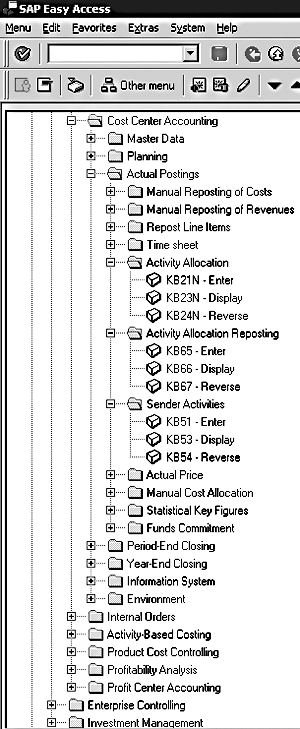
Figure 4
SAP Menu Options Involving "Activities"
Final Thoughts
You’ve seen how the "activities" method for recording cost allocations in the CO module tends to be underused due to four sources of confusion: (1) the word "activity" appearing in so many different SAP vocabulary words; (2) the need to use a "plan" cost rate for "actual" activity allocations; (3) the unclear purpose of the "fixed" vs. "variable" portions of an Activity Type’s cost rate; and (4) the non-intuitive titles given to the activity allocation menu options.
By clearing up its most common points of confusion, you should be able to implement the basic "activities" options. Moreover, I hope you can now read and understand the online Help concerning the more exotic options such as "indirect activity allocations," "executing business process templates," and using activities on cross-application time sheets (CATS).
Try ’em out! Experiment! Share the knowledge with other co-workers who can benefit! Because "activities" are the only form of CO module allocations that represent causal (and not correlational) internal consumption, they offer you a month-end analysis trail not available elsewhere in FI/CO and the most powerful R/3 allocation tool around!
If you have questions or comments on this article, you can contact me at the e-mail address below.
1
Tom Spetnagel
Tom Spetnagel, a former platinum consultant and top performer for SAP America, is a specialist in R/3's Controlling module. Since 1995, Tom has helped several major R/3 customers implement CO and has taught a number of Profitability Analysis and Product Costing classes at SAP training centers as well. Tom is currently the senior FI/CO configurator at Cox Target Media near Tampa. He has both an MBA and a master's degree in aerospace engineering from Georgia Tech and an undergraduate degree in aerospace engineering from the University of Michigan.
You may contact the author at thomas_spetnagel@coxtarget.com.
If you have comments about this article or publication, or would like to submit an article idea, please contact the editor.


 Premium