CRM Middleware contains important functionality to help SAP CRM share data with other systems. Learn about the components involved with CRM Middleware and then see how it helps to transfer data between SAP CRM and R/3 or SAP ERP Central Component.
Key Concept
CRM Middleware provides software to enable the transfer of data to and from SAP CRM. CRM Middleware is an integrated part of SAP CRM and links SAP CRM with another system, such as SAP ERP Central Component, or a non-SAP system.
SAP CRM, SAP NetWeaver Business Intelligence (BI), and R/3 or SAP ERP Central Component (ECC) share master data about customers and orders. CRM Middleware software, delivered standard with SAP CRM, facilitates these activities by ensuring that the data passes smoothly among the systems. However, I often find that people who take my classes are unfamiliar with how CRM Middleware works.
Although it is impossible to discuss and describe CRM Middleware thoroughly in just one article, let me introduce you to the basic architecture of CRM Middleware. Then I’ll walk you through the steps of using CRM Middleware to transfer data from R/3 to SAP CRM. Finally, I’ll show you the reverse steps of sending data from SAP CRM to R/3. In a future article, I’ll delve more deeply into the configuration aspects of CRM Middleware.
For those who want a refresher on the terms used when discussing CRM Middleware, refer to the sidebar, “Before You Begin: CRM Middleware Terms.” The processes mentioned in this article apply to R/3 4.6 and later and mySAP CRM 4.0 and later.
CRM Middleware Architecture
Although CRM Middleware has support for generic technologies (specifically XML), nearly all companies leverage the SAP- specific technologies used to pass data between CRM and the other SAP software. Figure 1 shows which systems are typically involved in a CRM Middleware implementation and the kinds of data it passes between them and SAP CRM.

Figure 1
The basic landscape and data involved with SAP CRM
CRM Middleware is the collection of software that links SAP CRM with its supporting applications, such as Interaction Center and Campaign Management. This collection is further grouped into separate software that links SAP CRM with one specific type of system (site). The specific software for each purpose is called an adapter, which functions as a technology link between SAP CRM and the associated system (Figure 2). For instance, the BW Adapter links SAP CRM data into the format and technical storage required to feed the data to SAP NetWeaver BI. The R/3 Adapter passes data between CRM and R/3 (ECC).

Figure 2
Adapters with CRM Middleware
Adapters are delivered functionality of the CRM Server. Although most adapters have names that disclose the system types they pass data between (for example, the R/3 Adapter), two of them might not be so obvious. One is the CRM Adapter. This collection of software validates incoming data using the logic configured for each CRM application. This ensures that only valid data is written to the CRM system. The second is the External Interface Adapter (XIF), which is responsible for the communication between CRM and third-party systems (normally back-office systems). It is designed to process incoming and outgoing XML or IDoc messages.
Sending Data from R/3 to SAP CRM
Before I get into the data flows, I should mention that you must make some technical settings to link the CRM system to your other systems. For example, you need to set up Remote Function Call (RFC) destinations with log-on information in SAP CRM and, in most cases, the target system. In addition, you must set up the tables delivered with the plug-in to tell R/3 which RFC destinations are active CRM systems that need R/3 information.
Let’s track what happens in two scenarios. First let’s see what happens when you create a new sales order in R/3 and you want to transfer this information to SAP CRM. Figure 3 depicts a simplified version of the seven steps in this flow.

Figure 3
The track of a delta order that originates in R/3
Step 1. A user saves or updates an order in R/3. In many cases, you may maintain the orders in SAP CRM, but either direction is common and possible.
Step 2. The save triggers a Business Transaction Event (BTE). This takes the customer data and writes it into a flat generic structure BAPIMTCS. This structure consists of a very long field, which stores the order and customer data.
Step 3. SAP CRM uses queued RFC (qRFC) to write the BAPIMTCS structure to an outbound queue in R/3. The structure containing the data is only sent to SAP CRM if there are available resources and a live connection exists. To accomplish this, CRM uses a qRFC to transfer the data to an outbound R/3 queue. The data then moves to an inbound queue in SAP CRM.
Step 4. The R/3 Adapter in CRM takes the BAPIMTCS structure from the inbound queue and converts it to a messaging BDoc (mBDoc). The mBDoc is a database object designed to hold a specific piece of data. For example, BUPA_MAIN is for business partners and BUS_TRANSACTION_MESSAGE is the mBDoc for sales orders.
Step 5. The system uses different function modules to validate specific business data and save it in SAP CRM using the CRM Adapter. If the data saves successfully, then it is valid and the system calls the outbound flow.
Step 6. The outbound flow calls various services (software functions for a specific purpose). The most important is the notification service, which uses the data maintained in the administration console to determine which sites need the data in the order. For example, if a mobile site needs the data, the system writes it to the Consolidated Database (CDB) for later replication to mobile employees.
Step 7. The system calls other adapters as needed. If other R/3 systems or third-party back ends need the data, the system calls the appropriate adapter software to accomplish the task.
In most cases, the system also calls the BW Adapter as part of the outbound flow. The BW Adapter’s job is to take the data (in the format of a BDoc) and transfer it to a specialized outbound queue called the BW delta queue. It transfers the data to a flat structure format that SAP NetWeaver BI can subsequently upload. The BW Adapter is called in most outbound flows no matter how the record originated. This means orders or customers starting in any system (in this example, R/3) are available for complex analysis in your SAP NetWeaver BI system.
Sending Data from SAP CRM to R/3
Now that I’ve shown you the flow for delta processing from R/3 to SAP CRM, I’ll describe the minor differences, at a high level, in the other direction. Basically, instead of R/3 initiating the inbound flow, the system calls the CRM Adapter when you create or change a business object in SAP CRM. This process calls the outbound messaging flow and any applicable adapters.
The R/3 Adapter, in outbound mode, is responsible for taking the BDoc structured data, mapping it to the BAPIMTCS structure, and sending it via qRFC to R/3. The plug-in software then executes a specific function module to parse the very long data field, which is in the structure that contains the business information, and write the record to the R/3 tables.
The previous section covers delta processing in both directions for business objects containing both master data and transaction data. However, you may be wondering about all the records existing in your R/3 system, which most likely have been around for a few years. This includes pricing condition records (discounts, surcharges, and general price information), and customizing settings that SAP CRM needs (Figure 4), master data, and transactions (e.g., orders). Initial loads handle this data when you first implement SAP CRM.

Figure 4
Customizing adapter objects settings (transaction R3AC3)
Note
Account groups are used in R/3 for number range assignment. To ensure that business partners created in SAP CRM have the same customer number when they get to R/3, SAP CRM needs the information about these account groups. This is an example of the need to transfer customizing data from R/3 to SAP CRM.
Figure 4 shows the customizing adapter object that is responsible for mapping R/3 account groups to SAP CRM. Although the initial load flow for business objects (partners and transactions) is more complex, the adapter objects look pretty much the same.
The flow for initial downloads for business, customizing, and condition objects all use transaction R3AS to initiate the transfer (Figure 5). However, the flow is less complicated for customizing objects, because they do not support delta processing and it is mostly an R/3 to SAP CRM transfer.

Figure 5
Start the initial transfer of business, customizing, and pricing data between SAP CRM and other systems
Notice that the data flow in Figure 6 (for customizing objects) does not involve BDocs, nor the inbound and outbound flows. In this case, R/3 and SAP CRM supply the function modules for extraction and mapping. These functions facilitate requesting, then the extraction and transfer, and subsequently storage of the data in SAP CRM.

Figure 6
Data flow for customizing objects, such as moving account groups from R/3 to SAP CRM
Step 1. Start the initial download transaction R3AS for the desired customizing table. In this example, the source system is R/3 and the target system is SAP CRM. SAP CRM sends a qRFC telling R/3 to open up a table and see which function it should execute when it requests this object’s data.
Step 2. The plug-in determines that a generic extraction program for customizing data is necessary. This program, combined with the parameters of the needed table, extracts the data and puts it into the BAPIMTCS structure.
Step 3. The R/3 Adapter writes the data into similar tables in SAP CRM. Note that the initial flow of business data is more complicated and involves BDocs and flows. It also goes in both directions.
Synchronization Between Systems
Let me mention two final important CRM Middleware features that are key to synchronization. In this process, the CDB, which is CRM’s main database, and R/3 (ECC) must be in sync. Although in a perfect world, the initial loads and delta mechanisms would keep everything in line, this is not the case. Therefore, SAP CRM allows you to request a refresh of the data from one system (with the correct data) to another system (the one with data problems).
Use transaction R3AR2 to define which sets of business data you want to refresh from one system to another (Figure 7). These requests flow in a similar way as initial loads but are designed to be targeted refreshes of limited data while delta processing continues uninterrupted.

Figure 7
A data request to fix bad data in one system (customer number 301101) by refreshing it from the correct system
The ability to first compare data sets between systems is contained within the refresh functionality. For example, does SAP CRM have the same customer data for Ned Falk as R/3? The Data Integrity Manager (transaction SDIMA) contains this ability. This functionality shows you the differences among data sets across systems. If one of the systems is out of whack, you can automatically execute a request to fix it, as discussed above.
Before You Begin: CRM Middleware Terms
CRM BDoc: A data container for moving objects (orders/master) data within CRM. Messaging BDocs (mBDocs) are special BDocs used to move data between R/3 and SAP CRM (as well as other systems).
R/3 (ECC) plug-in: A collection of software functions required to process requests for data from CRM or SAP NetWeaver BI systems. This collection of tables and functions resides on the R/3 system. Although it is called the plug-in, as of SAP ECC 6.0, it comes as part of the normal installation and does not need to be added later. Outbound and inbound interfaces are the parts of the plug-in software geared to either extracting the records from R/3 or writing them to R/3.
Structure: An ABAP term for a collection of fields that the system processes and references together
Messaging flow: BDocs have associated messaging flows that can be inbound or outbound flows. The flow is made up of one or more services (function modules) run in sequence, such as calling the Billing Engine or the BW Adapter or checking what sites are supposed to receive the data in the BDoc message.
Messaging queues (inbound and outbound): If you create a new customer or sales order in SAP CRM, ECC should know about it almost instantaneously. Although this is the goal and it normally happens, SAP CRM is loosely connected to its supporting systems via an SAP NetWeaver (not SAP CRM-specific) technology called queued Remote Function Call (qRFC). The data the system sends from SAP CRM goes to an outbound queue. The system then passes the data to the inbound queue on SAP ECC. Once there, SAP ECC picks it up and writes it to the database. The reverse happens when data passes to SAP CRM.
CRM Middleware adapters: Collection of software designed to interface SAP CRM with specific applications, such as SAP ECC, SAP NetWeaver BI, or external systems. They facilitate the exchange of both master data and transaction data to these systems.
Consolidated Database (CDB): The mobile sales force needs to get information about just its customers and their orders. The sales reps, however, often move from one organization to another. When this happens, they need to discard their old customers and orders and load the new batch. To make this possible, the customers and orders are not directly passed to mobile sites; rather, they are written to this special database. When the mobile force logs in, it syncs up to this database.
Adapter objects: Objects that contain the settings necessary to exchange and map specific pieces of data between a source and target system, such as business partners between R/3 and SAP CRM. These objects are further grouped into:
- Business objects (e.g., orders or business partners)
- Customizing objects (e.g., item categories or calendars)
- Condition objects (e.g., pricing, rebates, or surcharges)
Administration console: Manages which sites get which data from SAP CRM. One major site is your ECC system. Other sites can be for linking to groupware (such as Microsoft Outlook). They can also be mobile sites linked to mobile sale force personnel. Sites subscribe to selections of data from publications, which link back to SAP CRM business objects, such as orders or business partners (
Figure 1).
Initial and delta loads: Both master data (e.g., customers) and transaction data (e.g., orders) support delta processing, which means that they only send the new or changed records to and from SAP CRM. Customizing data and pricing information, in most cases, flow only from R/3 to SAP CRM
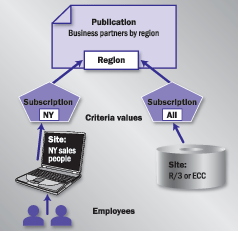
Figure 1
SAP CRM uses data maintained by the Administration Console to determine who needs what CRM data
Ned Falk
Ned Falk is a senior education consultant at SAP. In prior positions, he implemented many ERP solutions, including SAP R/3. While at SAP, he initially focused on logistics. Now he focuses on SAP HANA, SAP BW (formerly SAP NetWeaver BW), SAP CRM, and the integration of SAP BW and SAP BusinessObjects tools. You can meet him in person when he teaches SAP HANA, SAP BW, or SAP CRM classes from the Atlanta SAP office, or in a virtual training class over the web. If you need an SAP education plan for SAP HANA, SAP BW, BusinessObjects, or SAP CRM, you may contact Ned via email.
You may contact the author at ned.falk@sap.com.
If you have comments about this article or publication, or would like to submit an article idea, please contact the editor.



 Premium