Do the contribution margins for your products and customers reflect the actual costs of the goods sold? Learn how to use a little-known functionality in the material ledger to create an actual cost component split for each product and then transfer this split into Profitability Analysis (CO-PA).
Key Concept
Product Cost Planning (CO-PC-PCP) and Actual Costing (CO-PC-ACT) use the cost component split, one of the most important elements in Product Costing (CO-PC) customizing. Comprised of up to 40 cost components such as raw materials, freight costs, setup costs, labor costs, external processing, and material overhead, it is the same for all materials in a plant. Each cost component represents a group of cost elements, such as raw materials and activity costs, but a cost component split can include separate cost components for each purchasing condition (such as freight, duty, insurance, and activity type).
Do you calculate contribution margins based on standard costs and variances, or do your contribution margins reflect the actual costs to procure and manufacture the goods sold? Multilevel actual costing has been around since R/3 Release 4.5, yet many companies have yet to update Profitability Analysis (CO-PA) to reflect the changes.
In my last article, "Include Actual Costs in COGS with Material Ledger in Release 4.7," I showed you how to use the material ledger (CO-PC-ACT) to roll price differences through all levels of production so that the cost of goods sold (COGS) figure reported in FI would reflect the actual costs incurred in purchasing and production. In this article, I'll show you how to use Product Costing (CO-PC) to break down the COGS figure into its cost components and then transfer these figures into CO-PA.
In my last article, "Include Actual Costs in COGS with Material Ledger in Release 4.7," in the March 2005 issue, I showed you how to use the material ledger (CO-PC-ACT) to roll price differences through all levels of production so that the cost of goods sold (COGS) figure reported in FI would reflect the actual costs incurred in purchasing and production. In this article, I'll show you how to use Product Costing (CO-PC) to break down the COGS figure into its cost components and then transfer these figures into CO-PA.
Let's start with the typical postings in CO-PA when R/3 creates a sales order (document type A) or an invoice (document type F). In both cases, the valuation function in CO-PA pulls the standard cost estimate for the material sold from Product Cost Planning (CO-PC-PCP). This cost estimate uses the bill of material (BOM) and routing for the material to calculate the cost of goods manufactured for each material in the BOM and assigns the associated costs to product cost components.
R/3 maps these cost components to value fields in CO-PA so that it can adjust the contribution margins to reflect the raw material costs and the fixed and variable parts of the activity and overhead costs. Everything happens in real time as the system receives postings for sales orders and invoices. At the end of the period, CO-PA settles any price differences incurred for the associated production orders as variances.
It is the job of the material ledger to untangle these variances. As the goods movements are posted in purchasing and production, an additional set of tables collects variances for each material. You can view the contents of these tables at any time by calling up Material Price Analysis either from the Information System in the material ledger (Figure 1) or from the accounting view of the material master (transaction MM03).
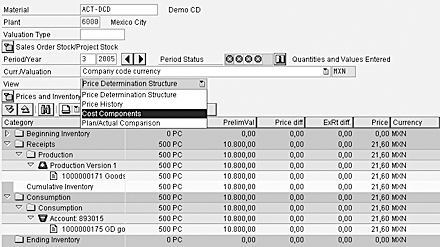
Figure 1
Material price analysis
At the end of the period, a costing run calculates the variances for each material and procurement alternative and then applies them either to the goods in stock or to the goods consumed in the next manufacturing level. This process rolls the variances through the production structure to the finished product in a way that mirrors the multilevel process in Product Cost Planning.
If you activate the actual cost component split (available from Release 4.6C), R/3 calculates the actual costs not just as a total price for each material and procurement alternative, but also as the same cost components used in Product Cost Planning. In other words, instead of using order settlement to assign the production variances to CO-PA, you can use the costing run to assign the variances to the relevant materials and then transfer the newly calculated cost components into CO-PA. Figure 2 illustrates the value flow.
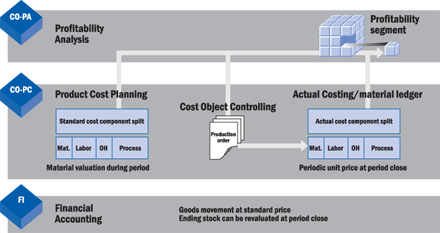
Figure 2
Value flow between CO-PC and CO-PA
Note
Most sites use cost component groups for reporting purposes. The cost component controls how the product costs are used in all subsequent applications. Flags control whether the cost component can be rolled up into the next production level or whether (as might be the case for sales overhead) it should not be rolled through the structure. For inventory valuation, R/3 flags each component as part of the standard price, part of the tax price, etc.
Now I'll walk you through the customizing steps needed for each stage of the process and show you the effect of the settings on the material price and on the contribution margins. For the purposes of this article, I'll assume that your site is already using a product cost component split for the standard costs. To find out how to configure the cost components, follow the IMG menu path Controlling>Product Cost Controlling>Product Cost Planning>Basic Settings for Material Costing>Define Cost Component Structure.
Activate the Cost Component Split in the Material Ledger
To activate the cost component split for actual costing, choose menu path Controlling>Product Cost Controlling>Actual Costing/Material Ledger>Actual Costing>Activate Actual Cost Component Split in the IMG and set the flag ActCstCmpSplt Active for each Valuation area (plant), as shown in Figure 3.
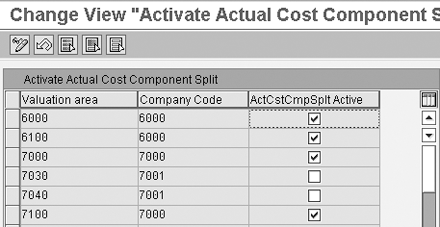
Figure 3
Figure 3 Activate the actual cost component split in the material ledger
If you activate the cost component split, then R/3 automatically assigns the costs to the appropriate cost components as it writes each of the goods movements to the material ledger and when the variances are rolled through the structure during the costing run at period close. This means that you can display the cost component split for each material at any time by choosing Accounting>Controlling>Product Cost Controlling>Actual Costing/Material Ledger>Information System>Detailed Reports>Material Price Analysis and selecting the view Cost Components, as shown in Figure 1.
Figure 4 shows the product cost components Material Components, Production Labor/Setup, Production Machines, and Logistics Processes. You can see the other cost components, Material Overhead and Other Costs, by scrolling to the right. This is known as the main cost component split and is the one used for inventory valuation.
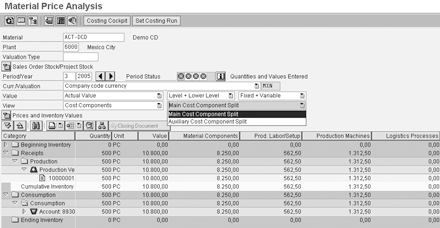
Figure 4
Main cost component split for material price
You can actually use the material ledger to create two cost component splits (the main cost component split, shown in Figure 4, and the auxiliary cost component split, also known as the primary cost component split) and transfer both of them into CO-PA. If you are interested in finding out more about the auxiliary cost component split, refer to my article, "Use the Primary Cost Component Split to Explain the Factors Behind Your Activity Rates," in the April 2003 issue of FI/CO Expert. I'll return to the auxiliary cost component split when I map the cost components to CO-PA.
Map the Cost Component Split to the Value Fields
Now I'll show you how to transfer the cost component split to CO-PA. I'll assume that you already have an operating concern that contains the appropriate value fields for the product costs and a valuation strategy to populate these fields for the standard cost estimate. If this is not the case, you'll find all the steps you need to set up the transfer under Controlling>Profitability Analysis>Master Data>Valuation>Valuation Strategies>SetUp Valuation Using Material Cost Estimate in the IMG.
To create the costing key for this transfer, choose menu path Controlling>Profitability Analysis>Master Data>Valuation>SetUp Valuation Using Material Cost Estimate>Define Access to Actual Costing/Material Ledger. Create the key shown in Figure 5.
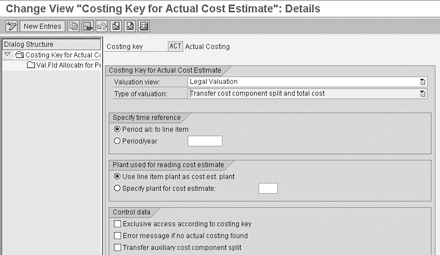
Figure 5
Define the costing key in CO-PA
To assign the costing key to the material types for which you expect to include sales orders in CO-PA, follow the menu path Controlling>Profitability Analysis Master Data>Valuation>SetUp Valuation Using Material Cost Estimate>Assign Costing Keys to Material Types and enter your Operating concern (Figure 6). If you have already mapped the cost components from the standard cost estimate into CO-PA, you'll find entries here for the real-time valuation (point of valuation 01) that takes place when the sales orders (documents of record type A) and invoices (documents of record type F) are posted.
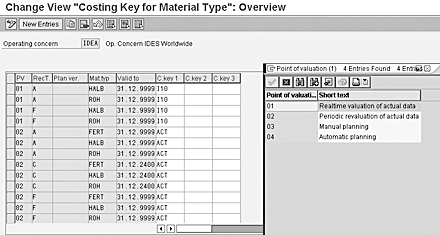
Figure 6
Assign the costing key in CO-PA
Duplicate the entries for PV 01 (real-time valuation of actual data) for PV 02 (periodic valuation of actual data) as shown in Figure 6. In my example, the system transfers documents of record type C (order/project settlement) into CO-PA. Because your order variances are now settling via the actual cost component split, you only need this entry if you are settling orders not captured by the material ledger (such as research and development projects or marketing orders) to CO-PA.
If you are using the auxiliary cost component split (also known as the primary cost component split), you can transfer the actual costs to CO-PA by setting the flag Transfer auxiliary cost component split in Figure 5. If you do this, remember to map both sets of cost components to the value field names shown in Figure 7. You can see the auxiliary cost component split screen containing the components Material Components, Wages and Salaries, Employee Benefits, Depreciation, and External Services in Figure 8.
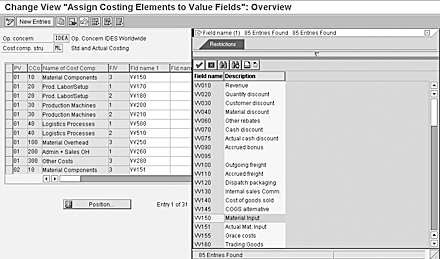
Figure 7
Assign costing elements to value fields in CO-PA
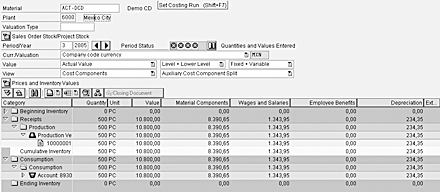
Figure 8
Auxiliary cost component split for material price
Now you need to map your cost components to the value fields for the product costs in CO-PA. Choose menu path Controlling>Profitability Analysis>Master Data>Valuation>SetUp Valuation Using Material Cost Estimate>Assign Value Fields and enter the operating concern and the cost component structure you are using for Product Costing, and map each cost component to the relevant value field. Use the F/V column to distinguish between fixed costs, variable costs, and full costs, as shown in Figure 7. You are now ready to transfer the actual cost component split to CO-PA.
When the costing run is completed in the material ledger, you need to include transaction KE27 in your period close procedures. To access this in the menu, follow menu path Accounting>Controlling>Profitability Analysis>Actual Postings>Period-End Closing>Periodic Adjustments>Periodic Valuation and set the flag for Periodic Valuation, as shown in Figure 9.
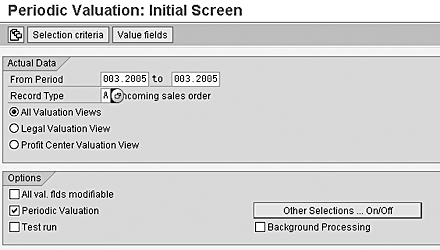
Figure 9
Transferring the cost component split to CO-PA
Contribution Margin Reports
You should now revisit the contribution margin reports in CO-PA (or in SAP Business Information Warehouse if you run your profitability reports there) to make sure that all relevant value fields are included in the reports. A sample report that calculated the contribution margins based on the planned and actual cost components is shown in Figure 10.
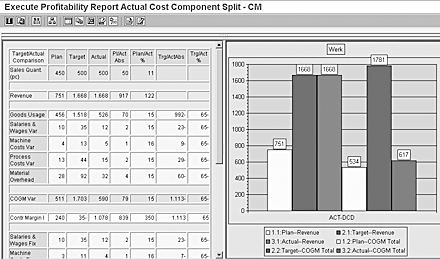
Figure 10
Profitability report
Figure 10 displays the value fields Goods Usage, Salaries & Wages, Machine Costs, Process Costs, and Material Overhead. The figures in the Actual column were determined by accessing the actual cost component split shown in Figure 4 and adjusting the figures to reflect the quantity of goods sold. As you can see, the report does not refer to variance categories but instead shows the variances assigned to meaningful value fields, providing improved decision support for these key expenses.
Janet Salmon
Janet Salmon joined SAP in 1992. After six months of training on R/2, she began work as a translator, becoming a technical writer for the Product Costing area in 1993. As English speakers with a grasp of German costing methodologies were rare in the early 1990s, she began to hold classes and became a product manager for the Product Costing area in 1996, helping numerous international organizations set up Product Costing. More recently, she has worked on CO content for SAP NetWeaver Business Warehouse, Financial Analytics, and role-based portals. She is currently chief product owner for management accounting. She lives in Speyer, Germany, with her husband and two children.
You may contact the author at janet.dorothy.salmon@sap.com.
If you have comments about this article or publication, or would like to submit an article idea, please contact the editor.




 Premium