Your cutoff for transactions at close may be affected if you don't understand the relationship between the Materials Management (MM) period close and the FI period close. You can configure your R/3 system to ensure a clean cutoff for MM transactions at period close.
Key Concept
The posting of MM balances to an MM period is dependent on the fixed time of the MM period roll, while the posting of a FI document to a FI period is dependent on the posting date, which is derived from a user's default time zone.
A key period-end activity is determining stock balances and ensuring a clean cutoff for transactions posted in the old period and the new period. Stock balances are primarily controlled in the Materials Management (MM) module, but have a significant impact on the FI balance sheet. Often I am asked what the link is between the MM period close and the FI period close, how they impact each other, and what to do to ensure a clean cutoff of MM transactions at month-end.
Companies with plants in multiple time zones have extra considerations for a clean cutoff. Under US Generally Accepted Accounting Principles (GAAP), the cutoff for transactions at any location is midnight local time, not midnight of the SAP system time. For a clean cutoff, you need to prevent posting of MM documents to the closed period after the cutoff. Many people are unaware that this is possible in R/3. I will show how to prevent this and give an example in which using MM and Warehouse Management (WM) can add to the problem.
I will explain the inter-relationship between the MM and FI period close, what the MM period close does, and, more important, what the MM period close does not do. Finally, I will show you a scenario in which the MM period close can cause problems when you try to reconcile prior period MM balances to the FI balance sheet. Understanding this is critical if you have to reconcile MM period balances to the FI balance sheet.
As I have stated in previous articles, when setting up interfaces such as period close, the FI and logistics teams need to work together closely. The FI team needs to educate the logistics team on the financial impact of its transactions and configuration.
MM Period Close
What does the MM period close do? You perform the MM period change with transaction MMPV, which is the same as ABAP RMMMPERI. You can only post MM documents to the current and prior fiscal period as defined by the MM period change (Figure 1).

Figure 1
This error message shows which posting periods are open for MM transactions
The current and prior period values are stored in transaction OMSY, table MARV, by company code (Figure 2). Later on I will show you how to restrict MM postings to the current period only. The MM period close used to be quite time consuming, but runs quickly after R/3 Release 4.5A. See the sidebar, "Revise Batch Jobs," for more detail.
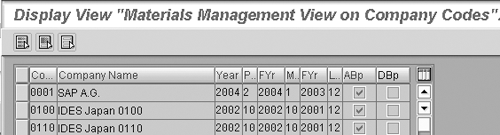
Figure 2
Transaction OMSY, table MARV, contains MM period settings by company code
Understanding what MM period close does not do is actually more important than knowing what an MM period close does. The FI posting date for the FI document related to a MM document is not controlled by the MM period close. Just because the MM period has changed, the related FI documents do not post to a new fiscal period automatically. In practice this may be what appears to happen, but the detail is more complex. The posting date is selected based on the user's default time zone (Figure 3). After midnight on the last day of the period, user's local time, any MM transactions posted by a user automatically default to a new posting date and post to the new period in FI.
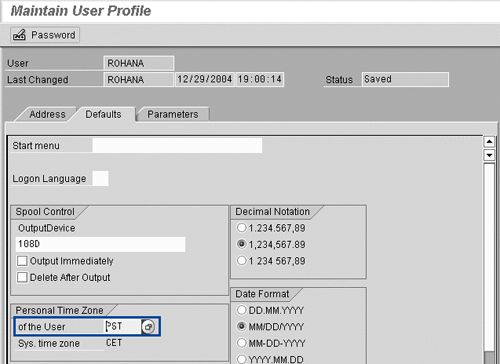
The impact of the user time zone applies equally to regular FI postings with transaction FB01. To test this out, change your default time zone via transaction SU3, save the change, log off and log on to R/3, and then call up transaction FB01. You will see that the default posting date changes. Try the values UTC+12 and UTC-12, which are at the extremes of the time zone scales.
You can see that since the MM period close is performed using transaction MMPV and is done once per company code, it affects all plants at the same time regardless of their local time zone. In the case of the matching FI postings, the fiscal period is selected based on the user's default time zone, which may vary from plant to plant. This is where the disconnect occurs between the way MM and FI determine in which period a transactions falls. In the case of a company in the US with a plant in New York and a head office in Los Angeles, the disconnect lasts for a three-hour window. If no MM transactions occur during this period, there is no problem. However, many companies have continuous operations at plants or have late-night shipping as close approaches, which results in MM transactions falling into the window of inconsistent MM and FI period determination.
Consider the case of the US company with headquarters in Los Angeles (PST) and a warehouse in New York (EST). Getting a clean MM cutoff can be difficult if the warehouse has 24-hour operations. According to US GAAP, the cutoff for the period is at midnight local time for each plant, not midnight system time. This is three hours earlier in New York than in Los Angeles. For the FI cutoff this is not an issue because each user is set up with the correct local time zone. For the MM cutoff this is a problem because the period change can occur only once for the whole company code, and usually it is set to be midnight head office time zone. The MM period close can only be run once per company code, so this is done at the head office at midnight, while individual MM transactions such as a goods receipt or goods are posted using the local time zone of the warehouse.
As shown in Figure 4, any MM postings between midnight and 3 am EST posted in New York go to different MM and FI periods. From a GAAP perspective this is all right, as the transactions posted to the correct FI period. Problems occur if you run any standard SAP MM value reports using the prior period setting. Transactions in the three-hour window won't match to the same MM and FI period (e.g., transaction MB5L, ABAP RM07MBST). If you run it with the current period setting, the report is OK.
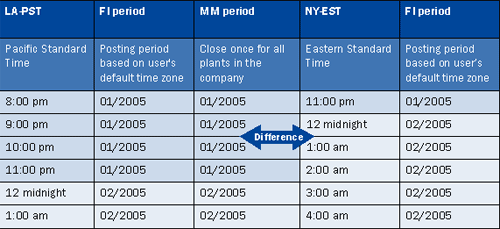
Figure 4
Posting periods for MM transactions made in New York are out of sync with the MM period close for three hours between midnight and 3:00 am EST
As I mentioned, to make sure a clean cutoff is maintained you need to prevent MM users from posting transactions to the prior period. Usually the old FI period is kept open for the first few days of the new period for close adjustments (e.g., elimination entries, overhead allocation).
Note
If you have the material ledger active, then a record of stock balances based on the FI posting period is kept and accurate historic stock balances can be viewed. This is probably not justification in itself to implement the material ledger, but if you already have it implemented, it gives you an alternate source to get accurate stock balances. This is especially useful if your auditors request you to prove your FI- G/L stock balances at the material level.
As long as the prior period stock balance accounts are open for posting, the MM user can backdate the MM posting date to the prior period (Figure 5). To ensure a clean cutoff you may wish to prevent posting MM transactions to prior periods. In transaction OMSY set the DBp flag to disallow back-posting after a change of period (Figure 2). MM postings can only occur for the current fiscal period. The full effect of this setting change only occurs after the next MM period change. The user cannot post to the closed MM period (Figure 6).

Figure 5
The user can manually adjust the MM posting date
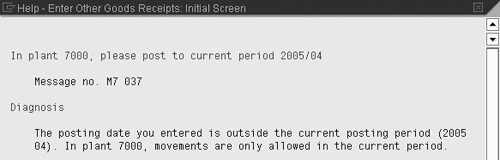
Figure 6
Only a single MM period is open after setting DBp flag in OMSY
Note one caution with making this configuration change. If you have plants in multiple time zones and the MM period close happens prior to midnight at the plant in the last time zone (the plant that gets to midnight last), then the plants operating after the MM period close will not be able to post to the correct period. In the case of the example of a plant in New York and head office in Los Angeles, this is a good solution because the MM period close is at midnight PST after New York has moved to the new period. If the locations were reversed with the head office in New York and plant in Los Angeles, setting the single period flag would not be a good idea because the MM period close would be set at midnight EST in New York, which is three hours before Los Angeles moves into the new period. Therefore, any MM transactions in Los Angeles between 9 pm and midnight PST would have to post to the new period, which does not comply with US GAAP.
It may not seem that MM users would deliberately backdate postings such as a goods receipt, so I want to show you a problem that I have come across at sites that have implemented MM-WM. In the case in which MM-WM is implemented, the post goods issue (PGI) date of an MM document is the creation date of the WM transfer order. In the case of a company with a period end on Sunday, the transfer order is created late on Friday. The warehouse staff goes home for the weekend and completes picking and the PGI creation date is Monday, the new period. The posting date of the MM document will be Friday in the old period.
Now let me show you an example (Figure 7).
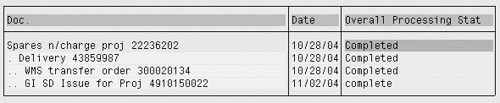
Figure 7
SD document flow for delivery with WM transfer order created in one period and the MM PGI created in the next period
In this case, the posting date of the MM document has been copied from the transfer order (Figure 8), so the corresponding FI document is posted incorrectly to P10/2004 instead of P11/2004 when the actual delivery took place.
Document/process
|
Day
|
Date
|
Fiscal period
|
Sales order creation
|
Thursday
|
10/28/2004
|
P10/2004
|
Delivery creation
|
Thursday
|
10/28/2004
|
P10/2004
|
WM transfer order creation
|
Thursday
|
10/28/2004
|
P10/2004
|
Period end
|
Sunday
|
10/31/2004
|
P10/2004
|
MM PGI creation
|
Tuesday
|
11/02/2004
|
P11/2004
|
This results in an incorrect cutoff, as the COS is posted to P10/2004 when the delivery actually took place in P11/2004 (Figures 9 and 10). This is possible because the normal MM period close allows posting to the prior MM period and the FI-G/L accounts are kept open for posting during the first few days of the new period for period close postings.

Figure 9
MM PGI document header shows document creation in P11, 11/02/2004, but the posting is in P10, 10/28/2004

Figure 10
FI posting for MM PGI document showing posting to P10/2004 even when the MM PGI document was created in P11/2004
At most companies it is common to keep the fiscal period open a few days after the actual end date of the period to allow posting of month-end adjustment entries (e.g., accruals, settlement, allocation). To avoid this type of error you can set MM period close to allow only posting to the current period.
Revise Batch Jobs
If you set up your MM period change batch jobs when you first went live with SAP, review the timing of these jobs as the period change now takes only a few seconds. In previous versions of SAP the period close could take several hours and batch jobs were timed for this. After R/3 Release 4.5A, you can easily run the job at exactly midnight to get an accurate cutoff. The batch job will be for ABAP RMMMPERI. See SAP note 171465 for more details.
When setting up the batch job choose the Close period only option (Figure 1). The Check and close period option takes a long time to run. It is best to run the check period option a few days before your actual month-end to detect errors in MM postings and give you time to clean up.
Figure 1
This error message shows which posting periods are open for MM transactions

Rohana Gunawardena
Rohana Gunawardena heads the SAP practice division at Exium Inc. Exium is a leading business and technology consulting firm that enables companies to achieve their strategic business goals. Exium specializes in delivering superior IT solutions using ERP systems, with a special focus on SAP products. Rohana has been working with SAP since 1992. During his career he has assisted multiple clients on detailed system correction projects, such as correcting inventory balances, controlling area reorganizations, retrospectively activating group currency, and optimizing inter-company accounting transactions. He has spoken at many SAP conferences and has published more than 20 articles in Financials Expert, SCM Expert, and SAPtips on various aspects of SAP. His presentations have focused on Financials module selection, the order-to-cash process, global rollouts, business segment reporting, cross-module integration, and the financial impact of SCM transactions. Rohana is widely acknowledged as a leading SAP expert. Rohana is a Fellow of the Institute of Chartered Accountants in England & Wales. Previously Rohana has worked with the consulting practices of Accenture, Deloitte, and PwC.
Rohana will be presenting at the upcoming SAPinsider Financials 2018 conference October 16-18 in Prague. For information on the event, click
here.
You may contact the author at Rohana@Exium.com .
If you have comments about this article or publication, or would like to submit an article idea, please contact the editor.


 Premium