Learn how to use standard SAP payroll functionality to automate your business policies on the basis of monthly payroll periods.
Key Concept
Restricting execution of personnel calculation rules based on payroll periods is made easy by using standard SAP payroll operations. By employing this methodology, you can automate business policies based on payroll period constraints.
SAP payroll systems can perform period-based evaluations (i.e., on the basis of payroll periods). HR payroll departments are being asked to adapt to new business rules — such as policy changes in a country’s statutory regulations or internal departmental changes — while at the same time ensuring legal compliance. For example, changes to payroll processing logic could require a certain allowance or deduction or any kind of evaluation to be processed on the basis of payroll periods.
I show you how to handle these complex payroll processes and stay in compliance with current legal regulations through standard payroll operations. Before going into detail, however, I discuss some basics that you need to understand.
Payroll Accounting Area
A payroll accounting area is a logical group in the SAP payroll system that contains all the employees for whom the payroll runs at a certain time. The payroll accounting area also defines the frequency with which employees are paid. The parameter period determines how often payroll is run for a payroll accounting area. Each payroll accounting area is assigned one period parameter. Examples of standard parameter values are monthly, weekly, and biweekly.
Payroll Period
Payroll periods, on the other hand, are defined for each period parameter against every calendar year. Each period is numbered in ascending order, beginning with 01. In the case of salaried employees, these periods are usually months (i.e., January is payroll period 01, and May is payroll period 05). However, when a period parameter is weekly, then the total number of payroll periods depends on the total number of days in the current year. Using this method can result in a fluctuation in the number of days paid per payroll period. For example, there are usually 52 weekly payroll periods in a year. If you apply a similar technique in the case of a biweekly period parameter as you would use for monthly payroll, the result is a different total number of payroll periods (i.e., for bimonthly payroll there are usually 26 periods in a calendar year).
Key field PABRP in table V_T549Q determines the payroll period against each payroll accounting area. To demonstrate this payroll method, I use an example of a salaried employee who is paid monthly.
Every new employee hired in the system, in addition to entering other mandatory payroll infotype data, is assigned a specific payroll accounting area in organizational assignment infotype 0001. This assignment determines the frequency of payroll processing for an employee. In my example for a salaried employee whose payroll periods are monthly (i.e., starting from January and going through December), there are 12 payroll periods, for which January is 01 and December is 12.
In addition to recurring payments entered in basic pay infotype 0008, HR payroll teams sometimes need special payroll allowances that are to be paid at specific payroll periods. An example of this would be a Christmas bonus, which is usually paid in the month of December. To achieve this special payment, I show how you can implement this automation in your payroll by using Personnel Calculation Rules (PCRs) and also show you how to restrict this processing to specific religions. Before going any further, here is a quick overview of some important aspects of payroll processing.
Note
Users do not need an in-depth knowledge of payroll to apply this knowledge in their SAP system. I cover the basics of SAP payroll in a way that provides a good understanding of SAP schemas and rules. You can use this knowledge to implement payroll period-based payments or deductions and also religion-dependent restrictions in the SAP payroll system efficiently. For more detailed information about this topic, refer to my SAPexperts article “
Using Personal Data Fields to Calculate Payroll Decisions.” All examples are taken from an SAP ERP Central Component (SAP ECC) 6.0 system with enhancement package 4. I have used standard operations and functions that are compatible with both SAP ECC 6.0 enhancement packages 4 and 5. All functions and operations used in this article are country independent. The article is intended for both functional and technical users.
Disclaimer
Although it is against the law to base payment on religion in the US and many other countries, in some countries it is perfectly legal to do so. Some companies give bonuses based on religion, such as a Christmas bonus. Examples of other such allowances are Eid bonuses (for Muslims) and Dewali bonuses (for Hindus). Before setting up any payments based on religion, gender, or age, check the specific laws regarding the legality of these types of payments for the country in which you are setting up the system.
Payroll Processing Overview
SAP payroll schemas and PCRs provide the processing logic for payroll systems. You can use these schemas and PCRs to enforce business rules in payroll, thus increasing process consistency and payroll quality.
There can be several stages of configuration in the SAP system (i.e., table and wage type control through configuration) to manage wage types during the payroll calculation process. The configuration is generally an easy and an efficient option, but if for some reason this option does not work, you can use ABAP customization.
For payroll processing, SAP provides a payroll schema. A group of functions is put together in a specific order, with each function passing its result to the subsequent step. The functions provide logic for payroll calculations, such as importing time results, gross calculation, and calculation of taxes. Several functions are available in the system, some of which are country specific. Functions may require parameters to be set in the schema, and they may allow users to read infotypes, process rules, and process payroll internal tables. Functions ACTIO, PIT, PORT, and P0014 are a few examples. In transaction code PE04 you can see the ABAP code associated with every function. Consequently, transaction code PE04 enables you to make custom functions with ABAP forms starting with fu.
On the other hand, PCRs are a collection of operations generally used to manipulate the wage type fields, such as AMT (amount), RTE (rate), and NUM (number). Some operations are used to retrieve specific data from an employee’s master data based on which you can make your own decision flows. OUTWP, VAKEY, and ADDWT are a few examples of SAP payroll system operations. In transaction code PE04 you can see the ABAP code associated with every operation, so custom operations can also be made with ABAP forms starting with op.
Documentation for functions and operations can be found via transaction codes PDSY or PE04. You can also read more about them in Steve Bogner’s article, “Understand Payroll Wage Type Processing: Payroll Schema and Rule Basics.”
Querying Payroll Periods in Payroll: Method 1
Organizational assignment infotype 0001 is one of the mandatory infotypes that needs to be maintained in the SAP HR system for every employee hired. This infotype also includes payroll areas for each employee, which determines the frequency of his or her payroll run. As discussed earlier, payroll areas are assigned with their specific period parameters (i.e., monthly, weekly, and biweekly). In my example, I execute the payroll of an employee with payroll area Z1, with the period parameter and frequency of payroll run as monthly.
In Figure 1 I use a simple parameter that puts the value of the payroll period in the number field, which can then be used to compare this value against a given payroll period by the user. This method for a payroll period query is the first of two I show you.
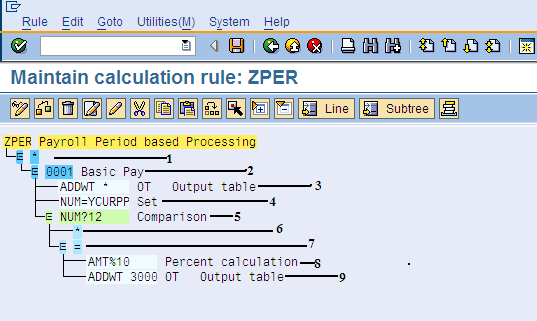
Figure 1
Parameter for querying payroll periods (method 1)
Step 1. I use an asterisk that determines that the PCR is written for all employee subgroupings (e.g., hourly wage earners, piece workers, and salaried employees). You can restrict this grouping based on user requirements.
Step 2. Here 0001 is the wage type for basic pay allowance for which this PCR is applicable. You can also use an asterisk if it is required for all wage types that lie within the employee subgrouping for PCRs defined in step 1. This grouping is based entirely on user requirements.
Step 3. The ADDWT * operation simply adds the 0001 wage type to the internal table OT because you do not want to change this wage type.
Step 4. The defined parameter YCURPP puts the value of the current payroll period in NUM (i.e., number 12 in the number field wage type). Again, if the payroll period frequency is weekly, then the parameter YCURPP would have put different a number in the number field of the wage type.
Step 5. The operation NUM?12 compares the value of number field with the given number (12 in my example).
Step 6. When there is a payroll period other than 12, the processing is skipped.
Step 7. If the value in the NUM field is 12, the logic is executed.
Step 8. Enter 10% in the AMT field. This parameter multiplies the value in the amount field — in this case, by 10 percent. In my example, I multiply the basic pay wage type amount by 10 percent, but the end user case may be different. This is just an example of a technique for comparing payroll periods. Using this as an example, you can extend the rule based on your requirement.
Step 9. Through operation ADDWT3000, the resultant value (i.e., the amount of basic pay wage type * 12) is added to wage type 3000 (i.e., in this case, the Christmas bonus amount).
After you are done writing the PCRs, the next step is to analyze where in the payroll schema your PCRs are to be placed. I place my PCRs in the sub-schema of gross time evaluation (Figure 2); you can put your PCRs where you require them.
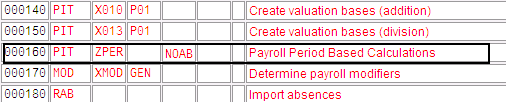
Figure 2
PCR placement in the payroll schema
In Figure 2 I use parameter NOAB because I want it to be executed for all employee subgroups. The definition of these parameters is based completely on your requirements.
Querying Payroll Periods in Payroll: Method 2
In Figure 3 I show a second technique for querying payroll periods using operation CMPER. Operation CMPER compares the given period number by the current payroll period.
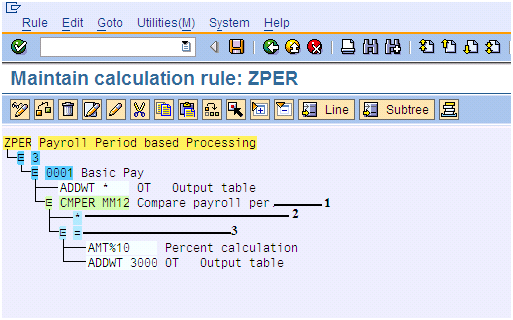
Figure 3
PCR for querying payroll periods (method 2)
Step 1. Instead of using operation NUM as in step 5 of the previous method 1 with a specific parameter, I use operation CMPER with multiple variants. I compare the current payroll run with 12 (i.e., December). Thus, this logic always runs on the December payroll or else nothing is required. If users require any other scenario (i.e., if the month is not 12), they can extend the PCRs’ logic as needed.
Operation CMPER is used to compare payroll periods with different variants. The periods used in the comparison are the in period (current period for which payroll is being run) with the specific period mentioned (i.e., 12). After you get the results of this comparison, you can then decide what to do in the different what-if cases. Examples of different what-if results are: > (what-if the resultant value is greater than 12), < (what-if the resultant value is less than 12), = (what-if the resultant value is equal to 12), or * (what-if no case matches).
Step 2. This step represents the else case in which the current payroll period is a period other than period 12 (i.e., a month other than December, in my example).
Step 3. This value determines the equal-to case when the current period is 12 (December). The logic defined below in the next section is executed once the condition is met.
Documentation for this operation can be found via transaction code PDSY or PE04.
Religion-Based Decisions in Payroll
In some cases you need to further restrict rules to meet the business requirements — for example, based on an employee’s religion. In the SAP system, religion is maintained in personal data infotype 0002 against each employee. I now show you how to query the religion in the SAP payroll system and then restrict the same calculation (as in method 2, above) based on religion.
In my example, the company’s business policy is to grant a Christmas bonus
only to employees who are classified as Old Catholic employees. In this case, during payroll processing, I require the SAP payroll system to query every employee’s religion. When the system locates any employee with Old Catholic religion in his or her personal data infotype 0002, then the SAP payroll system proceeds to execute business logic as in Figure 4.
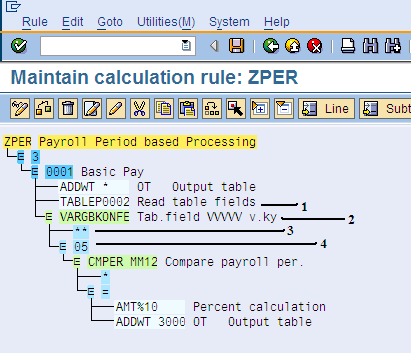
Figure 4
PCR for querying religion and then payroll
Step 1. Operation TABLEP0002 prepares access to the database table that contains the dictionary fields for SAP structure P0002.
Step 2. Using the operation VARGB, you can move the two-character fields read by the operation TABLE into the variable key. This operation works in combination with the operation TABLE and uses the data fields in the table mentioned (provided that the table is an ATAB table; to learn more about this table, consult your ABAP specialist). For religion-based evaluations use the data field KONFE.
Technically speaking, decision operation VARGBKONFE accesses table V_T516T and bases its decision on the KONFE data field (Figure 5). You can access this table through transaction code SM30.
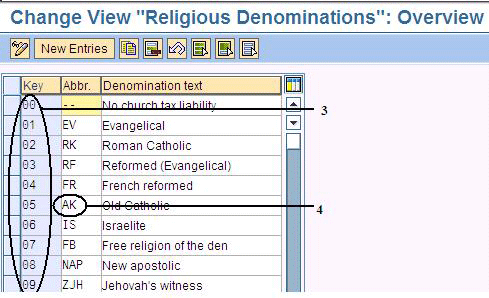
Figure 5
The SAP payroll system table for different religious denominations
Step 3. The Key column is a two-character data field with KONFE as its technical name.
Step 4. The Abbr. column is used to define abbreviations against every key field of this table. In infotype 0002, these abbreviations are displayed upon activation of the key field in the Customize Local Layout screen.
Step 5. Using operation VARGB along with data field KONFE automatically opens a sublevel in which you can enter the value keys on which your PCR’s execution is based. Data field KONFE is a two-character field. In this step ** represents the else case. Under this value key you can write your payroll logic.
Step 6. Based on the previously defined parameters, the payroll system queries the infotype 0002 religion data field and, if the employee’s religion is selected as Old Catholic (i.e., key field KONFE 05), then only the underlying PCR’s logic is executed (i.e., a calculation of 10 percent of basic pay amount for a Christmas bonus). Because there is no option for Christian in the standard SAP Payroll system’s religious denominations table, I use Old Catholic in infotype 0002 as the religion option for the employee. You can also create any new line item (i.e., create a new religion option) in this table and base your PCR on that.
Payroll Log
In the payroll log in Figure 6, the parameter VARGB has queried the personal data infotype 0002 data field KONFE and returned a 05 value key (circled). Based on this query, the system takes the next step. In this case, the current payroll period is queried and compared with 12 (December) and when the equal-to condition is met, the payroll system adds 10 percent to the basic pay amount in wage type 3000 (Christmas bonus), as displayed in the output for Table IT.
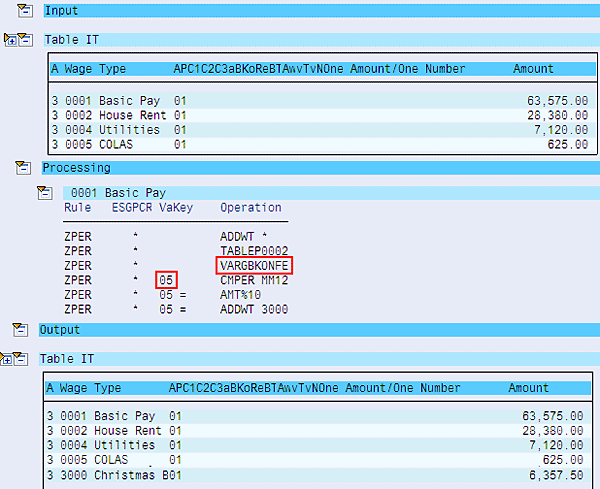
Figure 6
The payroll log
Irfan Malik
(Muhammad) Irfan Malik is a senior managing consultant at IBM Global Business Services in Pakistan and has been working as an SAP HR consultant for many years. He has consulted for various global, public, and private companies on their SAP HR core modules including Payroll and Time Management implementations.
You may contact the author at irfanmalik_sap@yahoo.com.
If you have comments about this article or publication, or would like to submit an article idea, please contact the editor.



 Premium