Gain an overview of SAP Records Management System (SAP RMS). Evaluate how SAP RMS can improve and streamline your supply chain documents and processes.
Key Concept
SAP Records Management System (SAP RMS) provides a central point of access to all documents needed and used within a business process. Instead of paper records, SAP RMS provides electronic records to end users and manages them in a comprehensive manner. SAP RMS uses a workflow to classify and represent all instances of a record in a single view. For example, you can quickly track and analyze every business decision, transaction, report, process, and sales order that relates to a record. SAP RMS can employ other SAP modules and non-SAP systems to display supporting documentation hierarchies and it is especially useful during audits.
Today’s companies struggle to meet evolving information management requirements due to disparate
systems and further government regulations. The need to manage more than just documents is becoming increasingly
prevalent across all industries. Information is developing in content and context, which compounds the demand for fast
access to records, business decisions, and activity history. To ensure you present the entire business picture, a
document management system must link records to related data and business processes.
A document management system should also be efficient. Users need to standardize and automate processes whenever
possible, although this is a tough challenge when you are working with legacy systems and a variety of data formats.
You can solve these dilemmas, comply with audits, and improve your document management with SAP Records
Management System (SAP RMS). You can use SAP RMS in R/3 4.6C if you also have SAP NetWeaver 7.0. As of R/3 4.7, SAP RMS
is integrated into the SAP NetWeaver Application Server. In this article, I’ll provide an introduction to SAP
RMS; walk you through the landscape, features, and functions of SAP RMS; describe the life cycle of a typical SAP RMS
implementation project; and examine how suppliers can benefit from SAP RMS. SAP RMS typically supports the following
types of information.
- Digital documents
–Scanned documents, which are stored securely, with retrieval support
–Create and change documents in the SAP system
–ArchiveLink documents, document info records, and interactive forms
- Digital records
–Put arbitrary information objects together (e.g., business objects, documents, and processes)
–Form a structure according to the business process
–Document business processes ensuring legal compliance
- Digital cases
–Actively process tasks
–Improve the foundation for decisions
Refer to the sidebar, “Extending RMS Functionality — The Service Provider Framework,”
for more information about integrating SAP RMS with your legacy systems.
An Overview of SAP RMS
SAP RMS links your SAP system to SAP Document Management System (SAP DMS), ArchiveLink, or any other
external document management system. In addition to documents, SAP RMS supports SAP business objects (e.g., sales
orders, material masters, transactions, and workflows) and non-SAP objects, such as those created in third-party
applications. SAP RMS allows you to define and build structured electronic records. An electronic record is a
structured summary of the information objects within a business process presented in a unified view.
SAP RMS consists of creating the electronic record and defining its elements and structure. Case
management adds the record to a case, in which it becomes a case record. You manage the case record, its metadata, and
its elements through an operation (also known as a life cycle).
Electronic records are composed of elements, such as workflows, business objects, transactions,
correspondences, and supporting metadata. You can manage the elements contained in a case record’s electronic
record through the electronic record’s complete life cycle. A case or operation helps manage the specific
business processes supporting a case record.
For example, SAP RMS uses a standard SAP workflow and Webflow to provide support for both structured and
ad-hoc process flows. SAP RMS uses standard SAP components (e.g., Knowledge Provider, ArchiveLink, Knowledge
Management, and Document Finder) with infrastructure components (e.g., the content, cache, and TREX servers). SAP RMS
provides a set of tools that you can use to create, integrate, and manage third-party business processes.
SAP RMS originated to effectively replace paper records with electronic files, in an intuitive and
process-oriented manner. Users can integrate documents, data, and other objects into the business processes that need
and use this information. SAP RMS employs standard SAP configuration settings and a toolbox that contains business
services, which enable you to tailor information to your specific business needs. SAP RMS provides an open architecture
in which you can define and access documents and data, regardless of the host system, without modifying your SAP
system. For example, you can use SAP RMS to:
- Document and control business processes
- Integrate information, processes, and business applications
- Create, organize, retrieve, and report information
- View information based on user roles
Electronic Records
Some of the elements included in an electronic record are as follows.
- Digital documents
- Scanned documents
- Documents created in the SAP system
- ArchiveLink business documents
- SAP DMS documents
- Interactive forms
- Third-party application documents
Digital records combine information objects (e.g., business objects, processes, and transactions), form
structures based on business processes, and document business processes. Digital cases execute tasks within a process
or a case. SAP RMS integrates many different types of information objects into one electronic record, including SAP
objects, transactions, reports, workflows, SAP business documents, emails, Web content, notes, and Microsoft Office
documents, for example.
Once you define and populate the electronic record, you can use the case management functionality to
track it through a life cycle. Examples of case management elements and processes are:
- Supplying business workflow to standardize and automate business processes, improving efficiency and
ease of use
- Real-time process handling
- Floating files, which is a process developed to handle the ad hoc workflow requirements, to support
dynamic approval procedures
- Selecting any element, at either the record or case level, and putting it into circulation
- Supporting functionality for managing ad hoc processes
- Enabling the determination of who is involved in a process and what task they will perform during the
workflow
- Supporting functionality for operations (i.e., cases) to control complex processes that might not
execute in the same way every time
Case Management
Case management deals with handling cases. A case is an operation that contains header data and
elements.
You use a case or operation to manage the specific business processes that support a case record. You
can add and update additional information, such as case notes, process routes, flows, reports (i.e., protocols), and
metadata to the case during the operation. This information is kept relative to the case and remains available for
history and reporting purposes.
RMS Features and Functions
A key feature of SAP RMS is that it only creates references to the objects it manages. This means the
user can still operate on existing systems or plan a long-term move to SAP when the time is right. SAP RMS provides a
central point of access to the different systems and applications within your landscape (Figure 1).
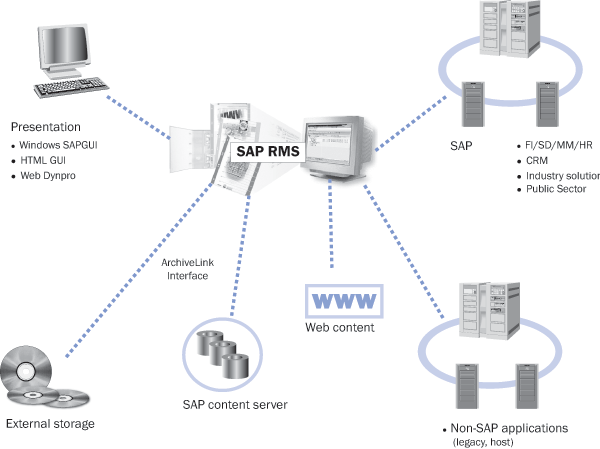
Figure 1
SAP RMS serves as a central point of access for other systems and applications in your landscape
SAP RMS provides a GUI that contains the functionality needed to build record templates. With record
templates, you can create and manage an electronic record. The Records Browser is a general user GUI that provides
access to the different electronic records. Because SAP RMS uses standard SAP security settings, your information is
safe and secure, and no additional security tasks are necessary. The browser supports the concept of roles, which make
it easy to present the right information in the format you want.
Figure 2 illustrates a typical view of the record browser. You can see record or
metadata attributes in the top pane of the browser. Either the user or the SAP system creates and populates the key
attributes you use to define and search for a record during the blueprint phase of your SAP RMS implementation
project. Note the structure and record elements in the lower pane. The structure is defined in the record model and
populated automatically or manually as it moves through its process life cycle. The X symbol indicates
a place-holder for a document, process, or transaction, which is added by a user or through programming in the
blueprint. The blueprint defines which elements should be populated from where and when, based on the business
processes you define and use.
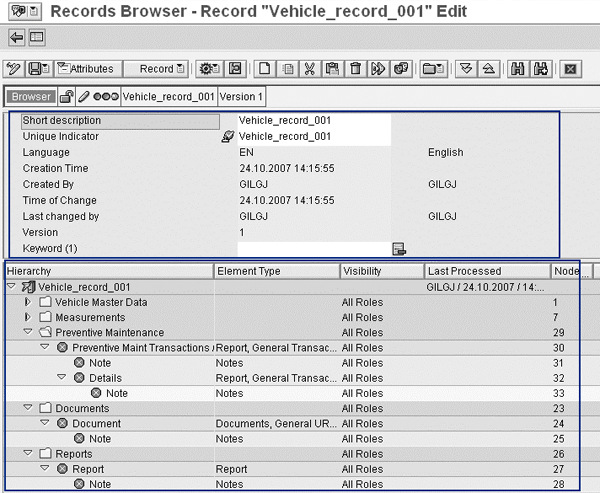
Figure 2
Record browser functionality
SAP RMS Landscape
SAP RMS stores the original documents in the SAP content server so you can use your existing SAP DMS
landscape, which can include cache, print, publishing, and TREX indexing servers. SAP RMS also supports the SAP cache
and TREX indexing functionality (Figure 3).
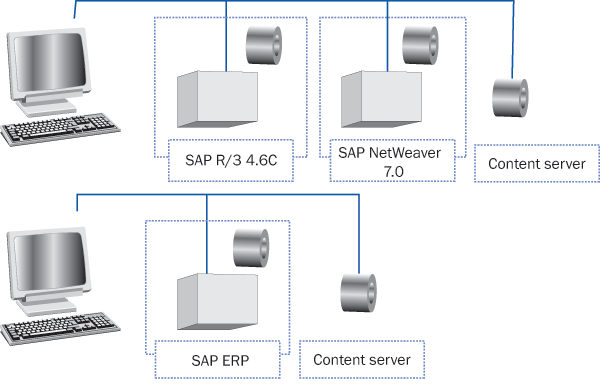
Figure 3
SAP RMS landscape and its relationship to other systems
Note
You can extend SAP RMS functionality to your suppliers with cFolders. Many SAP Project Lifecycle Management users employ cFolders to share data and documents and support design collaboration. By adding a cFolders server to your landscape, you extend the sharing of standard SAP documents stored in SAP DMS.
SAP RMS Architecture
SAP RMS functionality takes advantage of templates. Templates are a collection of element types and
record types. Element types allow the lead SAP RMS user to define and group collections of data (e.g., workflows,
documents, business objects, and transactions) that you commonly use in your business processes today. Your SAP RMS
implementation team defines these elements in the blueprint. This task creates a record model, which contains the
content model for your data (Figure 4). You next define and create the content model for your
different record elements types. Once you complete these steps, you can migrate your existing data and documents into
the electronic files and begin the process of creating and managing electronic records and cases.

Figure 4
Content models and elements combined into the SAP RMS architecture
A Typical SAP RMS Project
SAP RMS projects typically follow SAP’s ASAP methodology (Figure 5). ASAP is a
project management methodology used for many SAP projects. ASAP contain the six phases needed to implement SAP RMS into
an existing customer environment successfully. This includes a project planning phase to ensure the landscape and
resources are in place and ready to start working. A blueprint phase collects customer requirements. A concept and
prototype phase adds or builds the extensions and service providers needed to integrate existing applications. A
realization phase implements and tests the solution. A data and document migration phase builds and tests the migration
processes and populates your production system. Finally, a go-live and support phase ensures your team can support the
new SAP RMS system until they can stand on their own.
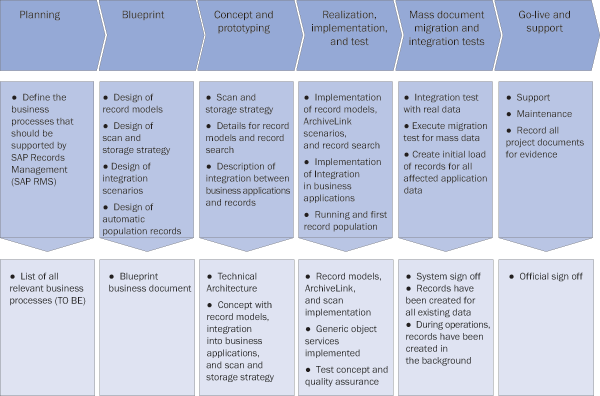
Figure 5
SAP’s ASAP implementation roadmap for SAP RMS
The goal of the blueprint phase is to gather the requirements needed to define and create a prototype
system. You accomplish this using your blueprint’s work packages, which are predefined data templates that help
the implementation team collect and structure the required data. You can then use these work packages to define and
build the prototype system (Figure 6).
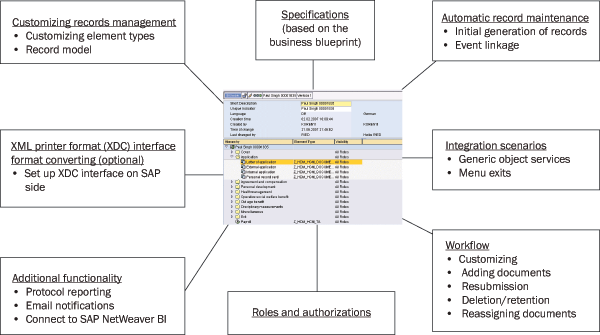
Figure 6
Examples of work packages within a project
Evaluate RMS for Your Company
If you work in a regulated industry, such as the public sector, medical, high tech, aerospace and
defense, oil and gas, legal, banking, or machines, in which you have audits or must keep track of product history, you
are a likely candidate for SAP RMS. An SAP RMS record supported by a case can keep track of all information that might
be needed during industry audits or legal investigations. Information comes from various sources in all different
formats during the stages of a project (Figure 7). Much of this information contains life cycles that
cause the information to evolve over time. An SAP RMS electronic record structure and case management can support these
needs.
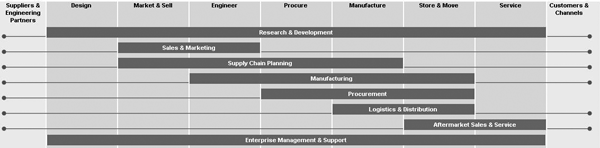
Figure 7
Various information formats are compatible and can be integrated into SAP RMS for every business department. *Click here to view larger image
Figure 8 is an example of an electronic record for a machine user in Europe. The record
includes all key information collected during the product development life cycle that you might need in the future to
modify, manufacture, purchase, assemble, and maintain the machine product. Engineering can access the computer aided
design (CAD) information and drawings used to design and build the machine. Sales has the information involved in the
sale of the machine to the customer. Manufacturing has access to the information needed to purchase and assemble the
machine. Service has access to the data needed to maintain the machine and keep a clear record of the machines
configuration. SAP RMS offers a single source of access to your data and documents.
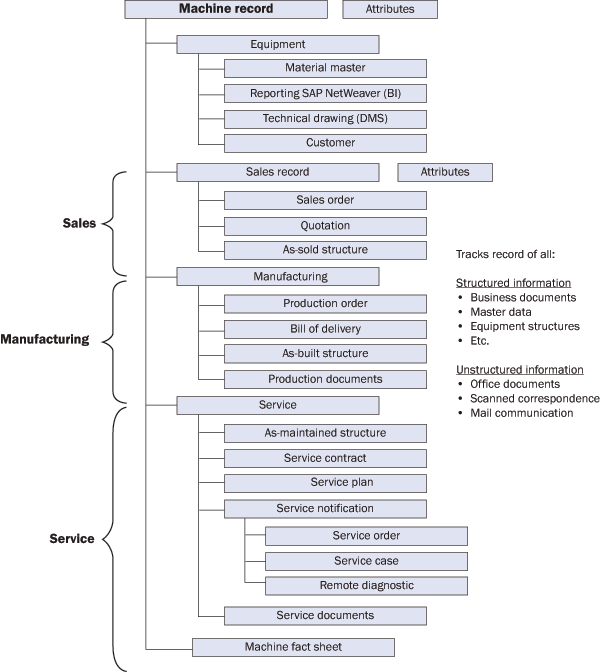
Figure 8
An example of an electronic record and the data it contains
The entire life cycle of an electronic record is shown in Figure 9. SAP RMS offers more
details than the traditional user interface.
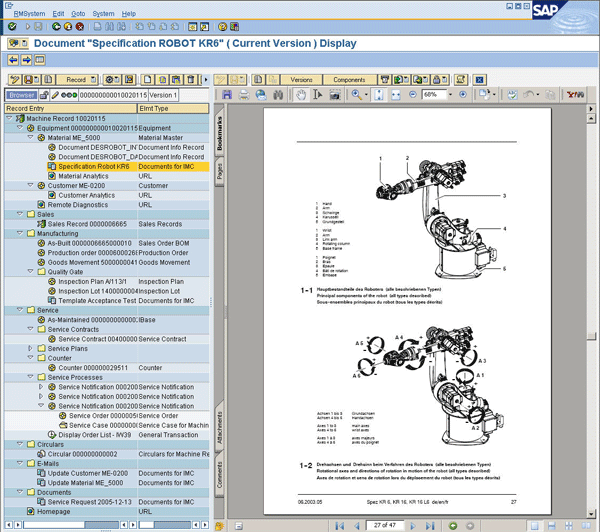
Figure 9
An example of an electronic record in SAP RMS
Extending RMS Functionality — The Service Provider Framework
SAP RMS provides a tool kit to develop and add functionality to your existing functionality, such as linking to third-party systems. You can use the standard service providers SAP offers or create your own to integrate your existing applications into the SAP RMS landscape.
This offers you the ability to continue using your existing legacy applications or provides the option to migrate to a central SAP infrastructure. Figure 1 displays the standard set of service provider options available in SAP RMS.
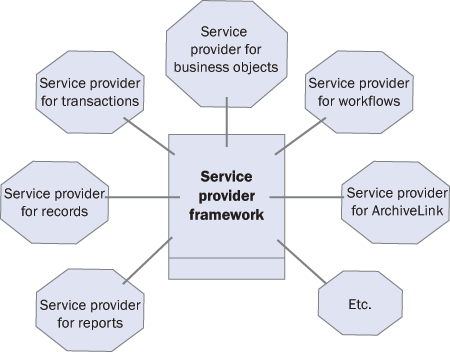
Figure 1
Service provider options available with SAP RMS
Peter Demtschenko
Peter Demtschenko is currently a platinum practice principal with the SAP National Competency Center and the national lead for the PDM/LDM Practices in North America. Peter has supported sales efforts and worked with SAP Product Development as a consultant and partner on several successful PLM implementation projects. Peter received a master’s degree in Computer-Aided Manufacturing from the Rochester Institute of Technology (RIT) in 1994 and is an adjunct professor at RIT. Peter has been a speaker at SAP Sapphire, ASUG, CIMdata International, The Management Roundtable, SAP PLM 2007, The Agility Forum, National Unigraphics Users Group, and various other conferences.
You may contact the author at editor@SCMExpertOnline.com.
If you have comments about this article or publication, or would like to submit an article idea, please contact the editor.