There are challenges to implementing the Near Line Storage (NLS) solution using Sybase IQ, and pitfalls to look out for during implementation. Learn tips for how to determine what to archive, how to segregate data, changes to the dataset, and understanding some features of the overall solution.
Key Concept
Near Line Storage (NLS) using Sybase IQ allows data to be offloaded from the SAP BW HANA system and therefore saves on expensive HANA hardware and maintenance costs. However, there are several important things to understand about implementing this product before proceeding.
Near Line Storage (NLS) using Sybase IQ allows data to be offloaded from the SAP BW running on HANA system onto the NLS system. Sybase IQ is the database optimized for BI and NLS that is run by Sybase, a company purchased by SAP in 2010. Sybase IQ provides slower query access but does allow data that is not often used to be moved to the NLS system, thus freeing up the HANA system for newer, more dynamic data.
By offloading the data onto the NLS system, it is possible to still have access to this data for query purposes but it takes the data out of the costly HANA nodes which stores data hot in memory. This move typically results in big cost savings for companies. As the NLS tool using Sybase IQ is rather new, there are some important tips to understand how to optimize its use. Here I discuss what you need to consider when administering and implementing SAP NLS based on Sybase IQ.
Choosing What to Archive
There are several things to keep in mind when choosing which areas of the SAP BW system to archive. Obviously, it is advised to choose those areas that have the most volume. Once implemented, this would allow larger amounts of data to be taken off the database and moved into the NLS system. However, it is not always as easy as just choosing the largest DataStore Objects (DSOs) or InfoCubes when selecting what to archive.
SAP BW does not allow records that have been archived to be updated via a data load change. This can cause quite an issue if the data that is to be archived is at all dynamic. For example, let’s assume that sales order data for the last year and older have been archived to NLS and deleted from the SAP BW system. Then, a user in the transactional SAP ERP Central Component (ECC) system makes a change to an old order; this would trigger a delta to SAP BW. Once that delta attempts to load, the system provides an error message in the load monitor screen (Figure 1). There is no way to update this data unless you bring this archive back into SAP BW, run the delta load, and re-archive the data back to NLS. This can be a time-consuming and cumbersome manual task.

Figure 1
Error message when trying to load a delta into an archived dataset
I recommend that non-dynamic data be chosen when determining what kind of data to archive. This means data that has little or no chance of being updated in the archived dataset. Some examples of this type of data would be Profitability Analysis (CO-PA), invoice, and general ledger data. If more dynamic datasets are chosen, it is important to choose data that is older and has little chance of incurring a delta record from the transactional system.
SAP has planned (in a future upgrade of NLS in SAP BW and Sybase IQ) to allow delta records to directly update the data in Sybase IQ. This means that any delta record that comes into SAP BW for an archived NLS data record would simply update that record in Sybase IQ. This would be a great feature as it would allow more dynamic data to be archived without fear of a delta record causing issues with the data. According to SAP, this is tentatively planned for release sometime in 2015.
Distribution of Data
One decision that must be made when archiving is determining which characteristics to use to segregate the archived datasets. Typically time is used as one partition—for example, segregation of data by month. However, it is often helpful to also use an additional characteristic such as plant or company code to segregate archives to make for smaller datasets and allow for better archiving performance.
To determine what characteristics would make the most sense, it is useful to see how the data is stored and how much data falls into each archive if a segregation methodology is implemented. For example, if data is segregated by plant, how much data is in each plant? If a DSO is used for this, it is very easy because the data can be analyzed by viewing the table contents using transaction code SE16 and using table counts of the records.
This becomes more challenging if the data is stored in an InfoCube. SAP has provided a tool for seeing the segregation of data within an InfoCube. To use the segregation tool, execute transaction code ST13 (Figure 2) and choose the tool name BIIPTOOLS. Then click the execute icon, which opens the screen in Figure 3.
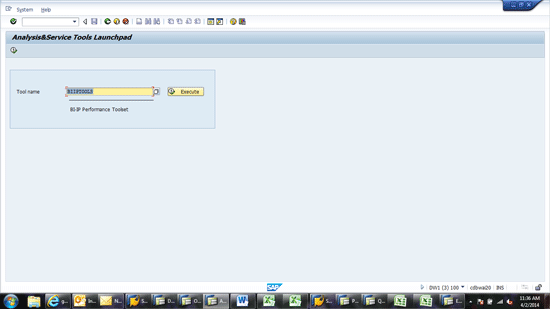
Figure 2
Enter the tool name to bring up the SAP BW toolset
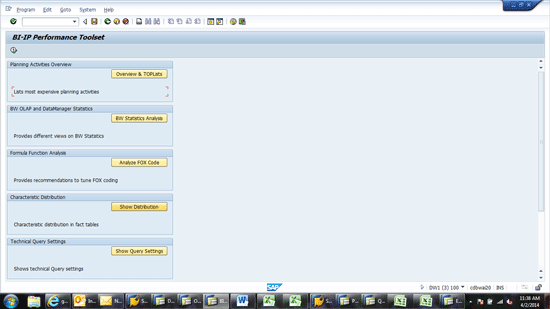
Figure 3
Select the characteristic distribution
Click the Show Distribution button (Figure 3). This opens the screen in Figure 4, where the system allows you to choose an InfoCube and its characteristics. This represents the InfoCube for NLS data migration and the InfoObject you will use to segregate the data. For example, if you choose an InfoCube and characteristic 0FISCPER, on the next screen (Figure 5) it shows you how many records you have for each fiscal period. This can be useful in determining how much data exists in each archived partition. It is useful to understand how many slices of data there are and how much data goes into each slice. This gives an idea of how data would be stored and segregated when archiving to NLS is completed.
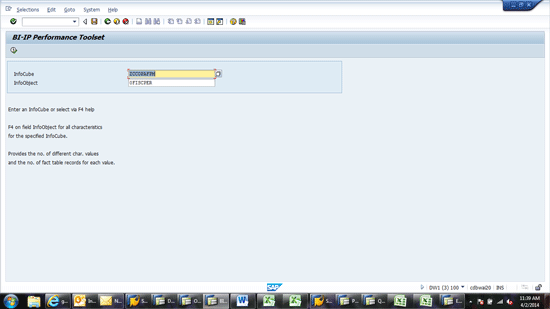
Figure 4
Choose the InfoCube and characteristic

Figure 5
Results of the characteristic in the InfoCube
Bringing Back Data from an Archive
If a delta record comes in from the source or there is a need to restate or reload history data back into SAP BW from the archived data in the Sybase IQ database, this data must be reloaded from the archive. In our tests of loading this data back from Sybase IQ, the performance was quite slow. It took several hours for 75,000 records. This is because in the current release the SAP system only brings data back from Sybase IQ in a single stream for each archived package. Thus no parallel loading occurs. This can be a challenge if a large volume of data needs to be reloaded back into SAP BW from the Sybase IQ archived data.
To mitigate this issue, I recommend that data be archived into more granular packages in Sybase IQ. For example, if data needs to be archived for a month, rather than archive this as one package with 30 days in the package, it is more useful to archive the data in multiple packages with chunks of five days or even less. If the data needs to be loaded back from the source, multiple packages can be loaded at once, and thus, reload is faster. This is also useful if a delta record comes in from the source. Rather than reloading an entire month of data, only five days or less need to be loaded. Note that there is no functionality to load a subset of a package back into SAP BW from the archive.
Changes to Archived Structures
A common question that is often asked is what changes can be made to the structure of an SAP BW DSO or InfoCube after archiving has occurred. For example, a sales InfoCube has been live with data for more than five years. Two new characteristics need to be added to the data for reporting purposes. Can you add these characteristics to the InfoCube even if it has data that has been saved into an archive in Sybase IQ?
The answer to the question depends on the need you have for these new characteristics. If you simply need to add the new characteristics and want to populate them from the time you add them and into the future with new data, you can add the characteristics without any issues. Simply add them and the system updates the archive structure to house the new data as it is populated and archived. However, if you need to populate these characteristics into the past archived dataset, the only way to do this is to bring the archived data back into SAP BW from Sybase IQ, populate the data with either a reload or recursive load, and then re-archive the data back into Sybase IQ.
Another common question is about editing structures after archiving has occurred. You can remove characteristics or key figures from an InfoCube or DSO that has been archived to Sybase IQ. However, the system does not allow you to archive another package unless you bring all the archived data back into SAP BW and re-archive it again. Otherwise you must delete the archived data from Sybase IQ. Thus, it is not recommended that key figures and characteristics be removed from a DSO or InfoCube that has been archived because, depending on the size of the dataset, it could take a long time to bring the data back into SAP BW from the archive.
Locking Data
The system does not allow data to be loaded into an InfoCube or DSO while archiving is occurring. This is to prevent data from being changed during the archiving process. Thus, process chains should be built to ensure that the data loads take place and are complete before any archiving can occur. This is also true for bringing data back from archive. The system will not allow data to be loaded into a DSO or InfoCube while data is being loaded back from Sybase IQ into SAP BW.
Viewing Data in Sybase IQ
Data that has been archived into Sybase IQ can be viewed using a new feature that has been added to transaction code LISTCUBE in SAP BW. This new option is named Read Data from Near Line Storage (Figure 6). By choosing this option, it is possible to see all the data that has been archived in Sybase IQ for one DSO or InfoCube. This can be useful to troubleshoot the data that has been stored or to view the volume of data that has been archived in Sybase IQ.
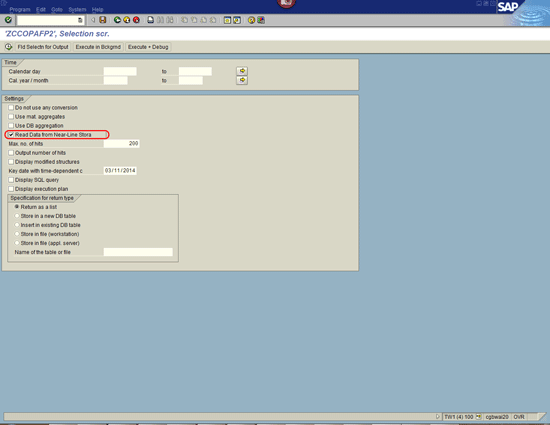
Figure 6
New option added to transaction code LISTCUBE
Smart Data Access (SDA)
When queries are run in SAP BW, the system can automatically read data in Sybase IQ and combine that data with data stored in HANA. The data stored in HANA is much faster to access than the near-line data stored in Sybase IQ. One of the challenges in performance is in the reading of the navigational attributes in master data. When data is read from Sybase IQ during query processing, and this data needs to be married up with navigational attribute data from master data in SAP BW, the query processing time slows noticeably as the system reads the corresponding master data and joins it with other data.
To combat this performance degradation, SAP has developed Smart Data Access (SDA). Once implemented, this can help with the performance degradation associated with navigational attributes of master data. Thus, I recommend that SDA be assessed as part of any project that needs to combine near-line data with any data in the SAP BW system. SDA can also be used to join data with other heterogeneous data sources like Hadoop and Teradata.
Determining Run Time
To determine the speed of data access for data that is stored in a near-line archive in Sybase IQ versus data that is stored in HANA, a tool is needed to assess the query performance of data coming from either sources, or data combined from both sources. It is possible to use the statistics data that comes from the query monitor (transaction code RSRT) in order to assess the speed. Here is how to use that tool to enhance the speed of accessing data.
Execute transaction code RSRT and choose a query. Choose the Execute + Debug option. The system allows you to choose parameters for your evaluation (Figure 7). Choose the two options highlighted in Figure 7: Display Statistics Data and Do not Use Cache. Then run the query as normal. The system shows the statistics of the query runtime (Figure 8).
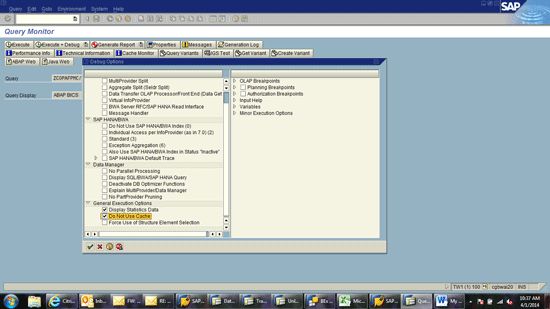
Figure 7
Choose your query options
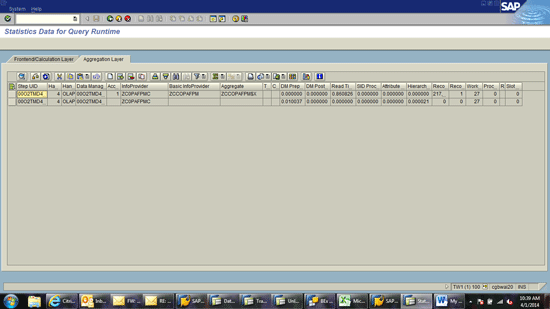
Figure 8
Statistics of data in HANA and NLS from transaction code RSRT
Look at the Aggregate column in Figure 8. If the value in this column is suffixed with $X, this represents the statistics for the HANA database. If it has a suffix of $N, it represents the statistics for the data coming from NLS based on Sybase IQ. This provides a view of the performance of each storage area of the data as well as the number of records in each.
Dashboard Status
An issue with the implementation and use of Sybase IQ archiving with SAP BW is the lack of visibility from the SAP BW system of the status, storage, and administration of data in Sybase IQ. For example, there is no way to see what archive jobs are currently being run, how long they have been running, how much data has been moved, percentage complete, sizing, and so on. This is a rather large functionality gap of which SAP is aware. Despite this, SAP has not committed to any functionality to provide this visibility in SAP BW. Thus, currently the only way to find this data is to work with someone who understands administration in Sybase IQ and try to view this administration data from that system. So far I have not been able to adequately provide a good dashboard of this data.




 Premium