Most of the custom transactions in an SAP system have to be manually added to the SAP BusinessObjects Access Control rule set. Therefore, the SAP implementation team must have a full understanding of the functionality of the custom transaction and how to identify the proper location to add the custom transaction. Follow these guidelines for identifying and adding the custom transactions to the SAP BusinessObjects Access Control rule set.
Key Concept
An SAP BusinessObjects Access Control rule set tracks risks caused by a transaction combination, by individual sensitive transaction, sensitive authorization objects and sensitive role or profile. The transaction combination is called a segregation of duties (SoD) risk, the individual sensitive transaction is identified as a critical action risk, an object-related risk is treated as a critical permission risk, and a critical role is known as critical role profile. Custom transactions start with Z or Y. As companies use custom transactions they have to decide if they should be added to the SAP BusinessObjects Access Control rule set. This analysis is based on the functionality of the transaction and the risk it poses to the company. As part of the risk review of the custom transactions they have to be classified as three groups: display, report, and change transactions. Report and display transactions do not pose a risk, but change transactions need to be reviewed for risk. For example, create, change, and delete vendor management transactions are in the rule set, but display vendor master data is not part of the SAP GRC rule set. Companies have to review the rule set and see what risks are relevant based on their type of business.
Your SAP BusinessObjects Access Control system is tracking only a portion of your segregation of duties (SoD) and transaction risks if you have not added your custom transactions to the SAP BusinessObjects Access Control rule set. The rule set tracks risks created by conflicts between two transactions and risks created by the transaction itself.
SAP BusinessObjects Access Control’s risk analysis and remediation (RAR) functionality (renamed access risk management in version 10.0) comes with a default rule set that contains SoD transactions and critical action transactions. However, this SAP BusinessObjects Access Control rule set includes only transactions created by SAP, not the custom transactions created by the company that is using the SAP system.
You can follow the steps shown in Figure 1 to help you identify the functionality of custom transactions and establish criteria for adding them to the SAP BusinessObjects Access Control rule set. I explain best practices for securing custom programs and tables with transaction SU24 updates or authority check statements. Transaction SU24 maintains the USOBT_C and USOBX_C tables. These tables hold the relationships between the particular transaction and its authorization objects. It is possible to add or subtract the checks performed in the transaction by changing the appropriate flag in transaction SU24.
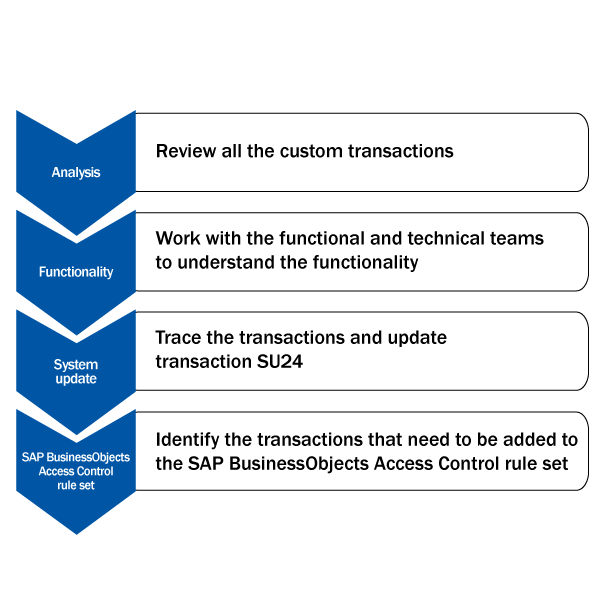
Figure 1
The custom transaction implementation process
Problem: Distinguish Risky or Critical Transactions
You create custom transactions for executing an ABAP program or updating a table. These transactions either display or update information in the SAP system. The SAP BusinessObjects Access Control rule set contains only standard transactions. All the custom transactions are not part of the rule set.
Transactions for Programs
Custom transactions for an ABAP program are almost always created to execute, display, and update data in an SAP system. There are also occasions when you want to provide additional functionality to an existing transaction. For example, the company has a custom program to upload data into transaction FB50 (G/L Acct Pstg: Single Screen Trans.). This transaction code, called ZFB50, enables the user to load data from a spreadsheet and uses transaction FB50 to process the data. Because the company creates this transaction, it needs to evaluate if it should add it to the SAP BusinessObjects Access Control rule set.
Transactions for Tables
When you want to update a table you usually create a call transaction with transaction code SM30 ([Call View Maintenance] in transaction SE93 [Transaction to create and maintain Transactions]) for updating a table. This step is done to avoid providing transaction SM30 access to a user. A classic example is transaction OB52, which is for opening and closing posting periods. This transaction basically updates table view V_T001B by using transaction code SM30 and eventually the table T001B is updated.
Imagine you want to create a new transaction, ZOB52, which updates the same table T001B. In this type of scenario you have created a transaction that basically replicates the functionality of the standard SAP transactions. Because the user created this transaction, it is not included in the SAP BusinessObjects Access Control rule set. However, because this transaction performs the same function as a standard SAP transaction, you need to include it in the SAP BusinessObjects Access Control rule set.
Identify Custom Programs and Tables
The first step in the process is to identify all the custom programs and custom tables, which you can find in SAP tables TRDIRT and DD02T, respectively. These two tables provide you with all the custom programs and tables in the system. With the help of the user, you then identify the programs and tables that have to be executed in production. The best practice is that all the custom tables or programs that are executed by the end user should be tied to a transaction. In other words, the end users should not have access to transactions SE38 or SA38 for executing programs or transaction SM30 to update the table. It is a good practice to identify the programs and tables that are not required to have transactions. The main purpose of the review is to document the purpose of these programs or tables and determine what is contained in them. If the table or program contains sensitive information, then the custom program or table needs to be protected properly. The other purpose of the review of all the programs and tables is to identify which custom programs or tables are end user facing and which are for internal purposes only.
To identify all the custom transactions, use the table TSTCT. This table contains all the transactions that are created in the system with their description. Identify the transaction that updates the table and that executes an ABAP program. This output from TSTCT provides the list of all the custom transactions that need to be added to SAP BusinessObjects Access Control rule set.
Custom Queries
To create custom queries use transaction SQVI, which helps the company quickly join tables or logical databases and query the data. When you have custom queries or SAP queries, it is a good practice to attach them to a custom transaction. All the tables that have to reviewed are shown in Figure 2.
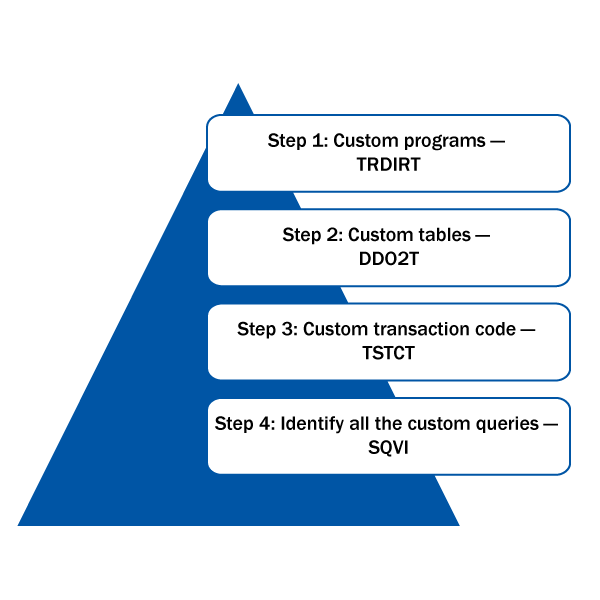
Figure 2
Tables and transactions that need to be reviewed for custom objects
Tracing and Transaction SU24 Update
The best way to find out all the objects required to execute the custom transaction is to do a trace. With this information you can update the transaction SU24 settings for the particular custom transaction in the SAP system. The best practice is to transport the transaction SU24 setting to the production system.
Analyze the Functionality of the Transaction
A functional team member needs to review each transaction for the following attributes:
- Display report
- Change transaction — Not risky
- Change transaction — Any risk
- Change a transaction that is a copy of a standard SAP transaction with minor modifications
Display or Report Transaction
Most of the custom transactions are mainly reports. These reports are not harmful unless they are displaying some sensitive information. Reports displaying sensitive information such as payroll or product pricing have to be secured by a role, and the role has to be assigned to a limited number of people on a need-to-know basis.
Risk Level: Low
You need to follow the best practice for naming the transaction — the transaction technical name should have team, subteam, and descriptions about the functionality of the transaction. Each program or table has to have an authorization group, which groups them based on their functionality. For example, if a set of programs or tables belongs to HR, they need to be assigned to the cgroup called ZHR. On the other hand, if they belong to finance, then they should be assigned to ZFIN. The custom transaction should be added to transaction SU24 with an authorization group. Check a user’s authority to view or change SAP data using the SAP ABAP AUTHORITY-CHECK command. This command is included in the program’s logic, so the program is forced to check if the user has access to the data. If your organization has data in the system that belongs to multiple countries, you want to restrict the data displayed based on the country to which the data belongs. Without the AUTHORITY-CHECK statement in the program logic, the report shows all the data. However, if you want the report to show data relevant to your organization (e.g., plant, company code, sales organization), then you need to force the program to check the desired organizational attributes with the AUTHORITY-CHECK statement. If the user’s security access is restricted to display data relevant to Australia, then he should not be able display any data other than Australia. The outcome is that none of the display transactions need to be added to the SAP BusinessObjects Access Control rule set.
Change Transaction Analysis
During the custom transactions review you have to identify which transaction has a financial implication to the company. Each company has unique criteria for classifying a transaction as risky.
The functional owner of the specific team understands the functionality of the transactions. The functional team should recommend the level restrictions needed for the custom program or table. With the functional team’s input the SAP security team can understand the function it performs or if the transaction can behave like a regular SAP standard transaction.
From the information you gather, you now can classify whether this custom transaction is risky to the business. Now you have to split the transactions into two groups — one group is a risky change transaction that needs to be added to the SAP BusinessObjects Access Control rule set, and the other group of transactions deemed not risky does not affect the SAP BusinessObjects Access Control rule set. Within the transactions that are deemed risky, there may be custom transactions that are copy of the SAP standard transaction with some variations, but contain the functionality.
Change a Custom Transaction Modeled after a Standard SAP Transaction
If the transaction replicates the regular SAP transaction or is modeled after an SAP transaction, then the process of adding the transaction to the risk in SAP BusinessObjects Access Control is straightforward. You can search the function in the SAP BusinessObjects Access Control rule set and see where the transaction is placed in the function. If the regular transaction is part of the SAP BusinessObjects Access Control rule set, then you add the custom transaction to the same function as the regular transaction and generate the rule set.
I explain this process in this video.
Add a Custom Transaction to the SAP Access Control Ruleset
An example is creating a transaction ZXK01, which is similar to transaction XK01, or creating a transaction ZLOAD_INVOICE for mass loading data into transaction FB60.
Change a Transaction Not Similar to a Regular SAP Transaction
If the transaction does not replicate the regular transaction, then you have to determine what function it performs and see if this functionality is part of SAP BusinessObjects Access Control functions. For example, if the custom transaction ZABC functionality is related to sales rebates, then the function that deals with sales rebates in the SAP BusinessObjects Access Control rule set is transaction SDO3 (Sales Rebates). If the functionality of the change transaction does not fit into any GRC function, and you still consider the transaction as one that can pose an audit risk to the system, then create a new custom function and add the custom transaction into that function. Once you create a new custom function, you have two choices:
- Find a conflicting function to create a custom risk if you determine that this transaction could pose a risk combining with a transaction or function
- Make the transaction a critical action risk, which basically means the transaction is risky by itself. An example is F.34 (credit limit data mass change)
Review the transaction with the functional team for understanding the functionality. Figure 3 shows the high-level process for analyzing the custom transaction and categorizing it based on the risk.
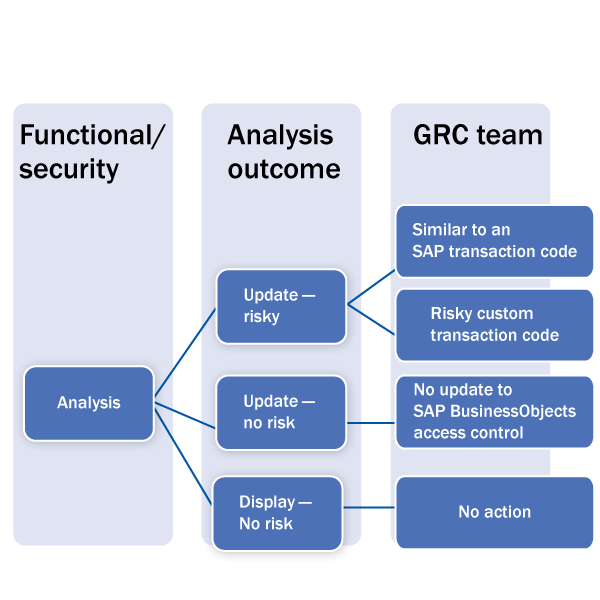
Figure 3
Process for deciding on classification of the custom transaction based on risk
Add a Custom Transaction to an Existing SAP Function
When you can clearly understand the functionality of the custom transaction and identify a similar SAP transaction, then the process becomes simple. You can identify the function with SAP BusinessObjects Access Control in which the SAP transaction is present and add the custom transaction to that SAP BusinessObjects Access Control function. For example, if the custom transaction has similar functionality as transaction XK01 (Create Vendor Centrally), then you look in SAP BusinessObjects Access Control to find where transaction XK01 is present. In this case, transaction XK01 is present in transaction HR02 (HR Vendor Data) and transaction PR01 (Vendor Master Maintenance), so you must add the custom transaction to those two functions. In addition to adding them, you also have to add the object-level restriction similar to transaction XK01, or if there are custom authorization checks within the program that are different from transaction XK01, then you may have to add them into the SAP BusinessObjects Access Control function configuration.
Create a New SAP BusinessObjects Access Control Function and Risk
If the transaction is not similar to the existing SAP transaction, the company thinks it is a risky transaction and could create risk with the third-party remittances function in the SAP system. Then a new SAP BusinessObjects Access Control function (ZR01) can be created with the one custom transaction ZXK01. This new SAP BusinessObjects Access Control risk (Z003) is created based on the existing SAP BusinessObjects Access Control function third-party remittance (PY01) and the new function (ZR01), which has the company’s custom transaction (ZXK01). The risk configuration is shown in Figure 4.
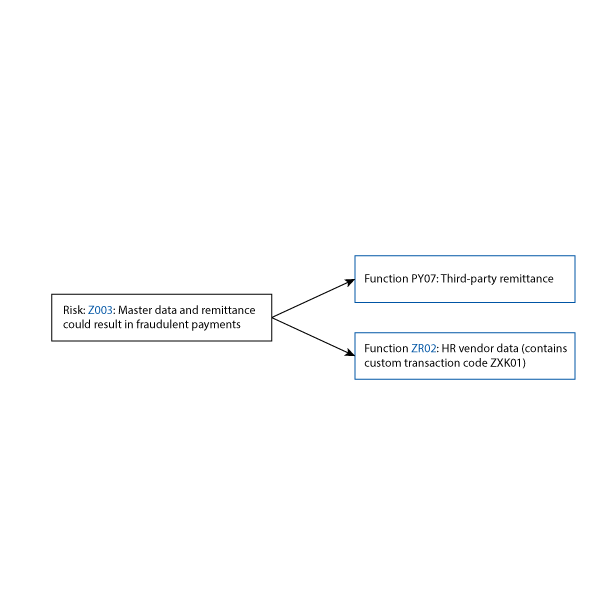
Figure 4
Custom risk based on custom transaction
Selva Kumar
Selva Kumar is vice president of AuditBots, which is an SAP IT audit compliance solutions company providing preventive and detective SAP controls automation software solutions. He is also an SAP audit compliance consultant with the federal government working on SAP BusinessObjects GRC implementation. The implementation is focused on automating user provisioning, emergency access policy, and risk analysis and remediation. Selva writes for the blog sapsecuritytrainer.com and is a frequent contributor to various technical publications. Selva has spent 15 years as independent SAP security consultant with SAP America, Accenture, Deloitte, E&Y, Eli Lilly, Du Pont DE, Ogilvy Mather NY, IPG America, HMCO America MA, IGT NV, AutoFena PA, Rohm and Hass PA, Cephalon PA, and Johnson and Johnson PA.
You may contact the author at selvakumardm@gmail.com.
If you have comments about this article or publication, or would like to submit an article idea, please contact the editor.

 Premium