Management
Gain an understanding of how using SAP HANA as part of SAP NetWeaver BW may reduce the time IT and your system spend on data loading, maintenance, and modeling.
Traditionally, most of the cost associated with managing and maintaining a data warehouse has been in the time and staffing it takes for IT departments to manage the business warehouse environment. With SAP HANA, IT departments can save time on the management and maintenance of SAP NetWeaver BW. This results in potential cost savings through reduction in expensive operational tasks (e.g., indexing and tuning), increased loading performance, simplified maintenance, and greater modeling flexibility. I elaborate on these points below.
Reduced Load Windows
Business gets fast reporting, planning, and real-time data from SAP HANA. However, what about the existing load processes? One common ailment in SAP NetWeaver BW environments has been the load window required to make data available as part of nightly batch loading cycles. With ever-increasing data volumes and pressure from business to make the data available in tighter service level agreements (SLA), IT departments struggle with meeting the load window SLAs must provide.
SAP NetWeaver BW, powered by SAP HANA, offers a variety of improvements to loading performance. Before I get into how the performance is improved, I’m first going to describe two new objects that are only available when SAP NetWeaver BW runs on SAP HANA:
- The in-memory optimized DataStore Object (DSO) has its delta calculation and activation logic implemented in SAP HANA instead of in the ABAP application layer (Figure 1). Additionally, all the DSO data resides directly with in-memory column tables within SAP HANA. This results in leveraging the in-memory and massive-parallel processing (MPP) capabilities of SAP HANA to speed up the delta calculation and activation logic of a DSO.
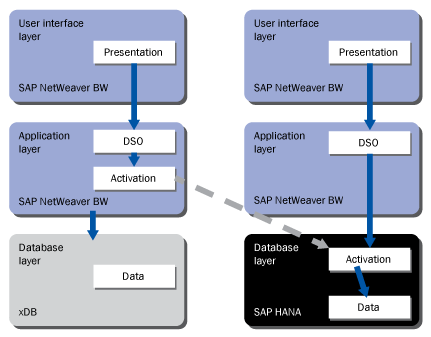
Figure 1
Activation within the in-memory optimized DSO is pushed into SAP HANA
- The in-memory optimized InfoCube provides a simplified schema for optimizing data loads, in which dimension tables are no longer generated as part of the InfoCube schema (Figure 2). Additionally, SAP NetWeaver BW InfoCubes traditionally stored compressed data in an E Fact table and uncompressed data in an F Fact table. With in-memory optimized InfoCubes, the E/F Fact tables are consolidated and partitioned as part of the InfoCube schema. This storage mechanism is internal to SAP HANA and doesn’t require any configuration or management by IT departments. This new schema provides faster loading time into these InfoCubes as dimension IDs. Thus they no longer need to be generated by the system as part of the load process.

Figure 2
Simplified schema of in-memory optimized InfoCubes (note: MD = master data tables and D = dimension tables)
The significance of in-memory optimized InfoCubes and DSOs is that there is improved performance within every step of the load process as follows:
- When data loads into a DSO within SAP NetWeaver BW, the data is loaded directly into memory, as memory is the primary persistence for SAP NetWeaver BW on SAP HANA. The loading of data into a DSO provides performance improvement for the loading portion of the extraction, transformation, and loading function.
- When activating the DSO to consolidate the changed data, the activation is processed within SAP HANA instead of the ABAP application tier, improving performance due to the activation taking place in memory and the activation being parallelized as part of the MPP computing architecture of SAP HANA.
- When loading data from the in-memory optimized DSO to the in-memory optimized InfoCube, there are performance improvements when extracting from the DSO (as the data is being read from memory), as well as loading into the InfoCube. This is because dimension IDs are no longer required to be generated and the data is being loaded into an in-memory persistent column table.
You do not need to make changes to existing process chains. Instead you just migrate your database from a traditional relational database management system (RDBMS) to SAP HANA and convert your DSOs and InfoCubes. You then can get significant reductions in your loading times, which helps meet SLA criteria for loading.
Additionally, because SAP HANA’s in-memory architecture does not require indexing and aggregate tables to speed query response, this portion of the load time is reduced. Also, in the past, once the loading was complete, users had to roll up the data into aggregates or SAP Business Warehouse Accelerator (BWA) to achieve good reporting performance. With SAP NetWeaver BW on SAP HANA, this portion of rolling up data into SAP BWA is eliminated, further reducing the data load times.
Simplified Maintenance
In addition to the streamlined load performance, maintenance is simplified with SAP HANA because there is no special effort for indexing or database statistics maintenance to guarantee fast reporting. All the time spent building aggregates (for companies that didn’t have SAP BWA) is also not required, so there is simplification of maintenance activities as well.
Columnar-based storage with high compression rates reduces the database size of SAP NetWeaver BW. Let’s assume, for example, that you get a compression factor of 5x, which is conservative. For a 1 TB system, the storage in-memory within SAP HANA would be roughly 200 GB. What this means is that nightly back-up activities run much faster as the overall system size to maintain has been reduced.
It is common for companies that run SAP NetWeaver BW on a traditional RDBMS to use SAP BWA, as traditional RDBMSs provide suboptimal performance compared to SAP BWA. However, this leads to IT departments having to manage SAP BWA, a traditional RDBMS, and the ABAP application server for SAP NetWeaver BW. As shown in Figure 3, by converting the RDBMS to SAP HANA, SAP BWA is no longer required. The system can be consolidated to only require managing the SAP HANA and SAP NetWeaver BW instances.
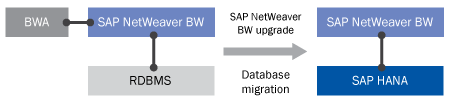
Figure 3
Consolidation of the systems to maintain
The SAP NetWeaver BW application server remains separate from SAP HANA, but the role of the application server is diminished because data-intensive logic is pushed from the server to SAP HANA. Therefore, users likely need fewer application servers as part of their overall sizing.
SAP has also simplified administration via one set of admin tools (e.g., for data recovery and high availability). Finally, companies need to consider their overall landscape topology. Within SAP NetWeaver BW environments, the landscape setup usually involves a central database server and numerous application servers to distribute workload. This workload is specifically for user queries and data loading. With the reduction in data load times and the acceleration of reporting queries, the overall workload on the system is reduced (i.e., the time that each operation takes), which leads to less concurrency and the ability to scale down use of some of the application servers.
Greater Modeling Flexibility
Maintenance is not just about landscapes, but also about the ongoing ability to change data models to evolve with business requirements. Today, within SAP NetWeaver BW on a traditional RDBMS, there are modeling considerations (e.g., line-item dimensions and high cardinality) that you need to take into account when modeling the InfoCubes. These considerations require specialized skills for understanding data modeling. Also, changes in the cardinality of the data may require cubes to be remodeled.
With the pace of business today, change is inevitable, and users are starting to ask about adding or removing dimensions to their data set more frequently. Within SAP NetWeaver BW 7.0, SAP introduced the remodeling toolkit to deal with these changes. This capability allows users to schedule jobs over the weekend to remodel their objects. The remodeling exercise almost always has to be a weekend activity if there is any sizable amount of data within an InfoCube or DSO.
However, with SAP NetWeaver BW on SAP HANA, the dimension tables are no longer part of an InfoCube definition, and the data is primarily stored in columnar format. This format allows you to quickly remodel by going to the Administrator Workbench (via transaction code RSA1), dragging and dropping dimensions in and out of InfoCubes, and activating the object. Performing this remodeling operation issues the change directly within the SAP HANA database and reorganizes the data as required.
As no aggregates are required with SAP NetWeaver BW on SAP HANA, there is no need to rebuild aggregates once the data model is changed — meaning IT departments can respond to business requests that involve changing the data model more quickly.
Migrating to SAP HANA
The migration process from existing environments to SAP NetWeaver BW on SAP HANA is a standard OS/DB migration away from the traditional RDBMS to SAP HANA. SAP has standard migration tools available for the migration process. For details about the migration process and supported DB/OS combinations, read SAP Help documentation at: https://service.sap.com/~sapidb/011000358700001167432011E.PDF.
Note
A prerequisite to using SAP NetWeaver BW on SAP HANA is to run SAP NetWeaver BW 7.3 Support Package 5 and SAP HANA 1.0 Support Package Stack 3.
As part of the OS/DB migration process, SAP HANA generates specific tables as column tables instead of row tables for objects that are read intensive, and for which there is a large data compression benefit from storing the data in a columnar format. Once the OS/DB migration is complete, SAP NetWeaver BW InfoCubes and DSOs remain unchanged. It is up to the user to convert these objects to in-memory optimized versions.
The conversion process can be done one-by-one or en mass and is available through running ABAP program RSMIGRHANADB. Preliminary lab results show that objects with about 250 million records can be converted in four minutes.
Project Approaches for SAP HANA
Customers have asked me how they should typically approach their projects. The two most common approaches that I see include the following:
- Companies that are ready to go full scale to SAP NetWeaver BW on SAP HANA typically create a copy of the existing SAP NetWeaver BW on RDBMS production instance as a new SAP NetWeaver BW on SAP HANA instance. This effort is typically straightforward because SAP HANA is an appliance and uses separate hardware. They then use this baseline to build up their new quality assurance and production instances of SAP NetWeaver BW on SAP HANA. Usually this also involves dropping some data, as an entire copy of production data typically is not required for development.
-
Companies that want to move more slowly tend to take a phased approach, in which they set up a new SAP NetWeaver BW on SAP HANA instance side-by-side with their existing landscape. Then they transport over InfoCubes and DSOs, or build them new in the new environment. In this way, they have a controlled environment to test and deploy SAP NetWeaver BW on SAP HANA without affecting their existing production landscape.
The Future of Modeling
Up until now, I’ve discussed what migrating to SAP HANA means to your existing objects. However, I want to pose the following questions:
- If my performance of reporting on a DSO was fast, would I even build an InfoCube?
- If I need to model InfoCubes to transform data, can I do this more logically with virtual providers directly on top of DSOs?
The approach on how users model with SAP NetWeaver BW on SAP HANA when they have new requirements needs careful consideration. Users who built InfoCubes as simple aggregations on top of DSOs may not need to build InfoCubes in the future. By not building InfoCubes unless they are required, companies can manage fewer objects and also save on their end-to-end loading time by eliminating the entire time to load data from the DSO to the InfoCube.
If they built InfoCubes to simply transform fields on top of DSOs, they could possibly model this via a virtual provider with transformations if the end-user response time is still good on the virtual provider. Companies need to explore these types of modeling considerations in new projects and challenge the status quo to find ways to simplify the landscape wherever possible.
Prakash Darji
Prakash Darji is an experienced professional with more than 10 years of end-to-end experience in enterprise software. He has a broad depth of experience including corporate strategy, sales, product management, architecture, and development. He has experience in product launch activities, including positioning, packaging, and pricing. He has delivered numerous product releases in a variety of capacities through his career. He thrives on building high-performing, scalable teams to achieve strategic deliverables, whether they close strategic sales deals, roll in product features, or roll out new releases. He is a recurring author for several publications and a speaker at SAP conferences around the world. Prakash is on LinkedIn at https://www.linkedin.com/in/prakashdarji.
You may contact the author at editor@BIexpertOnline.com.
If you have comments about this article or publication, or would like to submit an article idea, please contact the editor.



 Premium
