APO Demand Planning (DP) developers have a number of areas to be aware of that could negatively affect performance. This list of 23 DP performance tips explains how to avoid bottlenecks and why they can occur.
Key Concept
SAP Business Information Warehouse (BW) is the engine that supports APO DP analysis and reporting. Proper setup and execution of the data loads into BW have a significant impact on performance.
Performance bottlenecks in APO Demand Planning (DP) can manifest themselves in a number of ways. Planning preparation steps such as data loads into liveCache, realignment runs, or background processes can take longer than expected. End users may experience longer refresh times for planning book data. Data loads from liveCache into BW for reporting and backup purposes may take long hours. Such performance bottlenecks result in longer planning cycles and reduce DP's effectiveness. Since different departments use DP results to serve different purposes — as the base for supply and production planning or financial planning, for example — bad DP performance can have ripple effects.
Good performance comes from good design. In particular, DP developers should focus on three areas to optimize DP performance:
- Planning object structure and planning area design
- Planning book and data view design
- Mass processing
What follows are tips for each of these areas that my colleagues and I have learned through experience. Figure 1 shows the DP architecture.
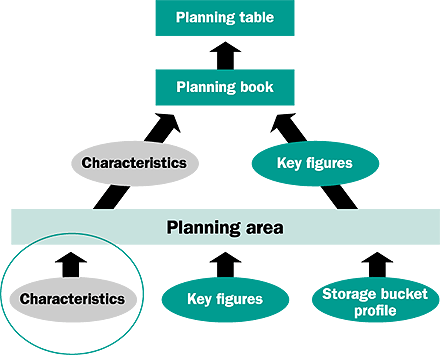
Figure 1
DP architecture
Planning Object Structure and Planning Area Design
1. In comparison with navigational attributes, the exclusive use of basic characteristics improves the performance in interactive demand planning because it eliminates the reading of navigational attributes from the associated InfoObject master.
2.The use of navigational attributes adversely affects performance during data selection and navigation in interactive planning. This is because navigational attributes read a large number of tables in the connection during the selection. However, the need for realignment of characteristic value combinations to reflect master data changes is reduced if you use navigational attributes.Using navigational attributes reduces the number of characteristics in the planning area and hence eliminates the possible realignment runs. Switching a characteristics InfoObject to navigational means that no characteristics value combinations are generated for that particular InfoObject, and any change to this InfoObject does not require a realignment run. Use navigational attributes if characteristic value combinations change frequently in DP. This, in effect, reduces the number of realignment runs and decreases the time consumed on preparatory workloads.
3. Using aggregates in DP increases performance. With aggregates, the system does not read all the data while displaying the different characteristic combinations in the planning book. Moreover, fixed aggregates have positive effects as long as the m
Planning Book/View Design
4. If less data is read from the planning book, the reduced workload of internal data processing results in better performance. So, select only the appropriate key figures for the planning book.
5. Use several specialized books that have only a small number of key figures to reduce the internal data processing load.
6. While defining a data view, limit the number of key figures and periods as much as possible.
7. Define several data views for a book, which ensures that each data view has only a small number of key figures or periods.
8. If historical data is required, then use only a time bucket profile for the past data in your data view (for the macros, for instance), thus reducing the dataset read and thereby improving performance.
9. Ensure that macros are not executed needlessly or more than once.Also, use standard SAP macros where possible, because they are already performance optimized, whereas a custom macro might not be.
10. To keep the loaded data set as small as possible, restrict selections to a maximum.
11. Select internal SAP drill-down macro functions instead of manual drill-downs, because internal SAP drill-downs allow large data sets to process internally without having to transfer them to the front end for display.
12. If the specific planning areas are not needed, do not initialize them. Once a planning area is initialized, it consumes liveCache memory.
Mass Processing
The most preferred and convenient way to carry out planning processes involving large data volumes is running these functions in the background using mass processing. The major areas that you may face potential performance problems or that are performance sensitive are:
- Macro calculations
- Automated forecast jobs in the background
- Data extraction from liveCache and updating data targets (This data extraction can be for either backup purposes or extraction to BW for reporting purposes. However, as previously stated, extraction from liveCache should be limited as much as possible.)
13. While working with background jobs in DP, I recommend that you use the log function (set Generate log indicator in the planning job). However, you should delete log files on a regular basis because performance deteriorates as the log file size grows. Check the log file size via the table /SAPAPO/LISLOG.
Macro Calculations
14. Keep data sets as small as possible when using macros. You can minimize the size of the data set if:
- The macros are defined at data view level and not at planning book level. The data view contains the key figures that the macro needs. The system reads only the information for the key figures used in the data view from liveCache rather than importing all the key figures in the planning book. Therefore, I recommend that you create macros for data views only, not the planning book itself.
- The data view covers the exact period required for the relevant planning process. Aggregate data in as a chronological form as possible for the relevant planning processes. (This applies to both interactive planning and to mass processing.) For example, if the storage bucket profile of the planning area consists of weeks and months, edit the data in a monthly period split instead of weekly period split (assuming that you are not required to manage date in weekly time buckets). Time-based aggregation is defined using the storage bucket profile ID (future or past) of the data view.
Background Forecast Jobs
15. In general, when running the forecast, not all planning area data is required. Maintain specific planning books and data views for the required background jobs. The planning book should include only the necessary key figures, and restrict the planning buckets of the data view to the time horizon needed for the job. The time period units of the planning book and forecast profile must be identical, since SAP does not allow using planning books with mixed period units in background processing. In most cases (e.g., loading planning areas), you can divide background processes into smaller subsets (new jobs) and run them in parallel to improve performance. The same objects cannot be processed by the parallel processes due to locking problems, and there must be a distinction via the use of suitable selection restrictions. Figure 2 provides an overview of background processing in SAP.

Figure 2
Background processing
Data Extraction from liveCache
Data in liveCache is extracted into InfoProviders for multidimensional analysis in SAP Business Information Warehouse (BW). For those of you not familiar with BW, the process of loading data from liveCache into InfoProviders consists of two steps:
- Data extraction from liveCache
- Writing data into the data targets
The general procedure for extracting data from liveCache to data targets, shown in Figure 3, is:
- Generate an export DataSource for the planning area
- Replicate the DataSource
- Assign the DataSource to an InfoSource
- Define the assignment of the communication structure to the transfer structure
- Create a basic InfoCube for backup purposes or to save old planning data
- Create an InfoCube in BW to carry out reporting with the BW front end
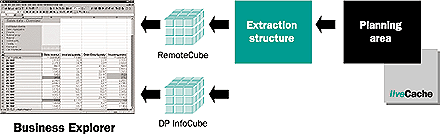
Figure 3
Data extraction from DP into BW and the reporting flow
16. Once data is extracted from liveCache to a backup InfoCube, it is preferable to load a BW InfoCube using the backup InfoCube instead of reading the same data again from liveCache. Extracting data from liveCache as few times as possible improves performance. Data extraction from liveCache into a backup InfoCube and loading the reporting InfoCube from the backup InfoCube should run in sequence to ensure consistency of data in different storage places.
17. To accelerate the data extraction from liveCache, do not use a single InfoSource for the data extraction from liveCache and the InfoCube. If the data in liveCache needs to be saved in the DP backup InfoCube for backup purposes and in another InfoCube for reporting purposes, it is best to define two different InfoSources. It is better to extract from an InfoCube rather than to extract the same information from liveCache twice. On the other hand, if a common InfoSource is defined for reading from liveCache and the InfoCube, the system reads the InfoCube data per extraction block from the InfoCube (as of APO 3.0 SP 21). In this case, the best performance results are seen when the system can transfer the results of the extraction in one block. So, block size should be set as large as possible via report /SAPAPO/TS_PAREA_EXTR_ SETTING or transaction /SAPAPO/ SDP_EXTR. Alternatively, you can decrease the data volume for each InfoPackage by making suitable selections. Nevertheless, defining two InfoSources (one for the data extraction from liveCache and one for the InfoCube) results in the best performance.
You have several ways to improve performance when loading into data targets:
18. Parallel processing by several InfoPackages is possible. Parallel processing improves not only the data extraction, but also the insertion of data into data targets. Adjusting the number of dialog processes that insert data in parallel into the data targets for every InfoPackage improves the performance.
19. Buffer data into the Persistent Staging Area (PSA). Data can be posted directly into the InfoCube or via the PSA. Loading data into the PSA has advantages. In case of an error (data was incorrectly imported into the InfoCube), for example, data can be directly reloaded from the PSA without reading it from the liveCache again. In addition, the PSA allows for checks on the extracted data. Disadvantages include the fact that inserting the data into the PSA requires runtime processing time, and you have to check the size of the PSA tables regularly to prevent any PSA table size problems.
20. Do not use Operational Data Store (ODS) objects for storing DP information. It is not possible to write in parallel into the ODS, and activation requires a lot of time. Activation time substantially increases with the size of the ODS object and the size of data to be activated. On the other hand, if delta functionality is required, using the ODS is recommended.
21. Delete the secondary indexes of the fact table prior to the upload. For large data sets, writing into the InfoCube can be considerably faster if the secondary indexes of the fact table are deleted before and set up again after the upload. This improves the performance, especially if large data sets are loaded into empty or almost empty InfoCubes (for example, if a backup from liveCache occurs into an InfoCube and the system always deletes the data already existing in the InfoCube).
22. Do not use compression. If data is loaded into a backup InfoCube and existing data is always deleted, it does not make sense to compress the InfoCube, as this will impair performance.
23. If you are loading large data sets into InfoCubes, increase the number range buffer for the dimensions by using a higher-than-expected number of data sets.
Hayrettin Cil
Hayrettin Cil is a senior SAP Business Intelligence Consultant with extensive experience in Strategic Enterprise Management (SEM), Business Information Warehouse (BW), Advanced Planning and Optimization (APO), and SAP R/3 Sales and Distribution, Financials, and logistics. He has been a speaker at various BW and SCM conferences, and has worked in the consumer goods, pharmaceutical, retail, chemical, oil and gas, public sector, and high tech industries. Hayrettin has a bachelor of science degree in industrial engineering and operations research and a master of science degree in financial management.
You may contact the author at hayrettin.cil@turquoiseconsulting.com.
If you have comments about this article or publication, or would like to submit an article idea, please contact the editor.
Mehmet Nizamoglu
Mehmet Nizamoglu is a senior SAP functional consultant with extensive experience in APO Demand Planning and Supply Network Planning, CRM field applications, CRM Customer Interaction Center, and R/3 Sales and Distribution. His industry experience includes consumer goods and oil and gas. Mehmet has a bachelor of science degree in industrial engineering and operations research.
If you have comments about this article or publication, or would like to submit an article idea, please contact the editor.